YouTube’s Algorithm Doesn’t Push Videos Anymore—And That Changes Everything About How You Build Reach
I’ve spent two decades watching platforms manipulate creator success through opaque distribution systems. YouTube just broke that pattern.
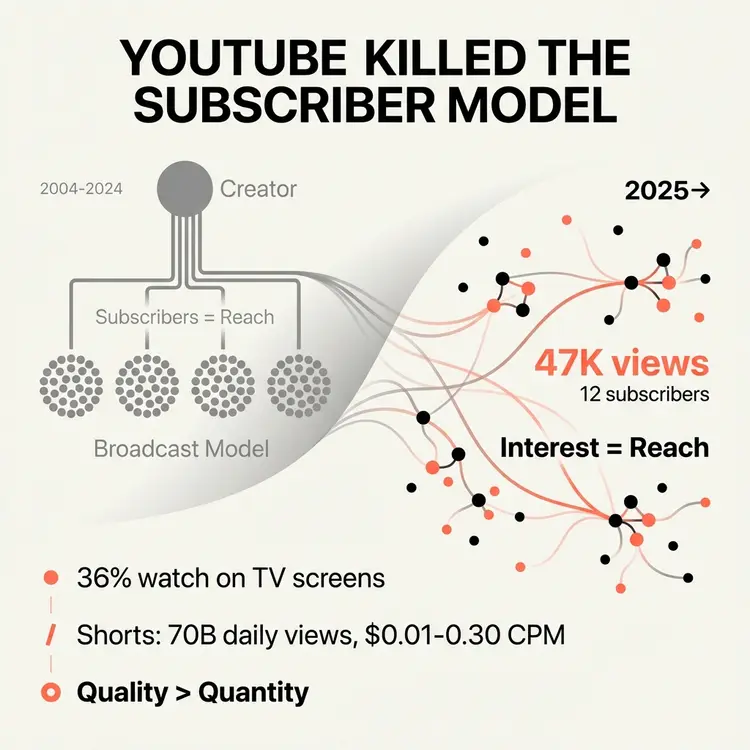
The platform’s 20th anniversary report reveals something I’ve been tracking for months but couldn’t fully articulate until now. YouTube shifted from a subscriber-broadcast model to an interest-based discovery system. The algorithm doesn’t push content to audiences anymore. Viewers control what gets recommended to them through their watch history and engagement patterns.
This isn’t a minor adjustment to how content gets distributed. This is a structural recalibration that eliminates the artificial barrier between new creators and established channels.
The Subscriber Count Myth Just Collapsed
Small channels have a real shot at wide reach now. The algorithm cares more about viewer response than subscriber counts or upload history. If a video hooks the right audience, it gets recommended regardless of who made it.
I tested this with a client last quarter. We launched a new channel with zero subscribers. Within three weeks, one video hit 47,000 views. The channel had 12 subscribers at the time.
That doesn’t happen in a subscriber-dependent system.
YouTube’s Director of Growth confirmed this through built-in viewer surveys that collect feedback on how people feel about what they watched. The platform optimizes for satisfaction over watch time. This means quality of engagement beats quantity of followers.
The implication for mid-growth companies is significant:
- You can rebuild reach quickly if you lose platform access.
- Your audience isn’t trapped behind a subscriber wall anymore.
- Content quality and viewer response determine distribution, not historical follower count.
TV Screens Now Dominate YouTube Consumption
YouTube amassed 45.1 billion viewer hours between January and June 2025. TV screens accounted for 36% of total viewer hours—16.3 billion hours. That’s more than mobile devices at 29% or 13.2 billion hours.
People over 50 represent about 36% of all time spent watching YouTube on TV screens, more than the combined 28% for teenagers and adults 18–34.
I didn’t expect that demographic split.
This shift to TV-based consumption changes content strategy fundamentally. Viewers watch YouTube on TV while cooking dinner, working from home, or doing household tasks. They want longer-form content suitable for multitasking, not just quick hits between meetings.
Your content now needs to:
- Function as background-capable media.
- Remain engaging enough to hold attention when viewers look up.
- Be structured for longer sessions rather than 30–60 second bursts.
That’s a different production requirement than optimizing for mobile-first consumption.
The Shorts Monetization Gap Reveals Platform Economics
YouTube Shorts now averages over 70 billion daily views globally. The format exploded in growth, but monetization tells a different story.
-
- Typical Shorts ad rates: roughly $0.01–$0.30 per 1,000 views in many niches.
-
- Long-form with multiple ad breaks: often $5–$25+ per 1,000 views in premium markets.
A viral Short commonly delivers only a small number of new subscribers relative to views, and the majority of those views come from non‑subscribers. Channels that combine Shorts with long-form content tend to grow significantly faster, but it’s the long-form content that keeps viewers on the channel and watching more videos.
In client accounts, the pattern is consistent:
- Shorts drive discovery.
- Long-form drives revenue and relationship.
The recommendation system often tests new Shorts with a small audience first; if performance is strong, the video gets shown to wider audiences over time, which means Shorts can take off weeks or months after posting.
This creates a clear strategic split:
- Use Shorts for audience acquisition and brand awareness.
- Use long-form for monetization and relationship depth.
Trying to force Shorts into a primary revenue role creates frustration because the platform economics don’t support it at scale.
Most Creators Still Earn Under $15,000 Annually
The creator economy has been estimated at around $250 billion in recent years, yet more than half of individual creators report earning under $15,000 a year, while only a small single‑digit percentage clear $100,000+ annually.
Top earners typically maintain multiple revenue streams—often around three on average—compared to roughly two for lower‑earning creators. Their income mix tends to include:
- Brand sponsorships.
- Digital products.
- Affiliate and ad revenue.
- Services.
- Paid subscriptions.
The pattern is clear: diversification determines financial viability.
Audience ownership is even more revealing. A majority of professional creators report owning their audience directly via email, and those with strong email lists are several times more likely to earn over $30,000 per year.
Across client engagements, the same dynamics show up:
- Platform reach fluctuates.
- Email lists remain relatively stable.
- Direct communication channels create resilience against distribution volatility.
Professional Infrastructure Becomes Mandatory
Among top‑earning creators, a large majority work on their creator business as their primary job, and most collaborate with at least one other person, compared to much lower figures among the general creator population.
As YouTube becomes more financially viable, amateur creators face pressure to professionalize. Content is increasingly viewed as infrastructure requiring dedicated resources.
After watching dozens of mid‑growth companies attempt to “wing it” with spare time and enthusiasm, one conclusion holds:
- The production quality threshold keeps rising.
- The consistency requirement keeps intensifying.
- The strategic complexity keeps expanding.
You need dedicated capacity to maintain competitive positioning. That doesn’t mean a full production team on day one, but it does mean treating content as core business infrastructure rather than marketing decoration.
Budget accordingly. Staff accordingly. Measure accordingly.
Early Monetization Signals Long-Term Success
Survey data on creators shows that nearly half of top earners made their first dollar within the first few months of starting, versus a smaller fraction among the broader creator pool.
This supports a simple principle: test small before you invest big.
- Start with one revenue stream and prove it works.
- Get your first paying customer.
- Optimize that conversion path.
- Only then add a second revenue stream.
Many creators spread effort across several income sources that each generate tiny amounts instead of focusing long enough on a single, higher‑leverage stream.
Platform Selection Determines Commercial Viability
Different platforms monetize attention in radically different ways. For example, creator surveys and platform reports suggest that LinkedIn and certain podcast ecosystems produce a higher proportion of creators earning $30,000+ compared with short‑form‑only platforms, especially in B2B and finance niches.
When asked for their primary platform, respondents often report a split along these lines:
- Podcasts as a primary platform for a significant minority.
- YouTube for another large segment.
- Newsletters, live streaming, and short‑form platforms making up the remainder.
Podcasters and B2B‑focused creators tend to outperform short‑form‑only creators in average income, largely because their audiences have budgets and buying authority.
The takeaway: platform economics matter more than pure content quality.
- If you sell to enterprise buyers, LinkedIn often beats consumer‑focused platforms regardless of follower count.
- If you need deep relationship development, podcasts and long‑form often beat Shorts regardless of production budget.
Companies that chase reach on platforms where their ideal customers lack purchasing power often build large but low‑value audiences.
Choose platforms where your audience has both attention and transaction capability.
What This Means For Your Content Strategy
YouTube’s transformation from subscriber‑dependent distribution to interest‑based discovery creates three immediate opportunities for mid‑growth companies.
- Enter without existing audience infrastructure.
The algorithm evaluates content performance independently of channel history. This lowers the barrier to building new distribution channels when you need to diversify platform risk. - Optimize for satisfaction, not vanity metrics.
Viewer response and satisfaction signals determine reach more than subscriber counts or raw view totals. This shifts focus from audience size to audience quality, which aligns better with B2B and high‑ticket models.
Almost every marketing team agrees AI search is the future. Almost none of them can prove what it’s actually worth to the bottom line.
Executives are asking a fair question: “What are we getting for this?” If your only answer is a referral report full of tiny numbers from ChatGPT or Perplexity, you’ll lose that conversation.
AI search has value. The old attribution playbook just wasn’t built for it. Here are five things you need to understand, including the three-part framework you can start running right now to prove the value of AI visibility.1. The Blue Link Is Dead, and Your Attribution Model Went With It
For twenty years, search measurement followed a clean story. Someone typed a query, clicked a blue link, landed on your site, and converted. Every step left a fingerprint, and it was easy to report.
That journey has changed. Today, a buyer asks a chatbot a question and gets a full answer without ever seeing a results page. They might read your brand name in a recommendation, absorb your point of view in a summary, or see your company listed alongside two competitors. Then they close the tab.No click. No session. No fingerprint.
But the influence happened. A week later, that same buyer types your company name directly into their browser or searches for you by name on Google. Your analytics will credit “direct” or “branded organic” traffic, and the AI answer that started it all gets zero credit.
That’s the core of the attribution problem. If you’re measuring AI search purely on direct clicks, you’re tracking a ghost. The value is real, but it shows up somewhere else in your data, often days or weeks later, and under a different label.
AI search ROI isn’t linear. Once you accept that, you can stop trying to force it into a last-click model and start measuring it the way it actually works.
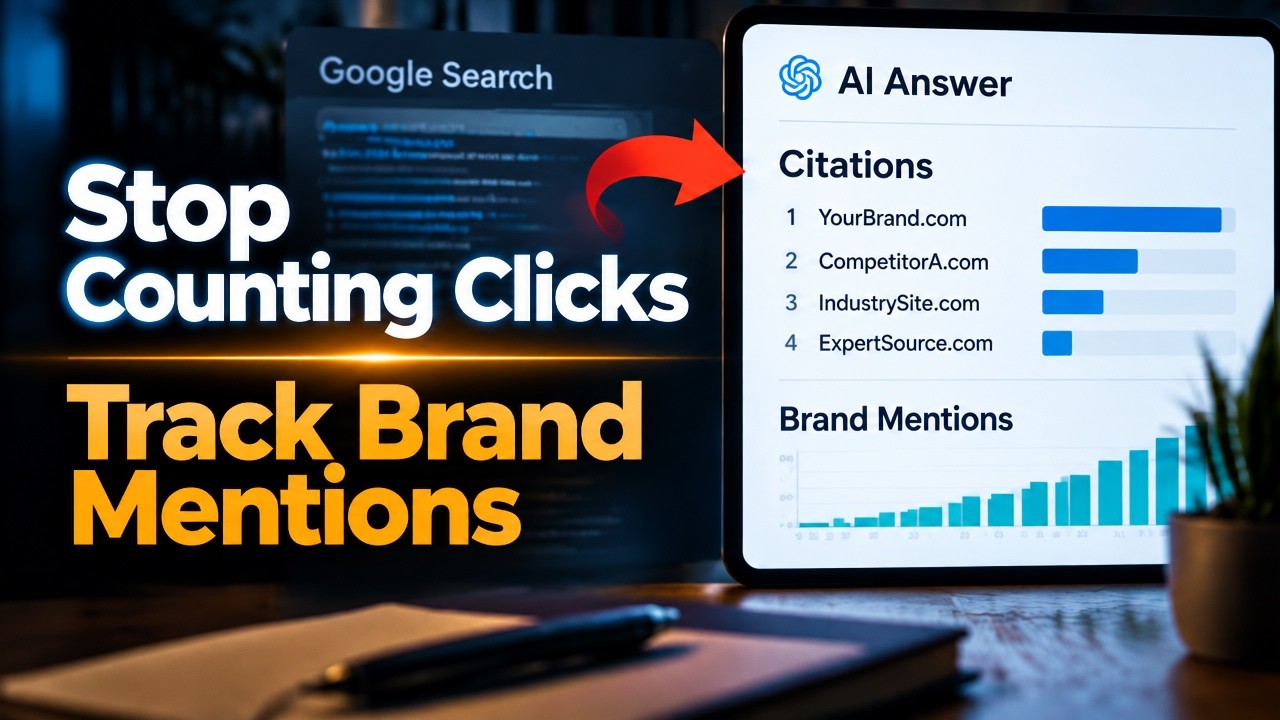
2. Framework Part 1: Track Brand Mention Share, Not Just Click-Through Rate.
The first shift is moving your primary visibility metric from click-through rate to brand mention share.
In AI search, the visibility question is simpler: When someone asks an AI tool about your category, does your brand show up, and how often compared to competitors?Brand mention share measures exactly that. Here’s how to start:
Build a prompt set. Write 25 to 50 questions your buyers actually ask.
Mix problem-aware prompts (“How do I reduce employee turnover in a staffing firm?”), comparison prompts (“Best B2B marketing agencies in Dallas”), and solution prompts (“What should I look for in a fractional CMO?”).
Run them across platforms. Test the same prompts in ChatGPT, Perplexity, Google’s AI Overviews and AI Mode, Gemini, and Copilot.
Log the results. For each answer, record whether your brand was mentioned, whether it was cited with a link, where it appeared in the response, and which competitors showed up.
Calculate your share. Divide your mentions by the total brand mentions across your prompt set. That’s your share of voice inside AI answers.
Run this monthly at minimum. AI answers fluctuate, so the trend line matters more than any single snapshot.
This measures influence that happens before the click, or in place of it. A rising mention share is an early, defensible answer when leadership asks whether content is working.3. Framework Part 2: Measure Direct and Branded Search Lift
Mention share tells you whether you’re showing up. The second part of the framework tells you whether showing up is changing buyer behavior.
The buyer who read your name in a chatbot answer and came back later leaves a trail. It shows up as lift in two places:
Branded search volume. Watch impressions and clicks for queries containing your brand name in Google Search Console. When AI tools start recommending you, more people go looking for you by name.
Direct traffic. Monitor direct sessions to your site, especially to high-intent pages like pricing, services, and contact pages, which people rarely stumble onto by accident.The key is correlation over time. Plot your brand mention share from Part 1 against branded search and direct traffic trends. If mention share climbs in a given quarter and branded search rises over the following weeks, you have a story worth telling.
A few practical guardrails keep this honest:
Establish a baseline first. Capture at least three months of branded and direct data before major AI visibility work begins, so you have something to compare against.
Account for other drivers. Trade shows, paid campaigns, PR coverage, and seasonality all move branded search. Note them on your timeline so you don’t over-credit AI.
Look for patterns, not proof. This won’t give you perfect causation. It gives you directional evidence, which is far more useful than pretending the channel doesn’t exist.
Branded search lift is where invisible AI influence becomes visible in your reporting. It’s often the strongest signal you’ll have.4. Framework Part 3: Tag Every Conversational Referral You Can
The third part of the framework captures the AI traffic that does click through, and makes sure none of it disappears into a generic bucket.
Some AI platforms pass referral data when a user clicks a cited link, but many analytics setups lump it into “referral” or “direct.” Fix that:
Create an AI referral channel group. In GA4, build a custom channel group that captures known AI referrers, such as chatgpt.com, perplexity.ai, gemini.google.com, copilot.microsoft.com, and claude.ai. Update the list as new platforms gain traction.Add a “How did you hear about us?” field. Put a free-text or dropdown field on your forms and include an option for AI tools. Self-reported attribution catches the zero-click journeys your analytics will never see.
Ask in sales conversations. Train your sales team to ask how prospects found you and log the answer in your CRM. “I asked ChatGPT for recommendations” is a data point worth recording.
Tag the links you control. Where you publish content likely to be cited, such as guides, research, and resource pages, use clean, trackable URLs so visits are easier to trace.
Tagging won’t capture everything. Its job is to close as much of the gap as possible and put hard numbers beside the directional evidence from Parts 1 and 2.5. Build Your New AI Attribution Model Today
Each part of the framework answers a different question:
Brand mention share: Are we visible in AI answers?
Branded and direct search lift: Is that visibility changing buyer behavior?
Conversational referral tagging: How much traffic and pipeline can we trace directly?No single metric proves AI search ROI on its own. Combined, they give leadership a credible, multi-signal picture of what AI visibility is worth.
Start simple. Build a one-page monthly dashboard with your mention share trend, branded search and direct traffic trends, AI referral sessions, and self-reported AI attribution from forms and sales. Review it quarterly against pipeline and revenue.
Stop waiting for platforms to hand you clean, perfect metrics. They may never arrive. The brands building their attribution models today are the ones who will own search share tomorrow.
What’s your team doing to track AI visibility? Watch the full breakdown on YouTube, premiering November 5, 2026, and share your approach in the comments.
AI business impact is shifting how companies operate. Learn how to navigate the risks and profits of this new technology.
Public accessibility to tools like ChatGPT has moved quickly from a tech novelty to a core component of modern sales. We break down the evolution of these systems and why they are currently forcing a massive shift in how businesses handle their daily operations and economic planning.
Whether you are managing a team or evaluating your own workflow, understanding these AI tools is necessary to stay competitive. We examine the practical application of artificial intelligence in sales and why the future of work looks fundamentally different than what we saw just a few years ago.
In this video, we break down the five pillars of society that AI will completely dismantle: Work, Business, The Economy, Romance, and Life itself. From deepfake influencers and infinite-learning sales bots to universal basic income and literal robot spouses, the future is arriving at breakneck speed.
But you don’t have to be replaced. I reveal the exact mindset shift you need to make today to transition from a manual “Producer” to an AI-leveraged “QA Expert” so you can 10X your output and your income before it’s too late.
Timestamps:
0:00 – The Fastest Growing Platform in History
1:15 – The 5 Pillars of AI Disruption
2:30 – What is AI Actually Doing?
4:15 – Super Intelligence & The Physical World
6:00 – The Singularity & The End of White-Collar Work
8:30 – Deepfakes & The Reset of Capitalism
10:30 – Robot Spouses & The Alien Theory
13:00 – The 10X Playbook: How to Make Money with AI TodaySubscribe for weekly business strategy breakdowns, and let me know in the comments how you are currently using these tools in your own workflow.
Question for you all: Which of the 5 pillars (Work, Business, Economy, Romance, or Life) do you think AI will completely break first? Drop your vote below. 👇
Bonus: Let me know if you’ve already made the shift to “QA Expert” or if you’re still doing 100% of the manual labor. I’ll be hanging out in the replies for the next 24 hours!
Your marketing team says they hit their lead goal this month, but your sales team says the leads are garbage. Most B2B marketing stops at the lead, sending form fills into a sales process that marketing never sees.In this video, Daniel Elliott, founder of Appture Digital Media, explains how to build marketing that generates qualified sales conversations rather than just clicks. A B2B program that actually produces revenue must have four parts planned together:

Here is the part nobody wants to say out loud: most B2B marketing stops at the lead. A form
fill comes in, someone celebrates, and then it disappears into a sales process that marketing never sees.
Marketing buys more traffic. Sales ignores more leads. And the company pays for both.B2B is fundamentally different from selling sneakers online. Your buyers take longer to decide. There is
usually a buying committee. And the price is high enough that nobody buys on impulse. Long sales cycles
punish marketing that only knows how to get clicks.The Four Pillars of Pipeline Generation
A B2B program that actually produces revenue must have four parts planned together. Everything we plan, from
the website to the video to the paid media, gets measured against pipeline.Part 1 Positioning & Messaging
Your buyers need a clear reason to choose you. If your website and your sales deck tell two different
stories, buyers believe neither. This messaging must be consistent everywhere: on the website, in the ads,
in the sales deck, and in what your reps say on the call.Part 2 Demand Generation
Most of your future buyers aren’t looking yet. Demand generation builds interest using thought leadership
video, search, AI visibility, and paid media aimed exclusively at your target accounts—not broad
audiences.Part 3 Lead Capture & Nurture
Interest that never turns into a meeting is just a nice-looking chart. We build landing pages, offers,
and email sequences that answer the questions a buyer would normally ask a rep, turning interest into
booked meetings.Part 4 Pipeline Reporting
Everything must be tracked from the first touch all the way to the closed deal. You get reporting on what
is actually working and what is just spending money. Not a report full of clicks—a report on pipeline.Our 4-Step Process for B2B Growth
Step Phase What We Do 1 Diagnose We review your market, your offer, your funnel, and your current sales process. 2 Plan We establish positioning, a channel plan, a budget, and rigid pipeline targets. 3 Launch We deploy the updated website, content, campaigns, and full-funnel tracking. 4 Optimize We optimize every month, providing clear reporting on pipeline and upcoming changes. Proven Results Built in Dallas
With over 40 years of experience in marketing and sales, Daniel Elliott understands that a lead is not a
result—a closed deal is a result.We work alongside your sales team, not around them. We establish a shared definition of a qualified lead,
set up lead routing rules, implement CRM-connected tracking, and build sales enablement materials your reps
actually want to use. We serve B2B clients across manufacturing and distribution, medical products,
government and public safety, construction, healthcare, and professional services.Ready for marketing your sales team will thank you for? We offer fractional CMO services to
lead your entire strategy, or standalone packages for websites, SEO, and video. Book a B2B strategy call to
see where your pipeline is leaking and exactly how to fix it.With over 40 years of experience in marketing and sales, Daniel understands that a lead is not a result—a closed deal is a result. Appture Digital Media has produced more than 850 websites since 2002, brought over 7,000 products to market, and utilizes an in-house studio in Dallas to serve industries like manufacturing, medical, public safety, construction, healthcare, and professional services.
Ready for marketing your sales team will thank you for?
Book a B2B strategy call: leadbuildermarketing.com
Call us: (855) GET-BIZZ
Like, subscribe, and drop your biggest pipeline
question in the comments.
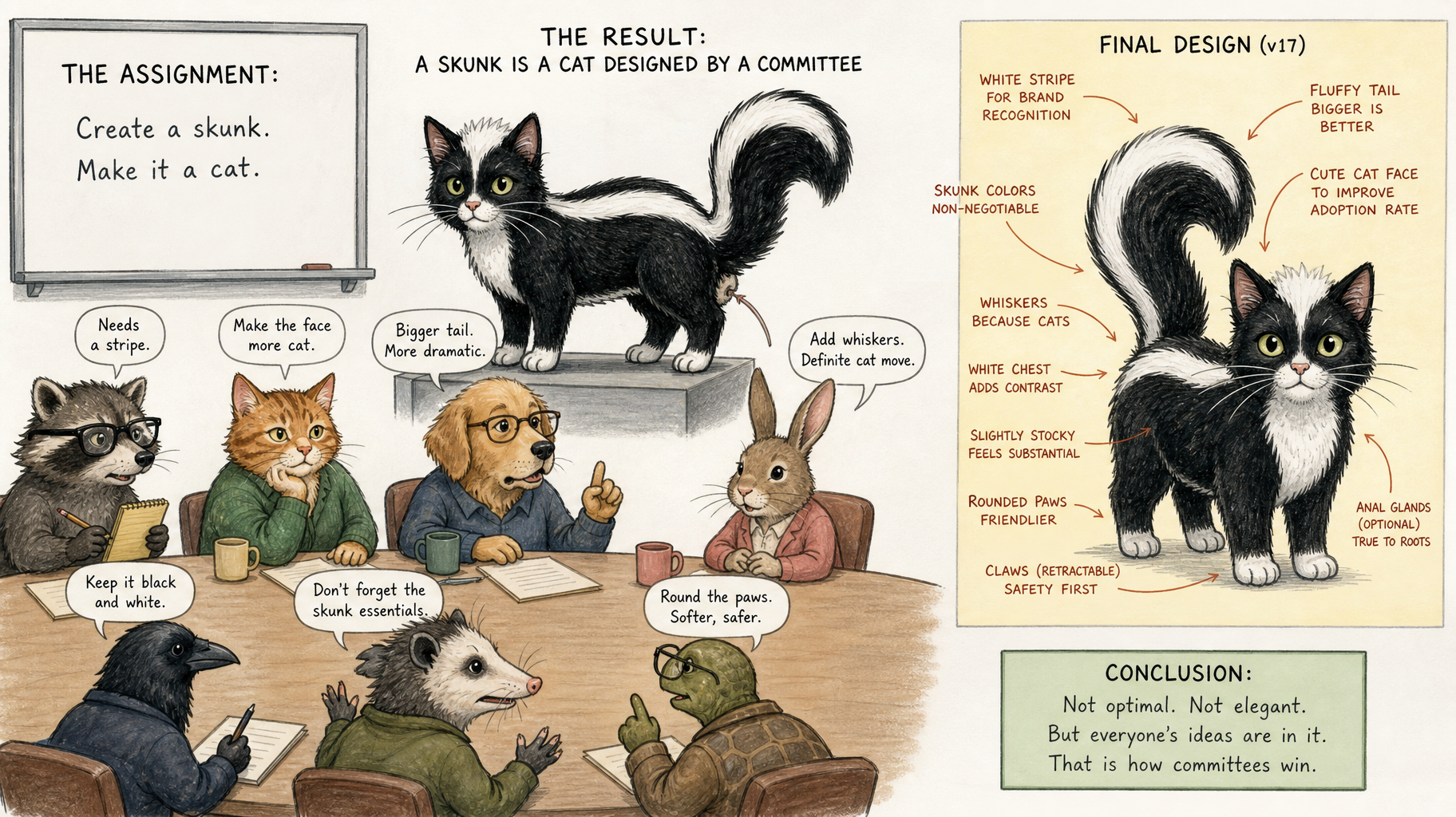
A skunk is a cat designed by committee
I have watched it happen for forty years. A founder has a clear vision. The product works. The market responds. Then the committee forms.
Marketing wants input. Sales wants a say. The board wants to weigh in. Finance needs to approve. Legal has concerns. HR wants alignment with company values.
Six months later, the thing that made you different is gone.
The pattern I keep seeing
A client comes to me burned. They have been through two agencies, maybe three. The first one promised the moon and delivered templates. The second one had great ideas but no follow-through. The third one was actually offshore labor branded as local talent.
I ask them what happened to their original concept.

They tell me it got “refined.”
Translation: it got committee’d to death.
The sharp edge that made people stop and look? Smoothed out because someone thought it was too aggressive. The bold claim that separated them from competitors? Watered down because legal was nervous. The personality that made the brand memorable? Removed because the VP of operations said it “wasn’t professional enough.”
What you are left with is a skunk. It looks like a cat. It is supposed to act like a cat. But it stinks, and nobody wants to be near it.
Why this keeps happening
Committees do not create. They negotiate.
When you put ten people in a room and ask them to agree on a direction, you do not get the best idea. You get the idea that offends the fewest people. You get compromise. You get safe.
Safe does not convert. Safe does not build brands. Safe does not make people stop scrolling and pay attention.
I have brought seven thousand items to market. I have built 850 websites. I have managed over a billion dollars in portfolio. The things that worked were never designed by committee. They were designed by someone who saw the pattern, trusted their experience, and moved.
What actually works
You need “one person” who understands the full continuum.
Not a committee. Not a department. One person who can see the genetic structure of the idea before it becomes visual, who knows what will survive execution and what will collapse under market pressure.
That person listens. They research. They clarify the plan. Then they execute.
No mystery. No theater. No endless revision cycles where every stakeholder gets to leave their fingerprints on the work until it does not resemble anything useful.
When a client hires me, I do not ask them to form a committee. I ask them to trust the process. I have seen this movie. I know how it ends. If you could do it yourself, you would not need me.
The real cost
Committees do not just slow you down. They erode your competitive advantage.
While you are negotiating with internal stakeholders, your competitor is shipping. While you are refining the message to make everyone comfortable, someone else is claiming the position you should have owned.
I have watched companies lose years to this. They come back later, frustrated, asking why their marketing is not working. The answer is simple: you designed a skunk when you needed a lion.
Here’s what I recommend
If you are stuck in committee hell right now, do this:
Identify the one person who actually understands your market, your customer, and your competitive position. Give them authority. Let them build the thing without requiring consensus from people who have never closed a deal or shipped a product.
If you do not have that person, hire them. Do not hire an agency that will tell you what you want to hear. Hire someone who will tell you what you need to hear, then execute without requiring you to manage the process.
Committees are useful for governance. They are terrible for creation.
Stop designing skunks. Start shipping work that actually moves the market.
If you have been burned by agencies that overpromised and underdelivered, or if you are tired of watching good ideas get watered down by internal politics, let’s talk. I have been doing this for forty years. I know what works. And I do not need a committee to tell me.
— Daniel

Vibe coding has made static websites easier than ever to build. You can spin up a site with Astro, Jekyll, Gatsby, Hugo, or another static framework without ever touching a traditional CMS.
But easier to build doesn’t necessarily mean easier to optimize.
WordPress and other CMSs quietly handle many SEO basics through plugins and built-in functionality, from canonicals and sitemaps to redirects, metadata, schema, and 404 handling.
With a static site, much of that work becomes your responsibility.
As Suganthan puts it,
Going static doesn’t remove SEO work; it moves it, in my opinion. WordPress hides a load of defaults behind plugins, and static turns every one into a job you do yourself.
That doesn’t make static sites bad for SEO. It just means you need to know what your CMS used to do for you, and what you now need to build, configure, and monitor yourself.
Common SEO issues on static sites
Static sites can be fast and technically clean, but they also leave more room for small SEO mistakes to slip through, since no CMS or plugin handles things in the background.
That becomes even more important with vibe-coded sites. AI can build the page, but it won’t necessarily know which SEO conventions you want it to follow across the entire site.
Here are some of the most common issues to watch for:
|
Why it happens |
Impact if missed |
|
|---|---|---|
|
Trailing slash and canonical conflicts |
Your website host (such as Netlify) and static site framework (such as Astro) may disagree about whether a page URL should end with a slash. |
Duplicate URLs and split ranking signals |
|
Sitemaps that ignore noindex |
Your sitemap may include pages you don’t want Google to show in search. |
Drafts, thank-you pages, and other unwanted URLs can get indexed |
|
Missing or misconfigured robots.txt |
Your website may launch without a robots.txt file unless you create one yourself. |
Important crawling rules can be missing or accidentally misconfigured |
|
Unoptimized images |
Images added outside your site’s usual image tools may not be resized or compressed automatically. |
Larger page weight, slower loads, and missing alt text |
|
Meta and schema template failures |
A mistake in a shared template can appear on every page that uses it. |
Duplicate or overlong titles, incorrect metadata, and broken schema at scale |
|
Incorrect HTTP status codes |
Missing pages can return a “success” response (200 OK) unless your 404 is set up correctly. |
Soft 404s and wasted crawling |
|
Inconsistent internal linking |
Different templates and components can link to the same page in different ways, for example, with and without a trailing slash. |
Crawl confusion and diluted internal linking signals |
|
Fragile sitemap logic |
A basic sitemap setup can become difficult to manage when different pages need different rules. |
Bloated, incomplete, or malformed sitemap files |
|
Poor loading performance and Core Web Vitals |
A static site can still load more JavaScript or CSS than a page actually needs. |
Slower page loads and weaker Core Web Vitals |
A website audit is one of the easiest ways to catch these problems.
Ahrefs’ Site Audit crawls your site and surfaces over 170 technical SEO issues that may otherwise go unnoticed, which is especially useful when there’s no CMS or SEO plugin checking them for you.
Not all businesses need a CMS. Not all businesses can live without one.
That’s probably the more useful decision framework. A small site with a handful of pages and infrequent updates may be a great fit for a static setup. A large publishing operation with complex workflows may not be.
Final thoughts
Static sites can give you more control, fewer dependencies, and less reliance on plugins. But that control comes with more responsibility.
A traditional CMS hides a lot of SEO plumbing behind plugins and defaults. With a static or vibe-coded site, you’re more likely to own that plumbing yourself, from canonicals and sitemaps to redirects, schema, performance, and status codes.
Vibe coding makes the build process faster, but it doesn’t remove the need to understand what good technical SEO looks like.
Type your company name into Google. Before your website shows up, there is a good chance Google has already written its own summary of who you are, what you sell and what it costs. And it may be quoting a YouTube reviewer instead of you.
Fresh research from Ahrefs shows how fast this is happening. AI Overviews, the AI-generated answers at the top of Google results, now appear on the large majority of branded searches. That changes who controls the first impression of your brand, and it changes what your marketing has to do about it.
Here is what the data says, why it matters, and what I would do about it if this were my brand.
AI Overviews now show up on most branded searches
Ahrefs analyzed 232.8 million US desktop Google results collected from July through September 2026. That included 92.5 million results for branded keywords and 140.2 million for non-branded keywords.
On September 29, 2026, AI Overviews appeared in 82.91% of US desktop results for branded keywords. That is where the 83% headline comes from. It is a single-day snapshot, so the monthly averages tell the steadier story:
| Month (2026) | Branded keywords with an AI Overview | Non-branded keywords with an AI Overview |
|---|---|---|
| July | 61.3% | 73.5% |
| August | 65.1% | 74.7% |
| September | 73.3% | 78.3% |
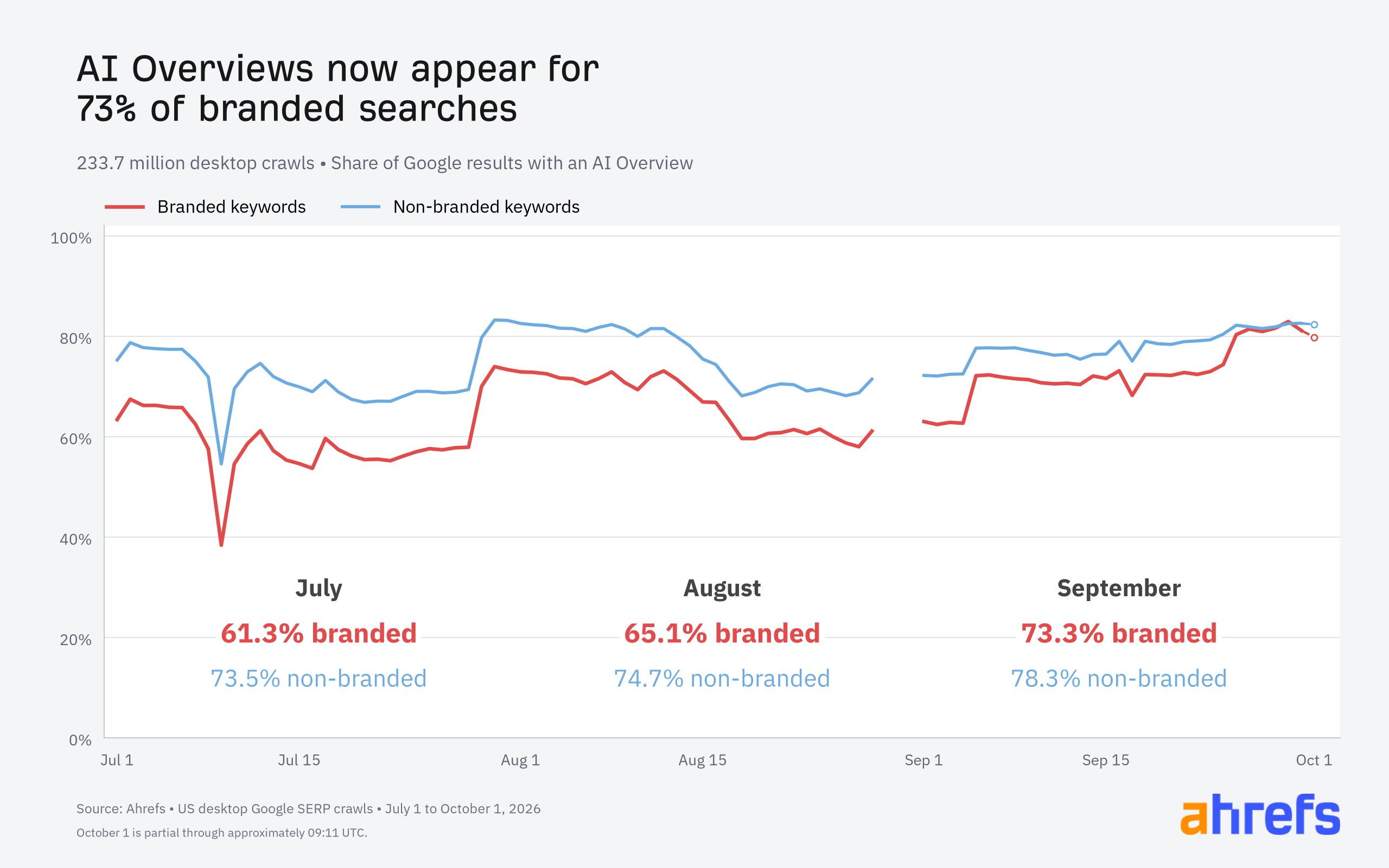
Branded searches climbed 12 percentage points in three months, roughly 20% growth over July’s rate. Non-branded searches rose too, but only by 4.8 points.
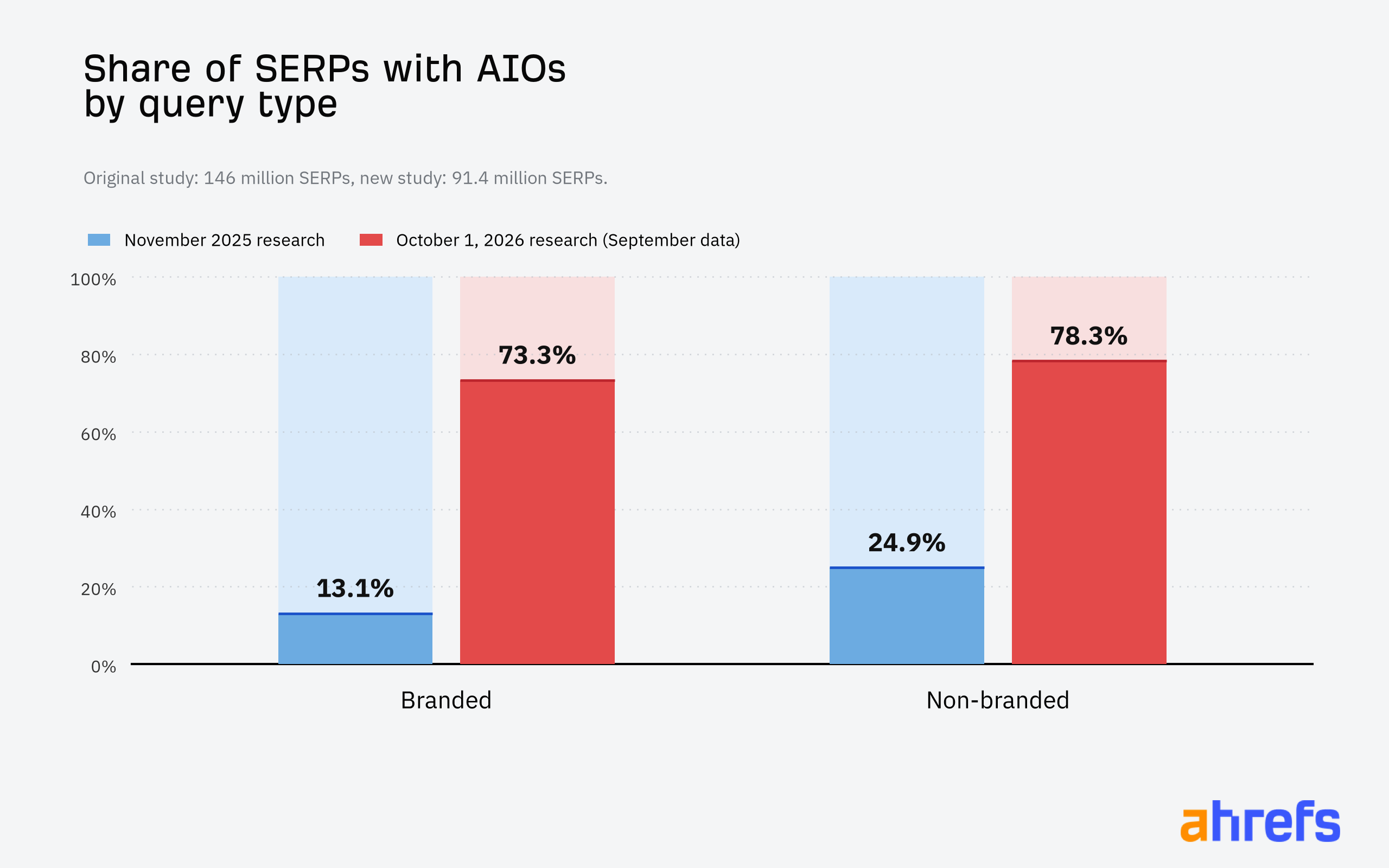
That is a real reversal. In an earlier Ahrefs study from November 2025, AI Overviews were far more common on non-branded searches than branded ones. Different samples, so treat the comparison as directional, but the direction is hard to miss. The gap between branded and non-branded queries shrank from 12.2 points in July to 5 points in September.
On brand-name searches, the AI answer usually takes the top spot
Where an AI Overview appears matters as much as whether it appears. Every AI Overview cuts into clicks. In an earlier study, Ahrefs found a 58% lower click-through rate for the top-ranking page when one was present. The worst case is an AI Overview sitting in position one for your own name, above your own website.
To measure that, Ahrefs tracked exact-name searches for 100 brands from Interbrand’s Best Global Brands 2025 list (bare names like “bluehost”) at 14 weekly checkpoints from July through September. This was a separate sample from the larger study above.
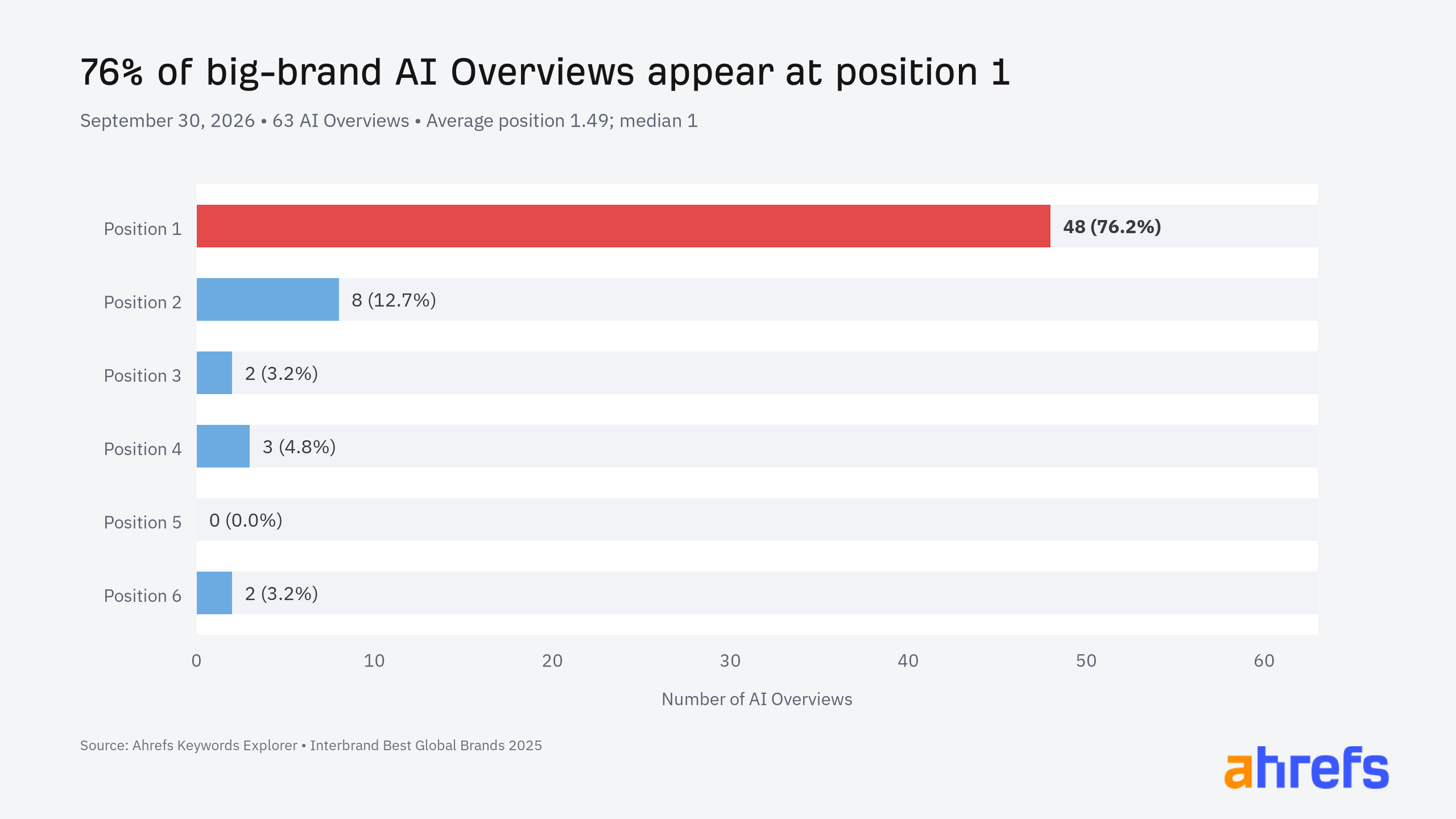
The jump came fast in September. On July 1, only five of 98 usable results had an AI Overview. By September 30, 63 of the 100 brand-name searches did.
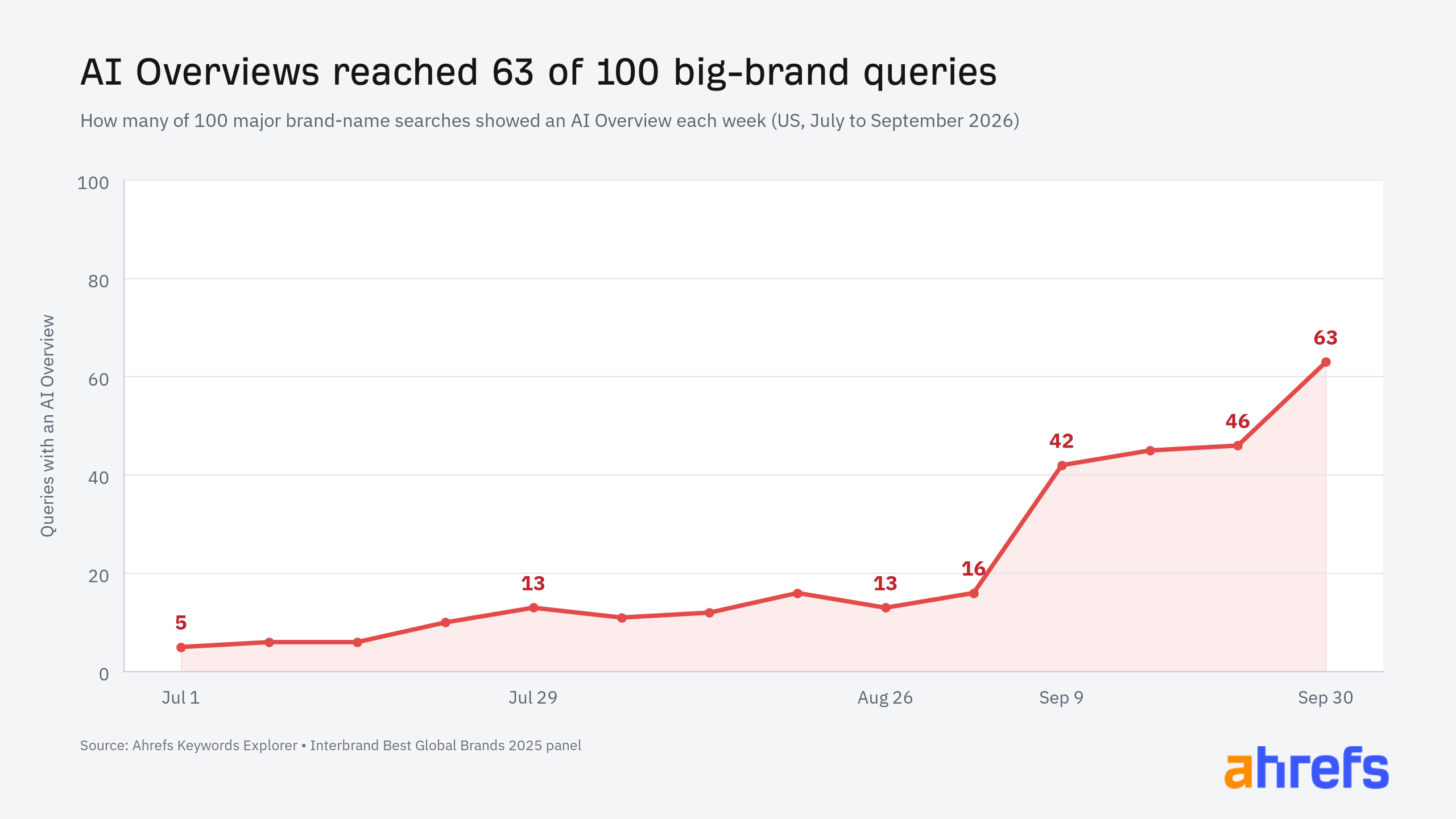
Of those 63 AI Overviews, 48 (76.2%) appeared in position one, with an average position of 1.49. Google could move them lower later. For now, on a brand’s own name, the AI answer is usually the first thing a searcher sees, ahead of the brand’s website.
Wikipedia, YouTube and LinkedIn are telling your story
The bigger risk is not the AI answer itself. It is where that answer gets its information. When Google summarizes your brand, it may lean on sources you do not own, and in the worst case, on a competitor.
In the same 100-brand panel, the most-cited outside sources (sites other than the brand being searched) were Wikipedia, YouTube and LinkedIn. Wikipedia led at 71.9% of the AI Overviews with source lists, followed by YouTube at 38.6% and LinkedIn at 22.8%.
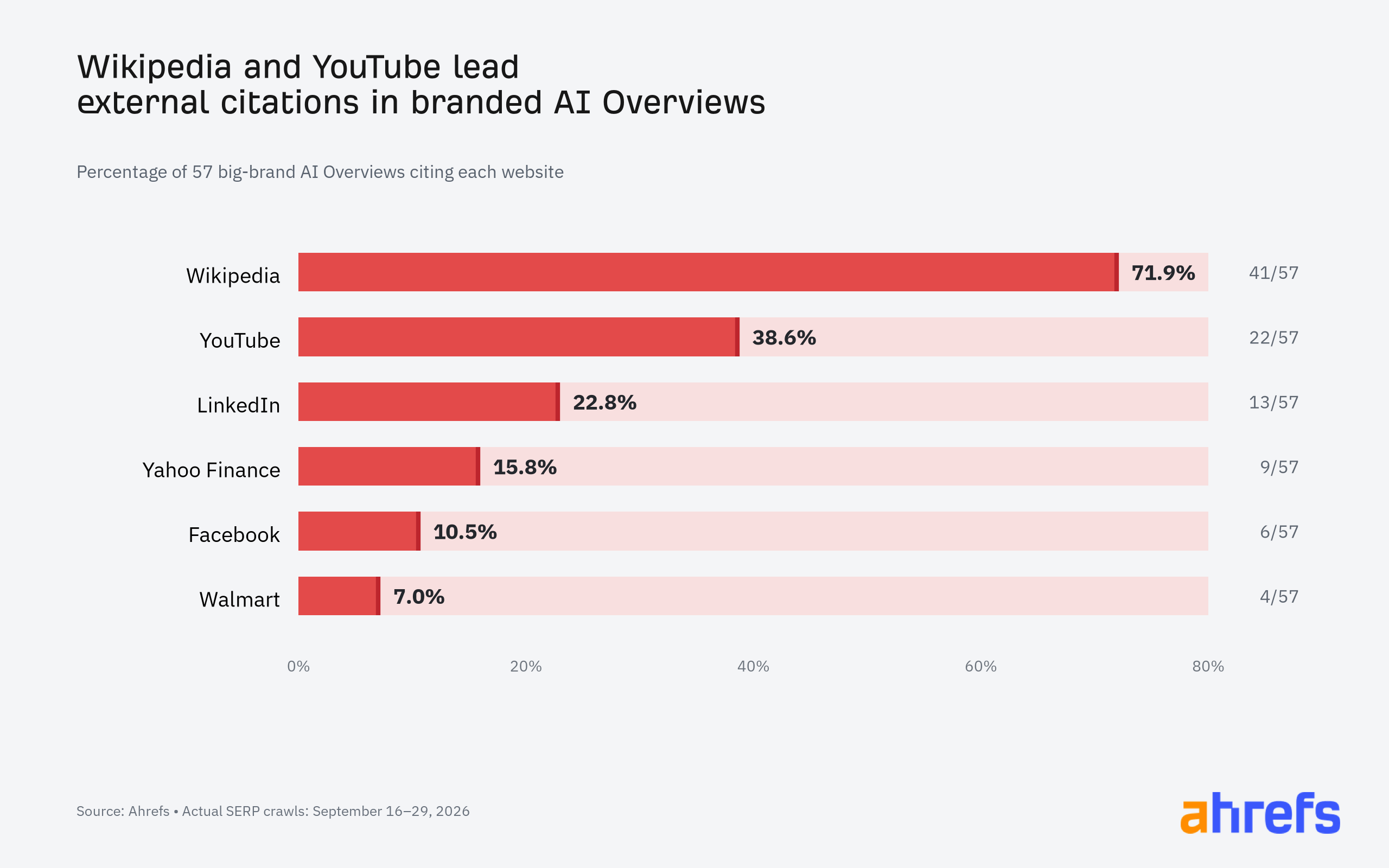
Wikipedia is at least a fairly neutral source for most brands. YouTube and LinkedIn are a different story. Anyone can post a video review or a LinkedIn take about your company, and you have far less control over those than over the pages on your own site.
Here is the AI Overview for Bluehost, with YouTube videos heavily represented among the sources:
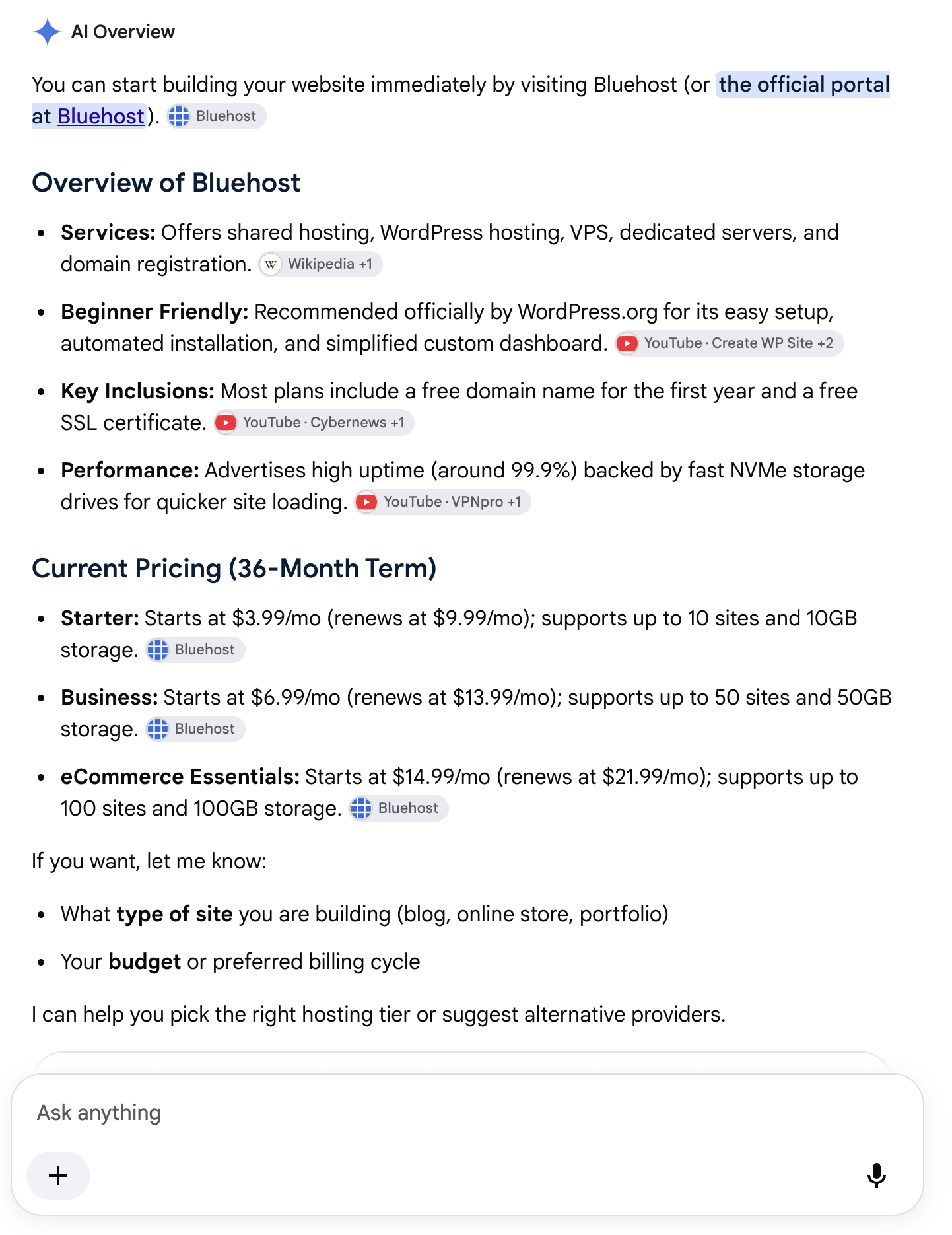
There is some good news. Of the AI Overviews where the full text was visible, only two of 58 (3.4%) explicitly discussed competitors. Pepsi’s answer mentioned Coca-Cola in the context of the “cola wars,” and Intel’s named TSMC and NVIDIA. Across 57 source lists, only one verified competitor-owned website was cited. For now, Google mostly avoids sourcing your brand story from your competitors.
Why this matters for your brand
Let’s be real: a branded search is the warmest traffic you will ever get. That person already knows your name. They are looking for your pricing, your login, your phone number or a reason to pick you. If Google answers them with a summary built from someone else’s content, you have lost control of the moment that matters most.
Chris Long put it plainly on LinkedIn: “competitors/external sources can now control the narrative of your brand directly in the search results.” Ann Smarty raised a related problem with the videos cited in these answers. They often are not from the brand’s official channel and “may very well include outdated product information.”
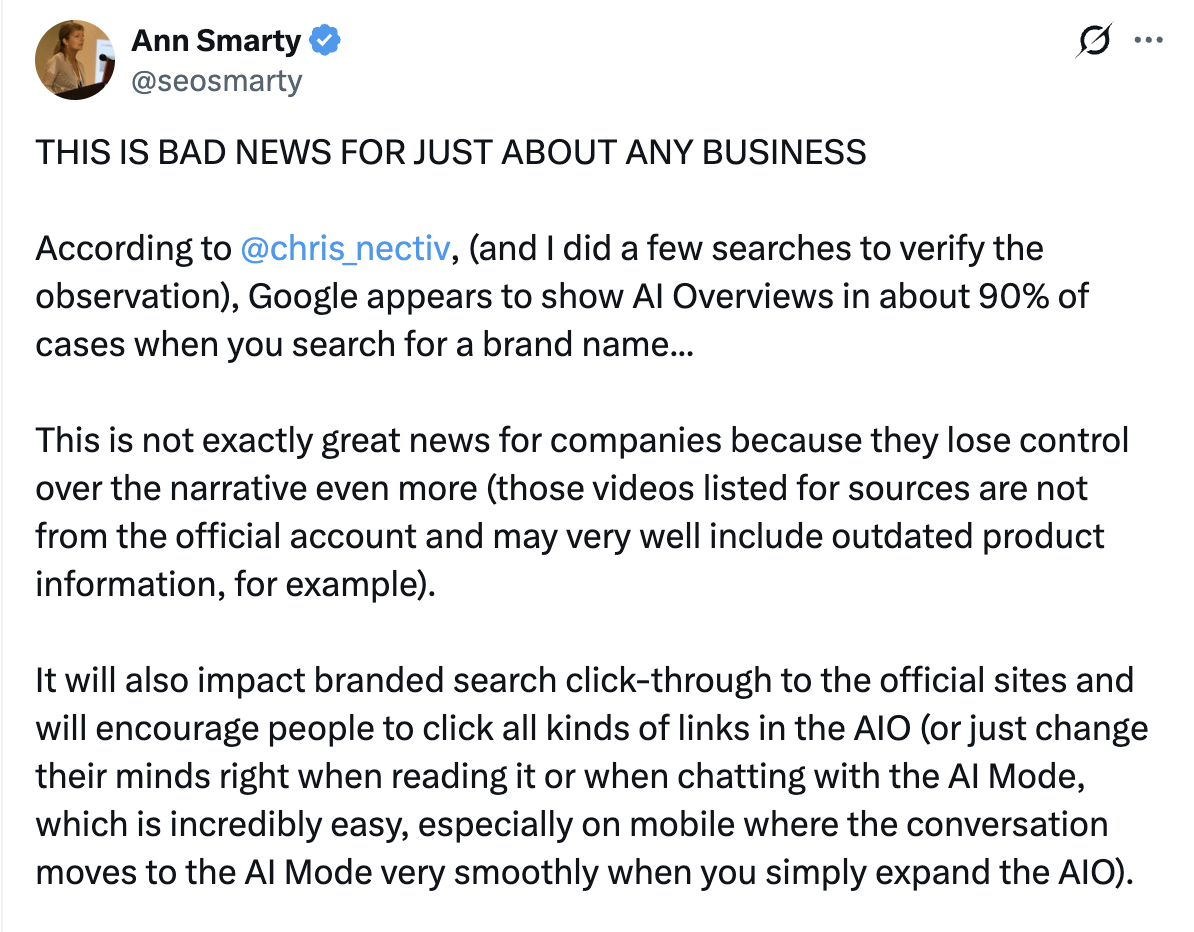
Google changes when and how AI Overviews appear all the time, so none of these numbers are permanent. But the trend is clear. Google is putting AI Overviews on every results page that will tolerate one, and branded searches are now firmly in that group. Plan for it.
What to do about it
You cannot turn AI Overviews off for your brand. You can make sure the sources Google pulls from say the right things. That is the core of AI search optimization, and it starts with a few practical moves:
- Make your own site the clearest answer. Your pricing, services, locations, contact details and FAQs should be easy to find, current and written in plain language. If your site is vague, Google will look elsewhere.
- Own your YouTube presence. If YouTube is one of the most-cited sources, your official channel should have current product, service and customer videos. Otherwise, someone else’s video gets to define you.
- Keep your LinkedIn and third-party profiles consistent. Your company page, leadership profiles, directory listings and Wikipedia entry (if you have one) should describe the business the same way your website does.
- Watch your branded results every month. Search your brand name, product names and “brand + pricing” or “brand + reviews.” Note what the AI Overview says and which sources it cites.
- Fix the sources, not just the symptoms. If an outdated video or article keeps getting cited, publish a current, better answer on a channel you control.
How to check your brand’s AI Overviews in Ahrefs
If you use Ahrefs, you can see which of your branded keywords trigger an AI Overview. In Site Explorer, open the Organic Keywords report. Under Intents, choose Branded keywords. Then click Add filter, choose SERP features, and select AI Overviews.
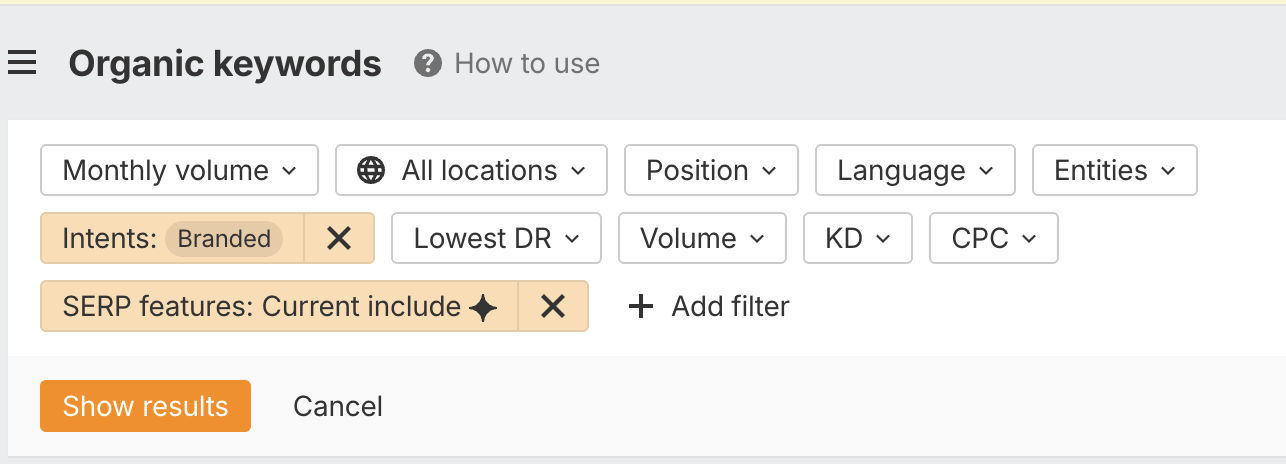
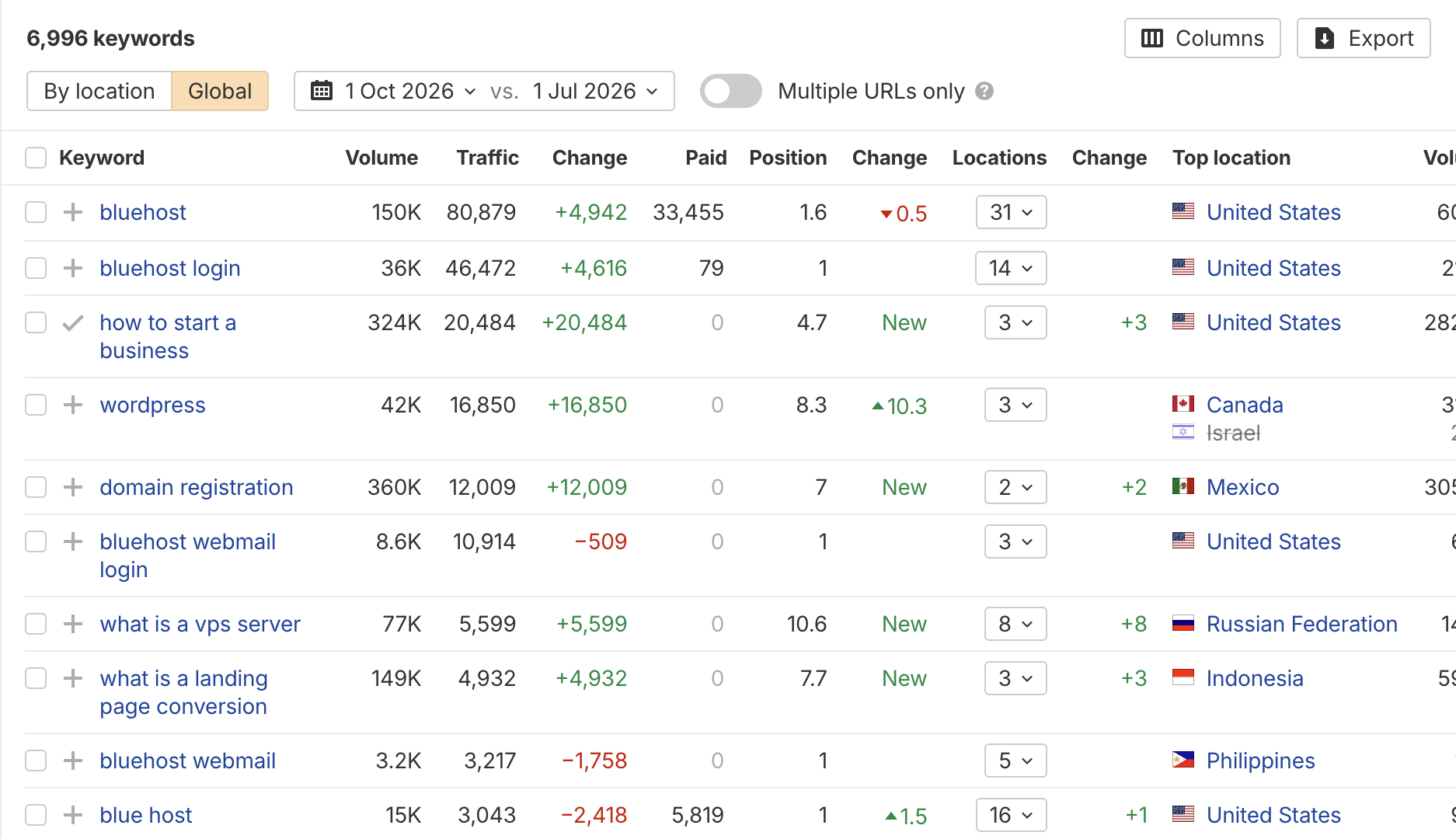
Click Show results to see every branded keyword your domain ranks for that also shows an AI Overview. In the Bluehost example, that includes its brand name and login searches.
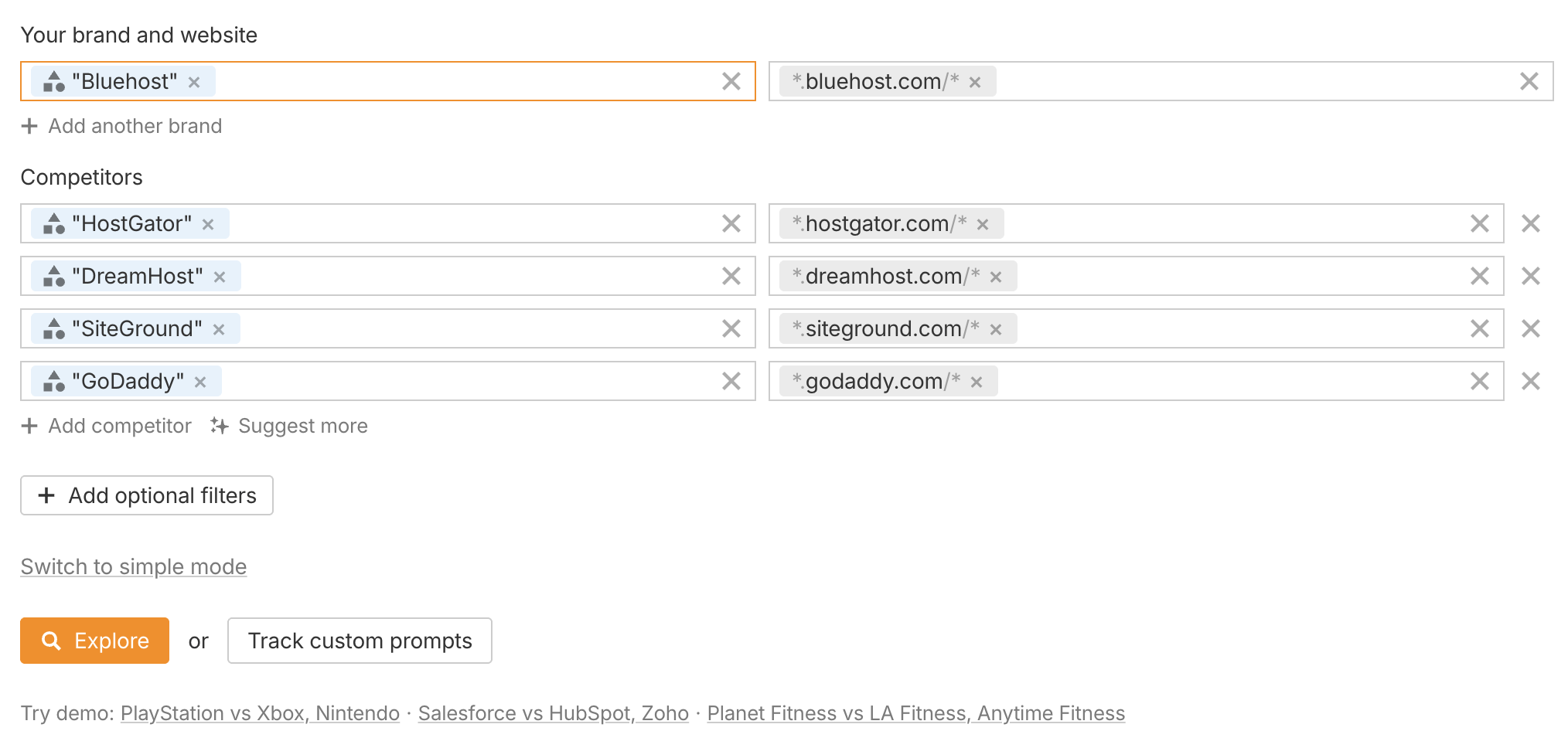
To see what those AI Overviews actually say, which competitors they mention and which sites they cite, use Ahrefs Brand Radar. Enter your brand, and it will suggest competitors and competing domains to track alongside you.
Open the AI responses report and filter for AI Overviews that mention your brand.
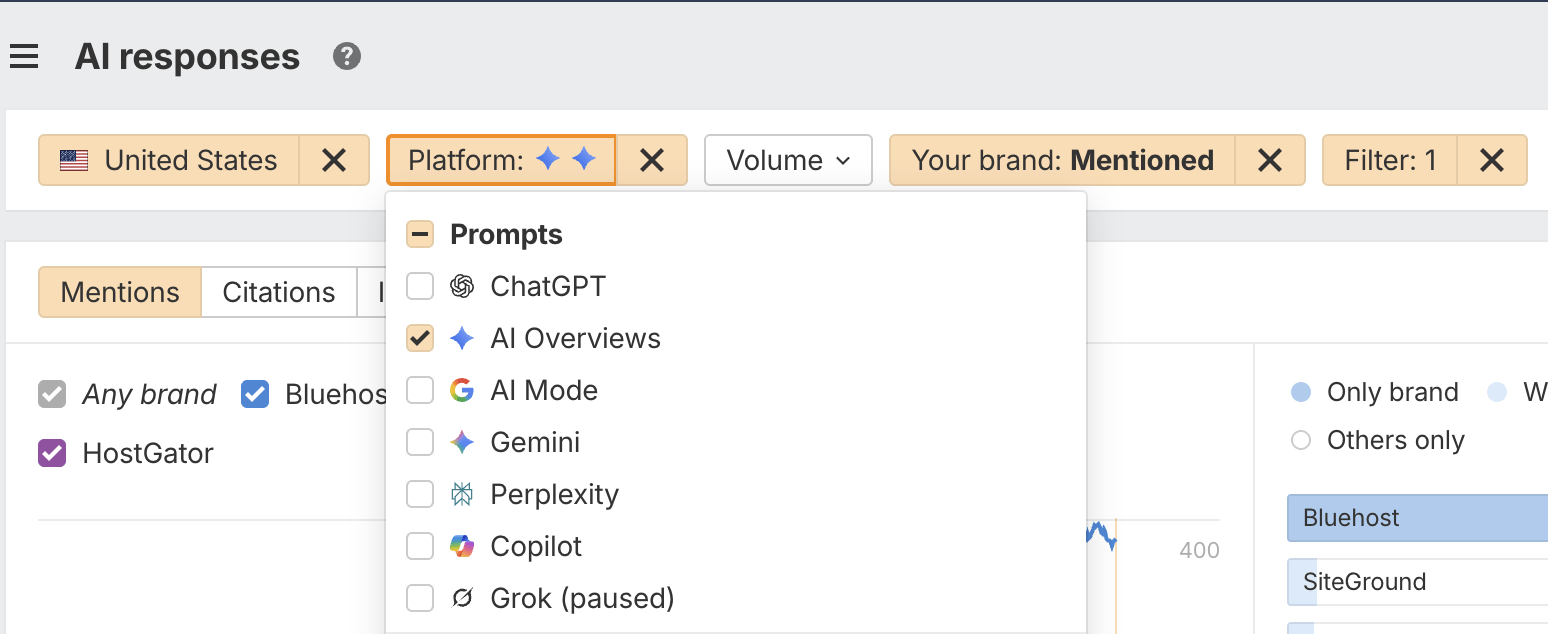
Click Apply, and you will get a list of AI Overviews with their full text, plus the brands mentioned and the domains cited in each one.
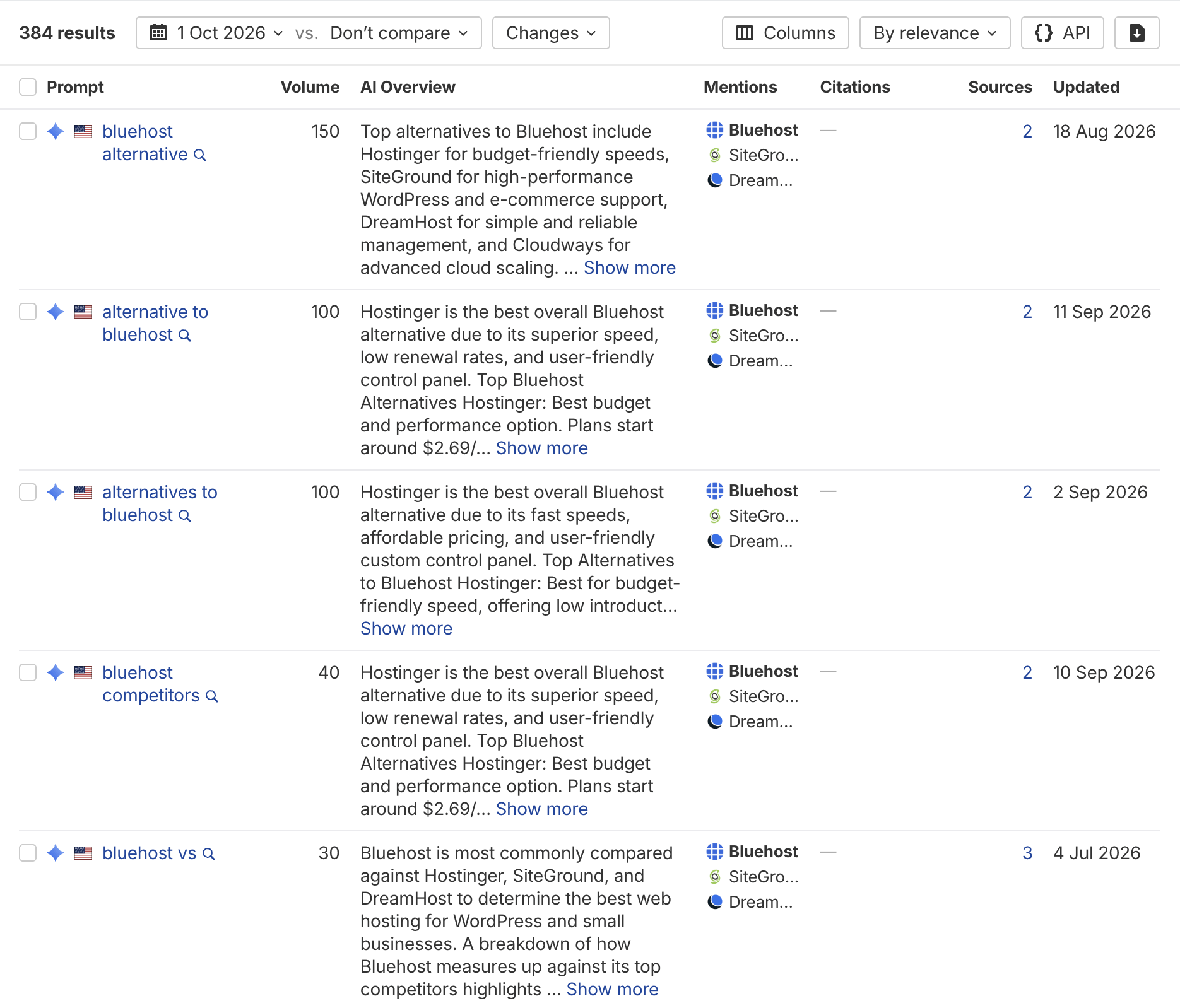
Don’t have Ahrefs? Start manually. Search your brand name and your top three branded phrases in a private browser window, screenshot the AI Overview, and list every source it cites. That alone will show you where your story is being told without you.
The bottom line
Your brand name used to be the one search you could count on winning. That is no longer guaranteed. Google’s AI is now the first voice many buyers hear when they search for you, and it is building that answer from whatever sources it trusts most.
If you want to know what Google is saying about your brand and how to fix it, book a strategy call. We’ll review your branded search results, show you which sources are shaping them, and lay out what to fix first.
Source: Ahrefs, “AI Overviews Currently Appear for 83% of Branded Searches,” October 2026. All charts, data and Ahrefs tool screenshots are based on that study.
Your buyers are asking AI before they ask you. According to Forrester research cited by Ahrefs, 94% of business buyers now use AI search when making purchase decisions, and they rate it above vendor websites, product experts and sales reps. Consumers are not far behind: NielsenIQ puts it at 42% of shoppers researching products with AI.
So budgets are moving toward AI search. And the moment money moves, leadership asks the obvious question: what are we getting back?
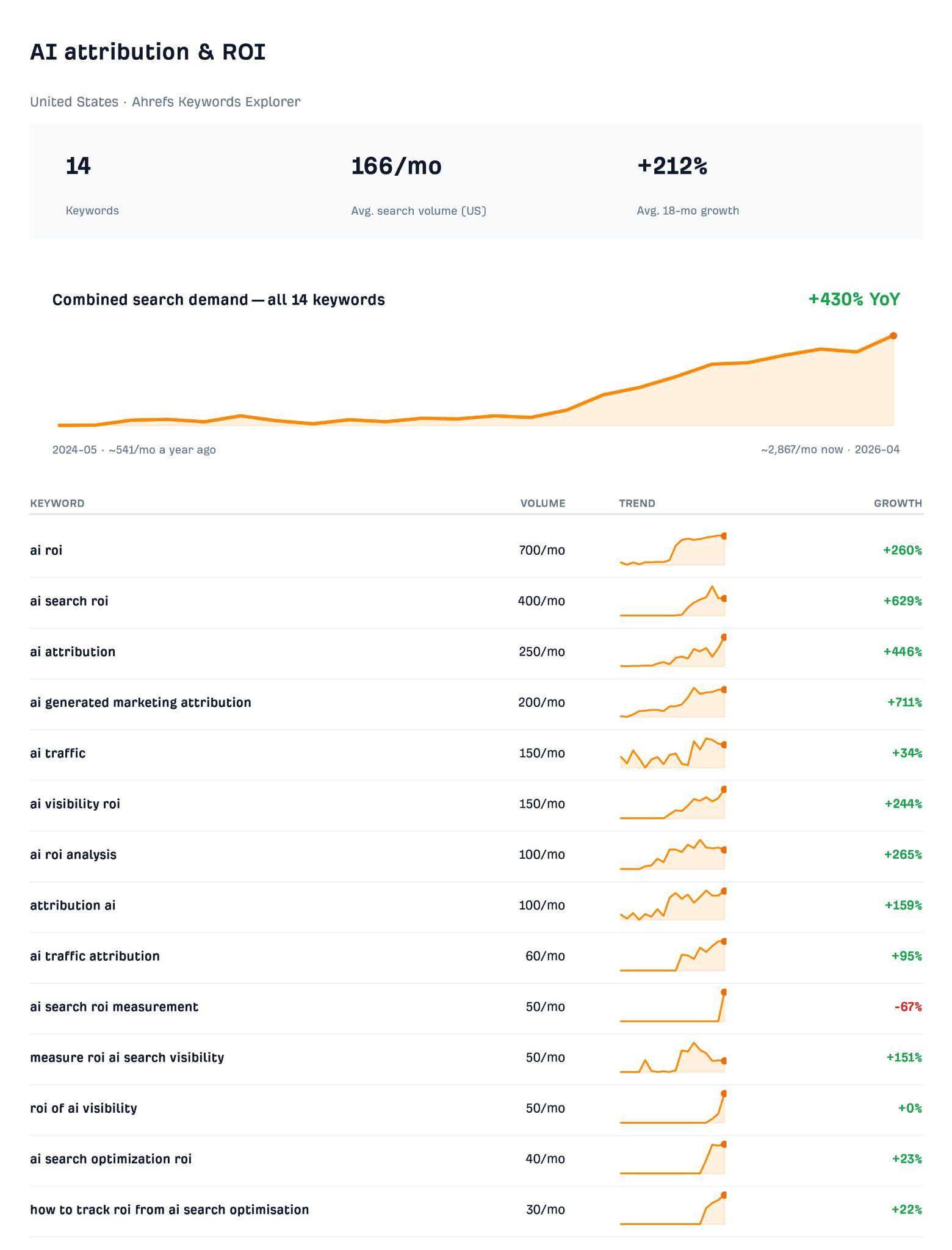
Interest in that question is climbing fast. Ahrefs’ Keywords Explorer data shows searches for AI attribution and ROI terms up 212% over the last 18 months.
Let’s be real: you will never prove AI search ROI to the penny. AI is one of the hardest channels to track that marketing has ever had.
- Someone can get a complete answer inside ChatGPT and never visit your website.
- When they do click through, the referrer is often stripped, so the visit shows up as direct traffic.
- And when someone acts on an AI recommendation, they rarely tell you that is what happened.
The good news is that leadership does not need a perfect number. They need a reasonable estimate they can trust and compare over time. Between what you can track and what your customers tell you, you have enough data to build one. Here is a practical method, adapted from Ahrefs’ approach, that you can repeat every quarter using data you mostly already have.
The AI search ROI formula
AI search ROI is the value you get from showing up in AI answers, minus what it cost you to get there, divided by that cost.
- Value includes sales, traffic, awareness among people who never click, conversions and better-informed buyers.
- Cost includes content, technical work, tools and team time.
Revenue is the number leadership cares about most, so that is what the steps below focus on:
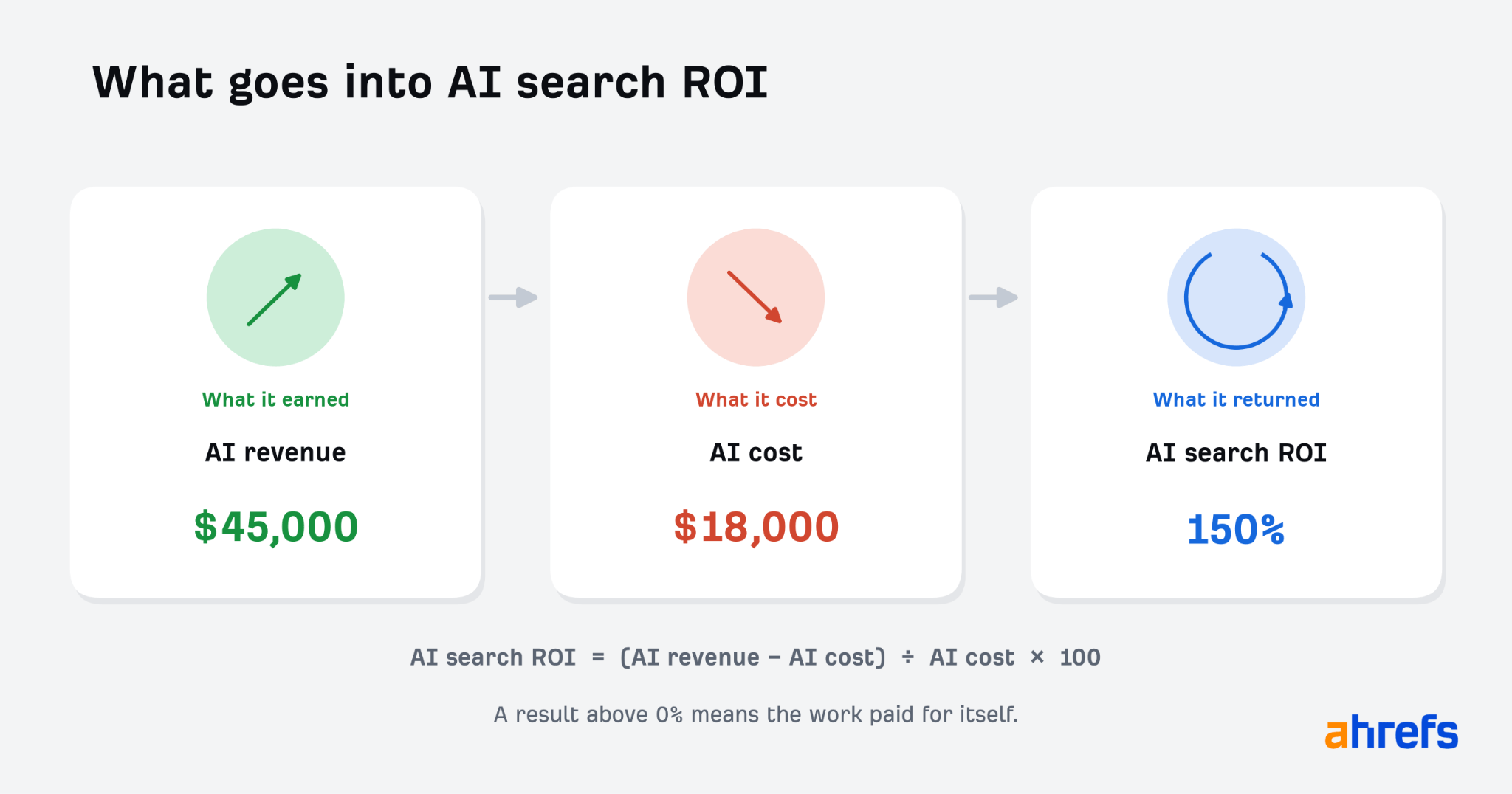
AI search ROI = (AI revenue − AI cost) ÷ AI cost × 100
Anything above 0% means the work paid for itself. For example, $45,000 in AI revenue on $18,000 in AI cost is a 150% return.
Revenue is not the whole story, though. The awareness and shortlisting value of AI visibility matters too, and it should be reported alongside your ROI. More on that at the end.
Step 1: Add up what AI search costs you
There are two kinds of cost to account for:
- Pure AI costs only exist because of AI search, such as an AI visibility tracking tool or an agency retainer for AI work.
- Shared costs support both AI search and your broader SEO and content work, including your team, SEO tools, ChatGPT or Claude subscriptions, freelancers and agencies.
The easiest way to sort them is one question: would you still pay for this if you stopped AI search work tomorrow?
- If the answer is no, count all of it.
- If the answer is yes, count a share of it.
Do not burn a week trying to account for every cent. A solid ballpark is good enough, as long as you calculate it the same way every quarter.
Your team’s time
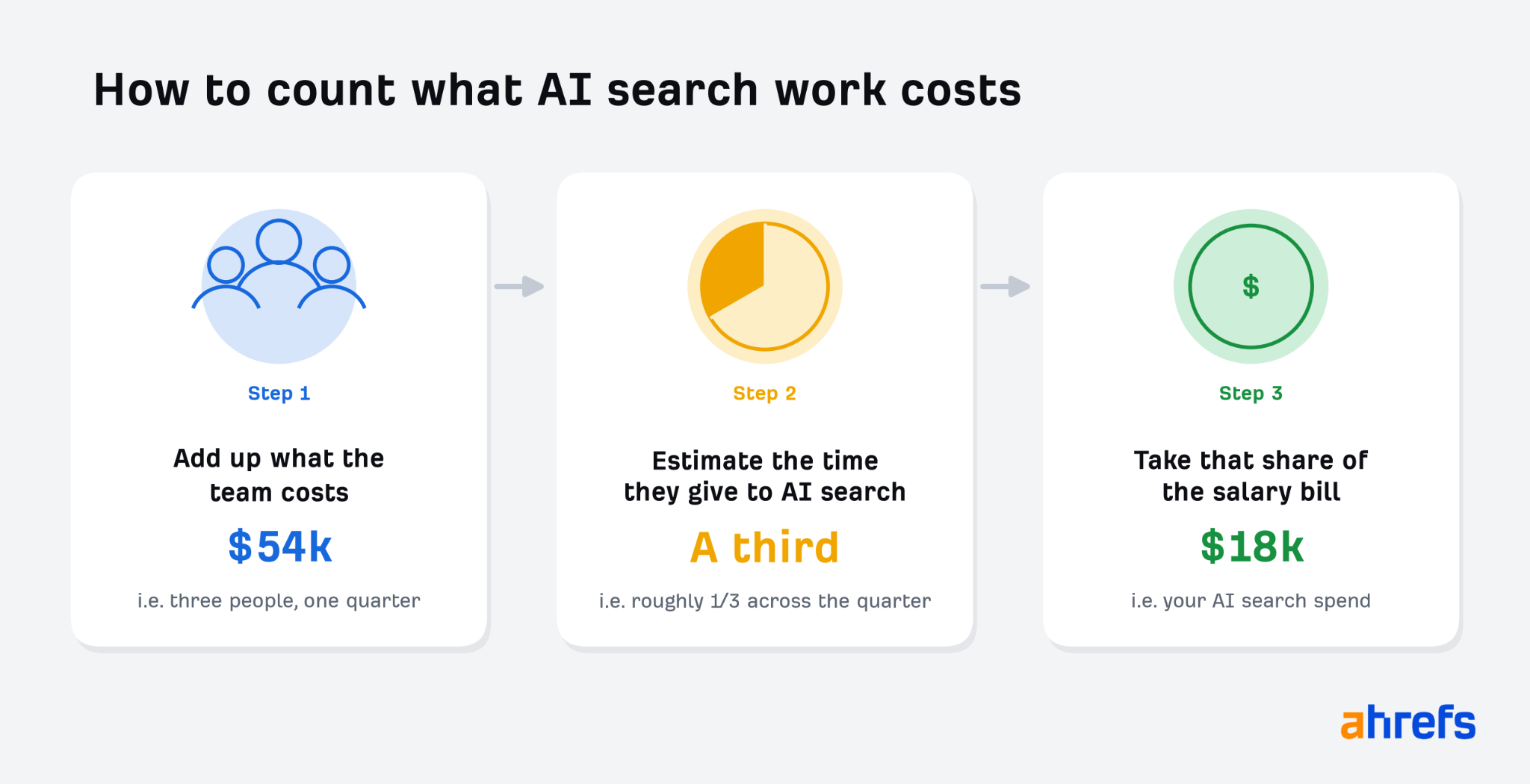
People are usually the biggest shared cost. You do not need timesheets. Just ask your team or vendors how they spent their time that quarter. Was about a third of it on AI content and optimization?
Say your three-person content team costs $54,000 a quarter. If they spent about a third of their time on AI search work, count $18,000.
Your tools
Most tools are shared too, and their usage is harder to pin down. The simplest approach is to use the same share as the team that uses them. If your content team spends a third of its time on AI search, count a third of its tool spend.
If a tool has a separately priced AI add-on, count the add-on and ignore the rest. And if your AI workload changes from quarter to quarter, adjust the share to match.
Put together, a quarter’s AI search costs might look like this:
| Cost | Type | Quarterly cost | Share counted | AI cost |
|---|---|---|---|---|
| AI visibility tracking tool | Pure AI | $1,500 | All | $1,500 |
| AI-only agency retainer | Pure AI | $3,500 | All | $3,500 |
| Content team (3 people) | Shared | $54,000 | A third | $18,000 |
| Freelance writer | Shared | $6,000 | Half | $3,000 |
| SEO suite and AI subscriptions | Shared | $3,000 | A third | $1,000 |
| Total | $27,000 |
That $27,000 is your AI cost. Hold onto it for Step 3.
Step 2: Estimate the revenue AI search brings in
Much of AI’s influence never shows up in analytics, so there is no single clean revenue number. There are two good ways to estimate it. Use whichever fits your data, or use both.
Either way, be upfront in your report that both methods likely undercount the real value of AI.
Method 1: Tracked revenue
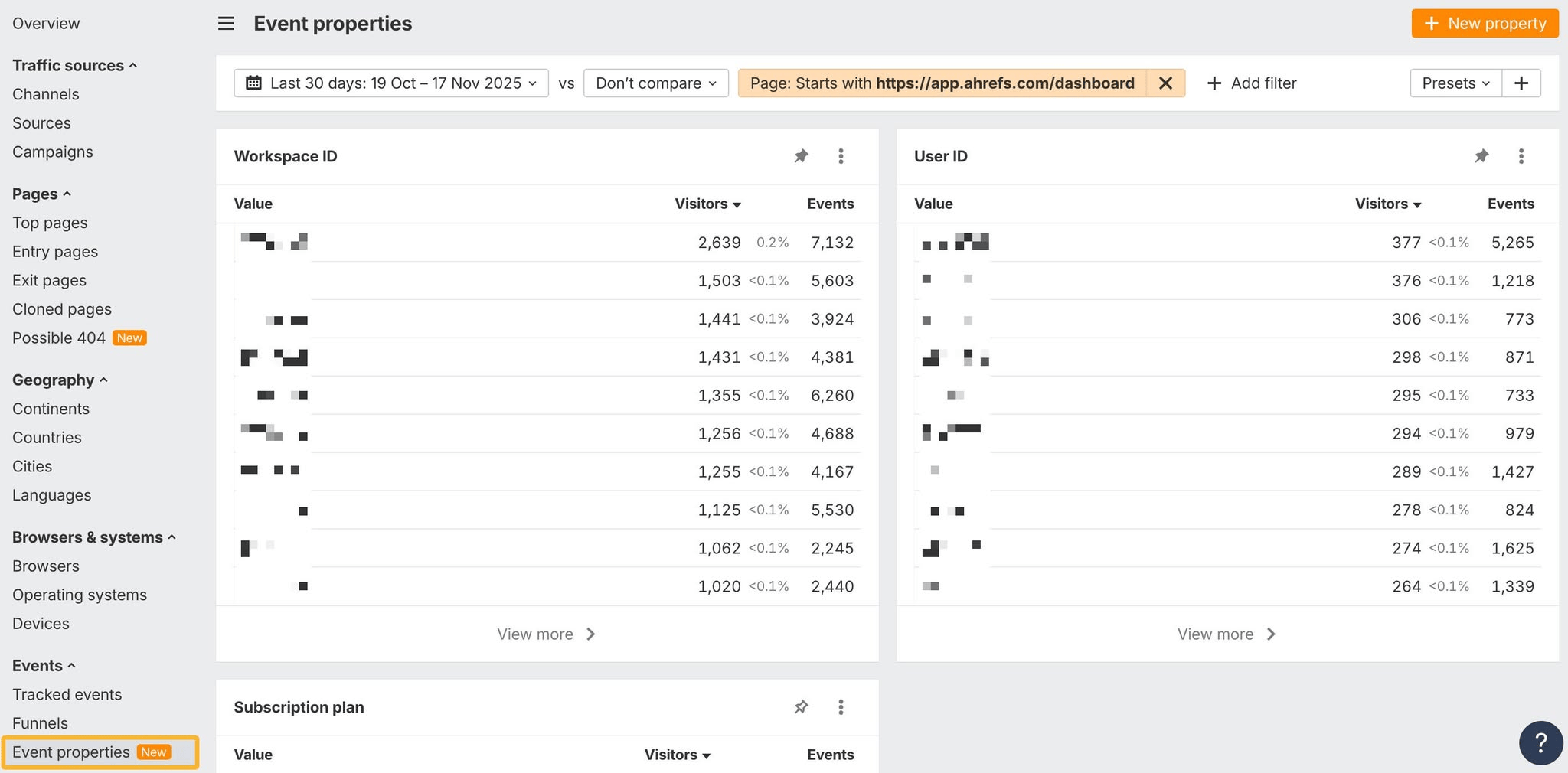
Tracked revenue comes from conversions you can tie directly to visits from AI tools. You can find those in GA4 or tools like Ahrefs Web Analytics.
- Count the conversions that came from AI referral traffic.
- Multiply them by your average customer value for that product or service, or use actual deal values if your CRM connects to your analytics.
If 40 AI-referred visitors converted last quarter and your average customer is worth $900, that is $36,000 in tracked revenue.
Tracked revenue only shows part of the picture. AI is usually one touchpoint in a longer buying journey. Plenty of people read an AI answer and come back later by searching your brand name or typing in your URL, and those visits never get credited to AI. The reverse happens too: your traditional content may have done the persuading, even if the final click came from ChatGPT.
Most analytics also cannot follow a visitor all the way to a closed deal. Declined cookie banners, cookieless tracking, device switching and long B2B sales cycles all break the chain. That is why average customer value is the practical choice for most teams. It turns the conversions you can see into a revenue estimate without needing every system to connect.
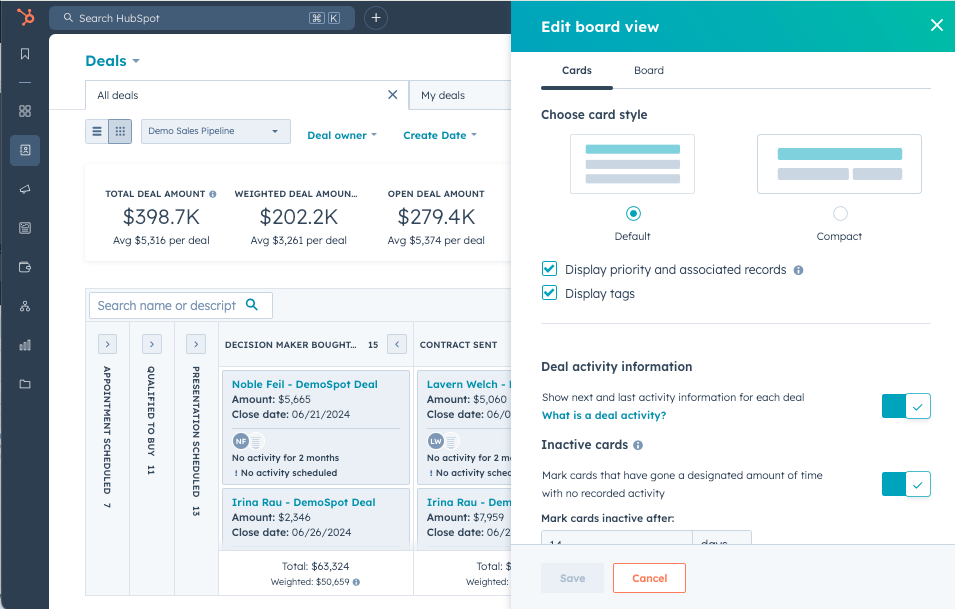
If your forms pass the traffic source into your CRM, you may be able to see the actual pipeline and deals tied to AI visitors who converted on their first visit. If those same 40 conversions carried $42,000 in deal value, use $42,000 instead of the $36,000 estimate. Just remember it only covers people who converted on that first visit.
Method 2: Self-reported revenue
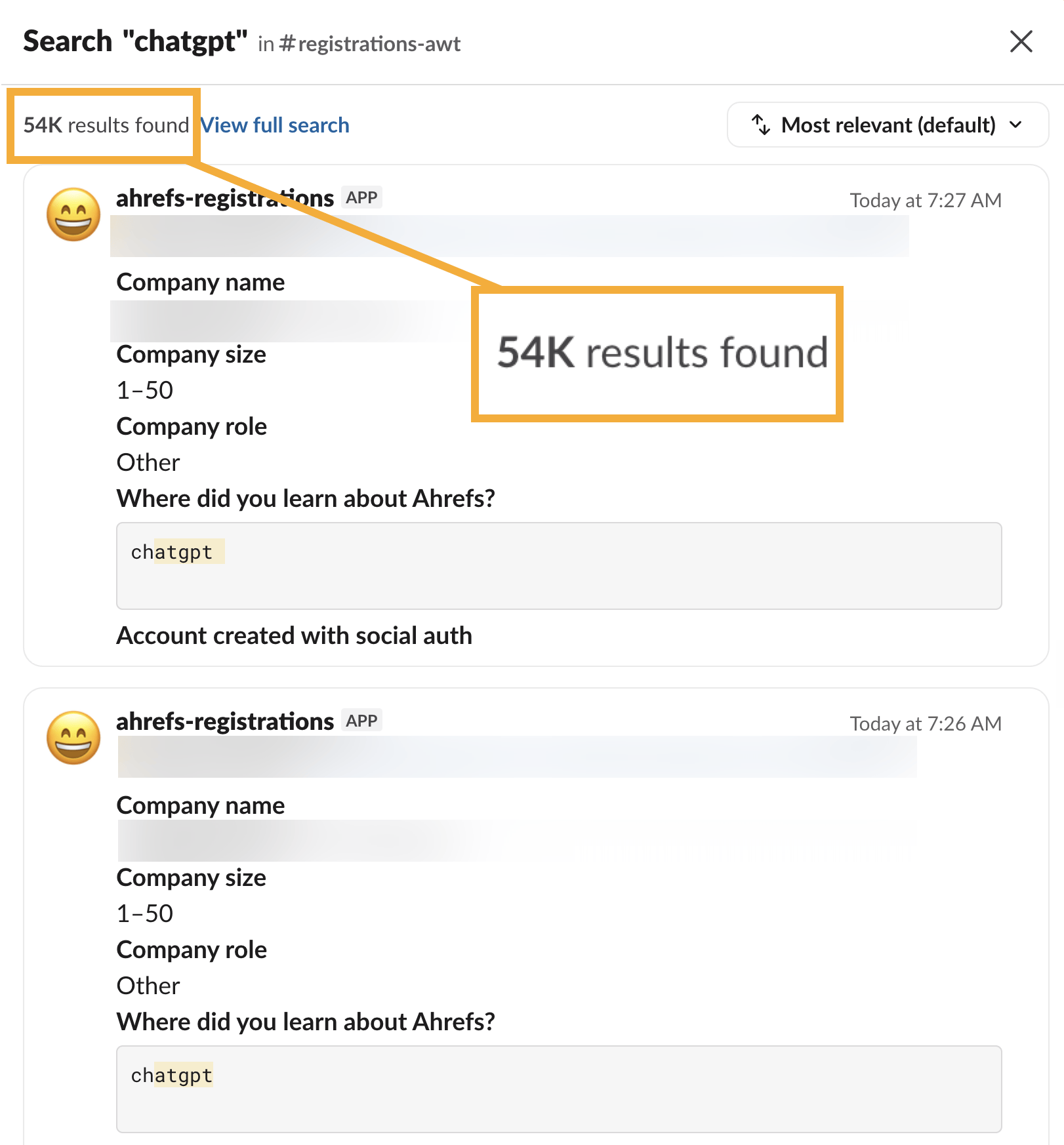
This one is simple: ask new customers how they found you. A “How did you hear about us?” question at signup, checkout, onboarding or on your lead form does the job.
Because it does not depend on tracking, it catches many of the people your analytics misses, including buyers who saw you in an AI answer and came back later another way. Ahrefs does exactly this with its own free signups and pipes the answers into its analytics and Slack.
To turn survey answers into a revenue number:
- Add AI tools (ChatGPT, Gemini, Perplexity, Copilot, Google AI Overviews) as answer options, and allow more than one answer.
- Use actual deal values, since every answer is tied to a real customer.
- Calculate what share of respondents’ revenue came from AI, then apply that share to all of your new-customer revenue for the quarter.
That last step matters because you will never get a 100% response rate. Start with the customers who did answer. Add up the revenue from those who picked an AI tool, and divide it by the total revenue from everyone who answered. Then apply that percentage to revenue from all new customers, including the ones who skipped the question.
For example, if respondents brought in $100,000 and $10,000 of it came from people who chose an AI tool, that is 10%. If all new customers brought in $400,000 that quarter, your estimated AI revenue is $40,000.
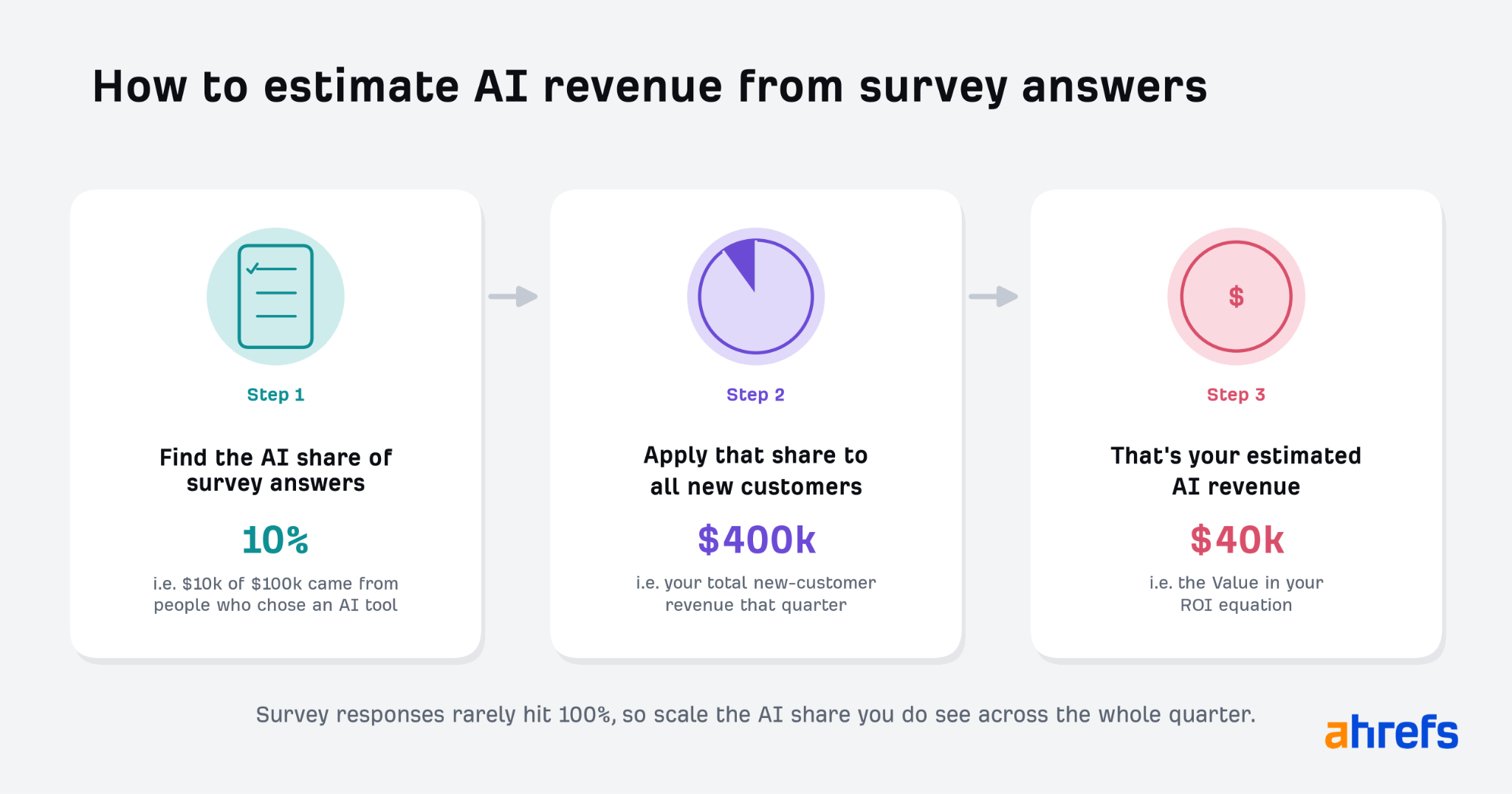
Now you have the value side of the equation.
Step 3: Calculate your ROI
Plug your numbers into the formula: subtract cost from revenue, divide by cost and multiply by 100.
AI search ROI = (AI revenue − AI cost) ÷ AI cost × 100
Using the $27,000 cost from Step 1:
- Tracked revenue of $36,000 gives you (36 − 27) ÷ 27 × 100 = 33% ROI.
- Self-reported revenue of $54,000 gives you (54 − 27) ÷ 27 × 100 = 100% ROI.
A 33% ROI is a good result. Every dollar you put in comes back with an extra 33 cents of profit.
If you used one method, that is your number. If you used both, lead with the higher figure and show the other next to it so leadership sees the full range. Then repeat the process every quarter. The calculation will never be perfectly precise, but doing it the same way each time keeps the trend honest, and the trend is what tells you whether the investment is working.
Step 4: Put an ad-equivalent value on your AI visibility (optional)
There is one more number executives love: what your AI visibility would have cost if you had paid for it. ChatGPT now sells ads by the impression at a reported $25 to $45 per 1,000 impressions, which gives you a benchmark.
AI ad-equivalent value = (mention-adjusted impressions ÷ 1,000) × CPM
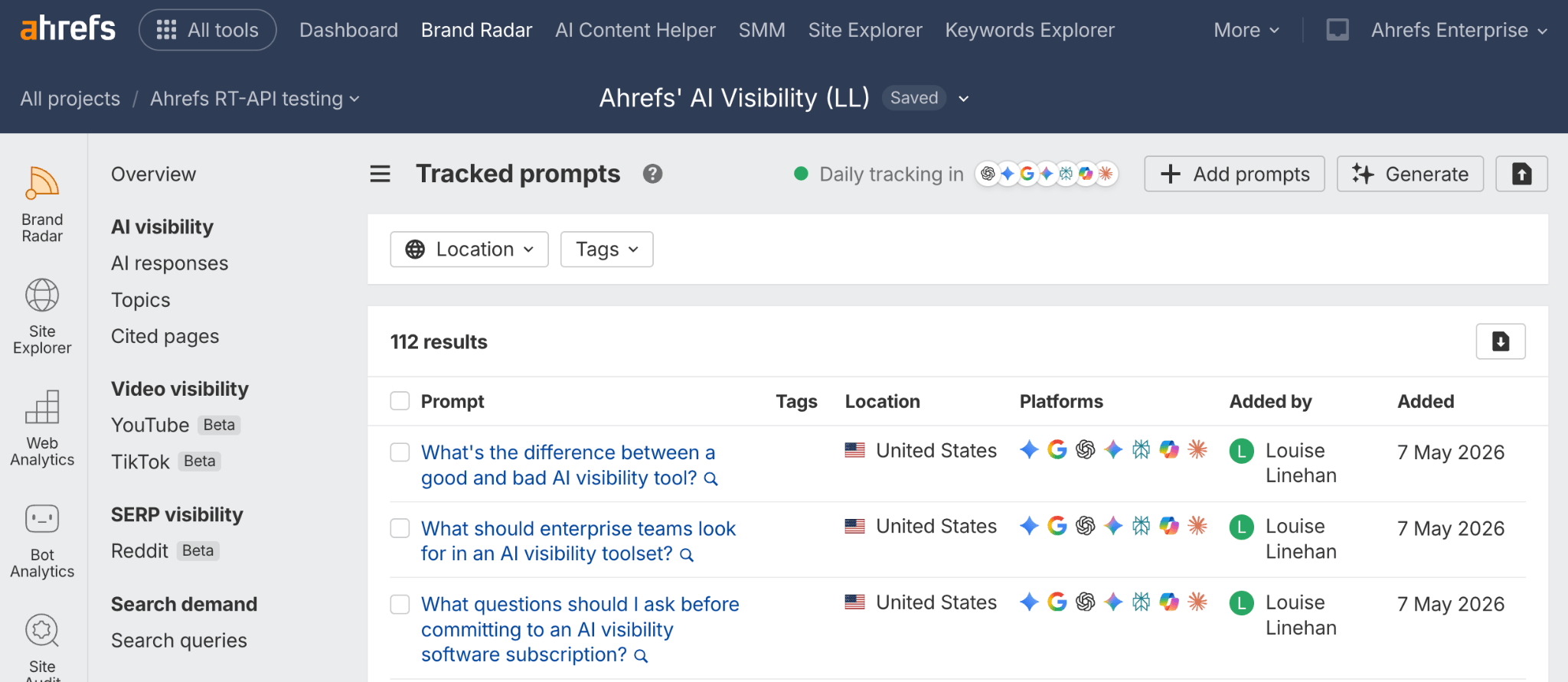
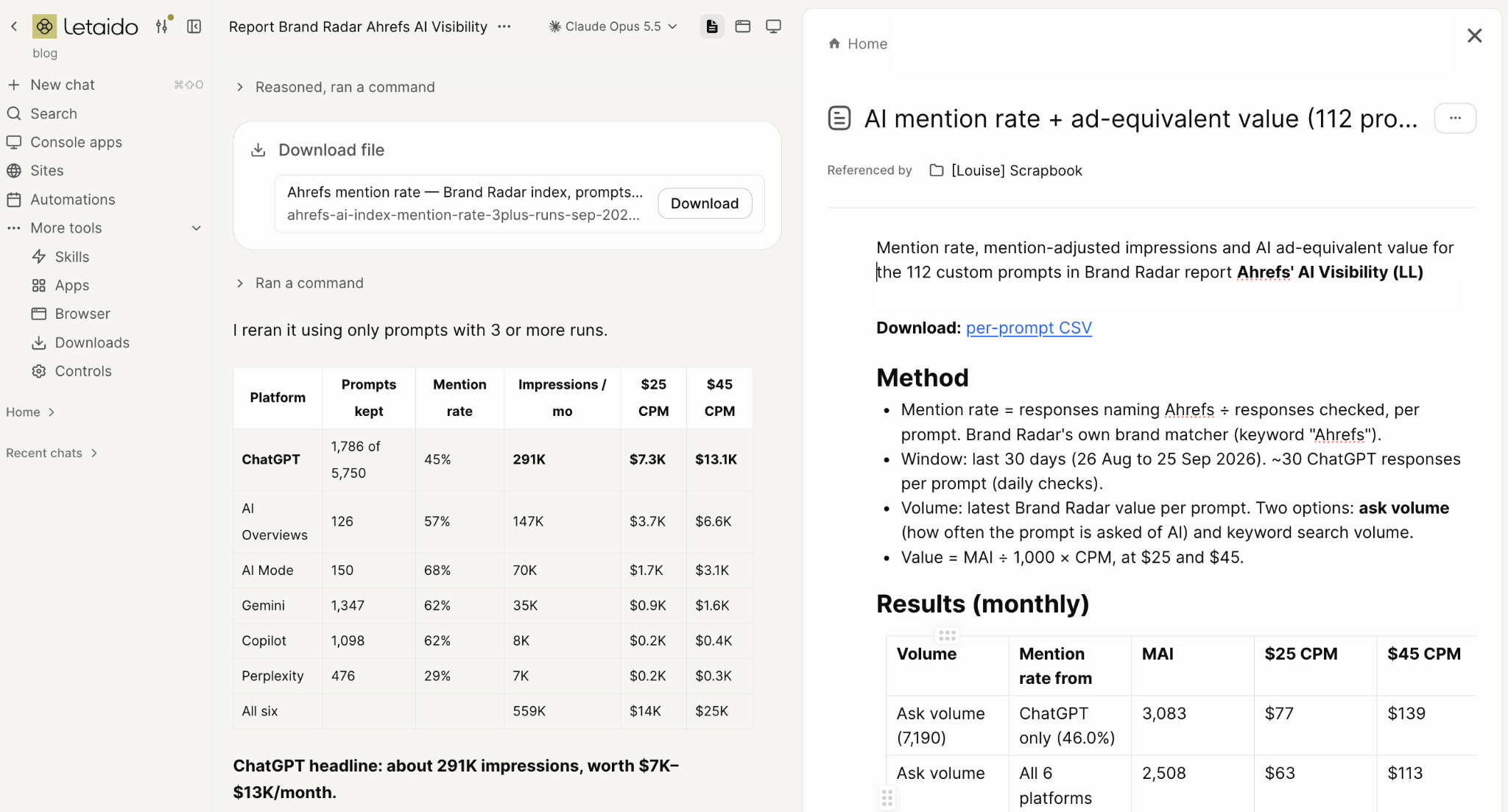
Ahrefs ran this calculation on its own brand. It started with about 110 custom, bottom-of-funnel prompts, the questions people ask when they are actively shopping for an AI visibility tool. Using Brand Radar’s estimate of how often each prompt is asked on each AI platform, Ahrefs adjusted for how often it actually appeared in the answers. Over 30 days, it showed up in 46% of ChatGPT responses to those prompts.
That visibility worked out to roughly $77 to $139 in equivalent ad spend. That is small, and it should be. High-intent, bottom-of-funnel prompts are niche and do not get huge volume, whether paid or organic.
Running the same math across roughly 1,800 broader prompts from the Brand Radar index gave a better picture of top- and mid-funnel visibility. Ahrefs appeared in 45% of those ChatGPT answers, worth roughly $7,300 to $13,100 a month in equivalent ad spend.
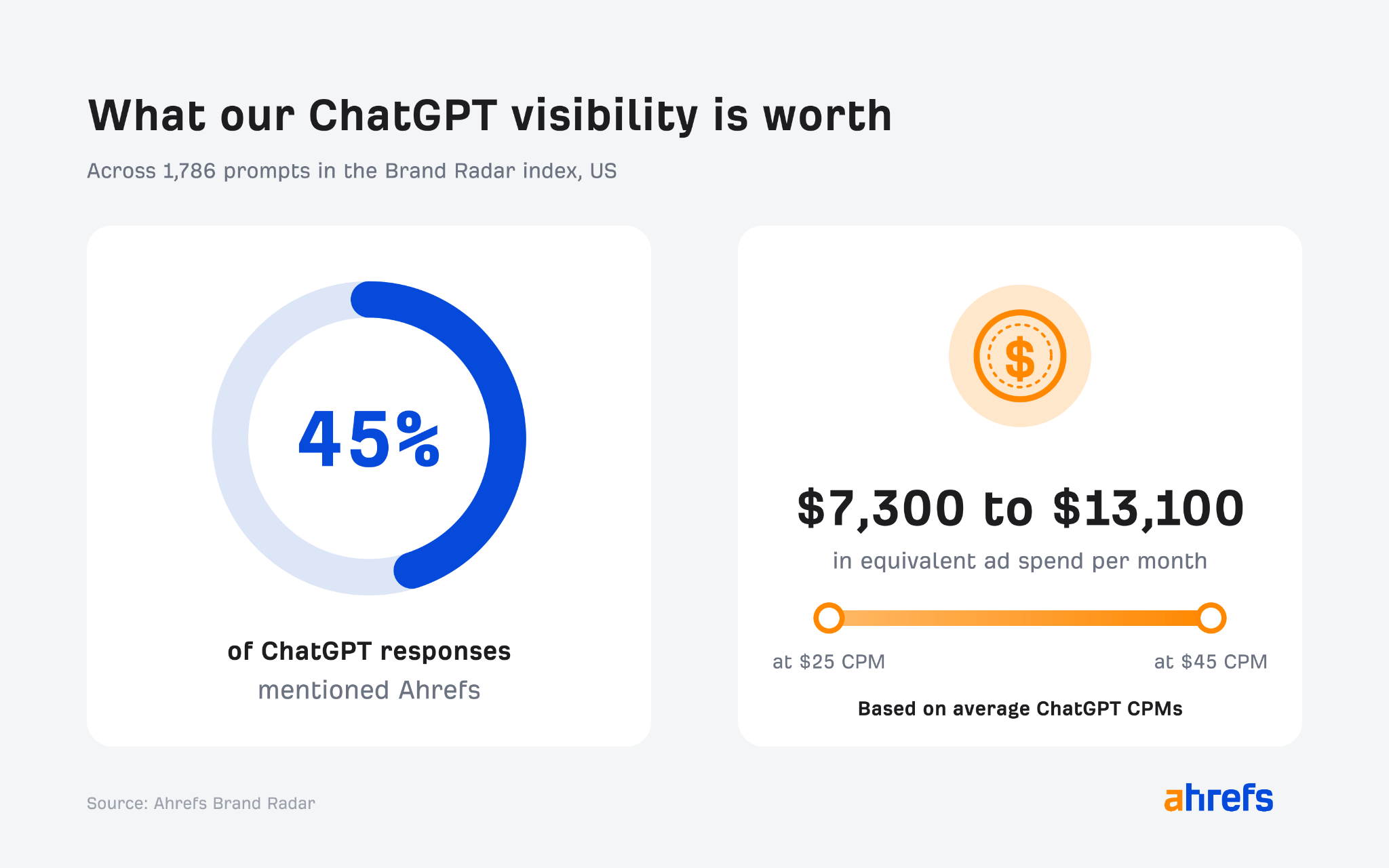
It is a hypothetical number, not cash in the bank. But it shows leadership what it would cost to buy the same presence, and that makes a strong companion to your ROI figure.
The bottom line
You will not prove AI search ROI to the penny. You can build an estimate leadership trusts and can compare quarter to quarter:
- Add up what you spend on AI search, counting pure costs in full and shared costs by share.
- Estimate the revenue it brings in, using tracked conversions, survey answers or both.
- Run the formula the same way every quarter, so when the number moves, you know performance moved with it.
- If you have the data, add the ad-equivalent value of your visibility.
Remember that revenue is the smallest, most measurable slice of what AI search delivers. AI answers shape which brands buyers remember and put on their shortlist long before they ever visit a website. Ahrefs covers how to measure that in its follow-up guide to measuring AI search visibility.
If you want help setting up the tracking, the lead-form source questions and the CRM connections that make this math possible, book a strategy call. We’ll show you what you can measure today and what to fix first.
Source: Louise Linehan, Ahrefs, “AI Search ROI Is Messy. Here’s How to Measure It Anyway,” October 2026. Charts, screenshots and the ad-equivalent calculations come from that article.
To help you find the right strategic partner, we analyzed DFW’s top digital marketing agencies by their core specializations, client fit, and conversion approach.
At a Glance: Top DFW Agencies Compared
| Agency | Primary Focus | Best For |
|---|---|---|
| Lead Builder Marketing | Custom B2B websites, conversion sprints, GTM pipeline systems & Fractional CMO | B2B, Industrial, Staffing & Tech |
| Thrive Agency | Multi-channel SEO, PPC, social media management & national campaigns | Enterprise & Multi-location Brands |
| Spire Agency | B2B brand strategy, corporate identity, messaging & high-concept creative | Mid-Market B2B Rebranding |
| JSL Marketing | Boutique WordPress web design, local SEO & Google Ads | Local SMBs & Professional Services |
| Agency Entourage | Social-first campaigns, paid digital media, PR & consumer marketing | Consumer, Retail & Regional Brands |
1. Lead Builder Marketing / Appture Digital Media
Best for: B2B lead generation websites, Fractional CMO leadership, and high-ROI go-to-market engines.
- Location: Dallas (Addison / North Dallas), TX
- Primary Focus: B2B lead-generation websites, Fractional CMO services, conversion rate optimization sprints, video production, CRM/marketing automation, and AI-search optimization.
- Pricing Model: Transparent, fixed project tiers starting at $2,500 (website refresh & conversion sprints) and $7,500 (custom lead-generation website builds).
Why They Stand Out
Operating under the Appture Digital Media umbrella and led by veteran marketing principal Daniel Elliott (40+ years in marketing, 850+ web builds), Lead Builder Marketing takes a revenue-first approach to digital design. Rather than building static “digital brochures,” they construct conversion-engineered sales engines for B2B, industrial manufacturing, recruiting/staffing, and govtech/SaaS companies.
Key Highlights
- Proven Revenue Proof: Over $113M+ in documented client sales generated, including a $90M contract pipeline for Auth-Florence/Gibraltar Industries and $12.8M for IThinQware.
- Fractional CMO Guidance: Bridges executive marketing strategy with execution—ideal for companies that need senior GTM leadership without hiring a $250k+ full-time executive.
- 100% Asset Ownership: Clients retain full ownership of their domains, code, CMS, ad accounts, and analytics data with zero proprietary lock-in.
- In-House Studio: Integrated professional video production and studio photography based right in Dallas.
2. Thrive Internet Marketing Agency
Best for: Enterprise-scale brands and multi-location franchise operations needing national reach.
- Location: Arlington / Dallas, TX (with nationwide presence)
- Primary Focus: Enterprise SEO, multi-location PPC, link building, reputation management, and social media advertising.
- Pricing Model: Monthly recurring retainers (typically $3,000–$15,000+/month).
Why They Stand Out
Thrive is one of the largest agency names with North Texas roots. With hundreds of team members and deep department-level resources, Thrive excels at scaling multi-location local SEO campaigns, enterprise eCommerce paid search, and high-volume link building across multiple regional markets simultaneously.
Considerations
Because of their agency scale, daily account management is typically handled by junior-to-mid-level account coordinators rather than senior agency partners.
3. Spire Agency
Best for: Mid-market and enterprise B2B companies undergoing high-stakes rebranding.
- Location: Dallas, TX
- Primary Focus: B2B brand strategy, corporate identity design, print/digital collateral, and employer branding.
- Pricing Model: Custom project and enterprise retainer-based pricing.
Why They Stand Out
Spire Agency is one of the most awarded B2B branding agencies in Texas. They specialize in transforming complex B2B brand architecture into sleek, cohesive corporate identities. If your organization is undergoing a major merger, corporate repositioning, or brand overhaul before an IPO or major acquisition, Spire’s visual polish and brand-first storytelling are top tier.
Considerations
Spire’s core focus is brand identity and creative elevation; organizations seeking rapid conversion sprints or technical lead-capture funnels will find their process more branding-intensive.
4. JSL Marketing & Web Design
Best for: Small-to-midsize businesses (SMBs) seeking boutique web design and local SEO.
- Location: Addison / Dallas, TX
- Primary Focus: Custom WordPress design, local SEO, content marketing, and Google Ads management.
- Pricing Model: Project-based web builds and monthly marketing retainers.
Why They Stand Out
JSL Marketing offers an accessible, boutique experience for local DFW businesses. They specialize in creating clean, user-friendly websites paired with steady local organic search strategies. Their culture is centered on close client communication and hands-on support for growing regional businesses.
Considerations
Ideal for local service providers, medical practices, and boutique firms, though less specialized in complex B2B buyer journeys or multi-tier CRM integrations.
5. Agency Entourage
Best for: Consumer-facing (B2C) and regional lifestyle brands wanting integrated multi-channel campaigns.
- Location: Downtown Dallas, TX
- Primary Focus: Paid social media, creative content production, media buying, PR integration, and search marketing.
- Pricing Model: Full-service monthly retainers.
Why They Stand Out
Located in the heart of Dallas, Agency Entourage focuses on building buzz and community engagement. They excel at integrated social campaigns, influencer collaborations, and digital advertising tailored for consumer, hospitality, retail, and regional lifestyle brands.
How Lead Builder Marketing Compares Directly
| Evaluation Factor | Lead Builder Marketing | Traditional Full-Service Agencies |
|---|---|---|
| Primary Metric | Qualified pipeline & bottom-line sales | Impressions, clicks, and pageviews |
| Leadership Involvement | Direct access to senior principal (40+ yrs exp.) | Account managed by junior/mid coordinators |
| Pricing Transparency | Upfront published tiers ($2.5k refresh, $7.5k flagship) | Custom opaque retainers with minimum spend gates |
| Target Niche | B2B, Industrial, Staffing, Tech, Professional Services | Broad mix of B2C, retail, and general SMBs |
| Deliverables | Conversion sales engines, CRM sync, video, GTM plan | Static design templates & monthly vanity metric decks |
Key Takeaways: Which Agency Fits Your Business?
- Choose Lead Builder Marketing if: You are a B2B, staffing, industrial, or tech company that needs a high-converting website, measurable sales pipeline, or hands-on Fractional CMO strategy with clear upfront pricing.
- Choose Thrive if: You manage 20+ franchise locations and need massive national SEO and PPC scaling power.
- Choose Spire Agency if: Your primary objective is corporate rebranding, visual identity redesign, and high-concept creative prestige.
- Choose JSL Marketing if: You are an emerging local DFW business seeking an approachable, boutique agency for local web and SEO services.

Instead, I sit down and ask five operational questions:
- How long does it take your sales team to call a new lead?
- What is your exact customer churn rate over the last 12 months?
- How many steps does a client go through before they get fully onboarded?
- What is the #1 complaint your account managers hear from existing clients?
- How often do your sales reps follow up with a lead that goes quiet?
The answers to those five questions almost always change the entire plan. Half the time, the “marketing issue” is actually a response time issue or a client retention problem.
Fix the operational friction first, and your marketing suddenly works twice as hard.
If this has made you curious, why not take the next step and book a free 15 minute discovery session by clicking on https://www.leadbuildermarketing.com/meetnow. I’ll see you next time. Don’t forget to like and subscribe.

Well, hey there. You’re back again and so am I. Now ask yourself — do you just want to make a website? Or do you really want the website leads? Because your website won’t matter in 3 years. Here’s what to build instead.
68% of searches right now end with zero clicks. They never even touch your website. If you’re a B2B firm living off organic leads, you’re screwed unless you build this instead.
Why: Strong curiosity gap for staffing / industrial owners feeling the traffic drop.
Posting another blog does not make Google send you buyers. No, far from it. Google’s AI answers them right inside search now. So let’s build what it actually pulls from.
SETUP / WHY WEBSITES ARE LOSING
Last month I broke down why your knowledge catalog is gonna be more important than your company’s website in the next 3 years. That idea blew up — over 300,000 views.
And the number one question I got was, “Dan, what actually goes into one, and how do I build it?”
So today, B2B version. No fluff. What goes in, how to build the pipeline, and how to actually use it to get demos, placements, and proposals — not just traffic.
Here’s why this matters real quick. Right now 68% of searches end with zero clicks. People ask Google, Google answers inside AI Mode. No 10 blue links. No visit to your site.
And folks say, “Well, Google needs my website to sell ads.”
Nope. They’re rolling ads inside AI Mode. You have a knowledge catalog, you deploy it in an agent, that prospect can start a conversation, book a call, fill a form — right inside Google. Never touches your website.
Sundar Pichai himself said 2027 is the year of the agent. AI Mode just crossed a billion users. Your website isn’t dust yet. But it’s not your lead engine anymore. It’s just a data layer.
Pattern interrupt:
Are you aware that only about 2% of visitors go beyond page one? Now imagine they don’t even go to page one. Got it? That’s why we’re here.
WHAT A KNOWLEDGE CATALOG ACTUALLY IS
Your business already has a brain. Think about it. Your sales team, your recruiters, your project managers, you — everything happening every day. That’s the brain.
Problem is, it’s scattered. SOP over here. Sales calls over here. Reviews over here. Nobody documented the whole thing.
A knowledge catalog is a second brain for your business. Living system that captures everything you know and keeps getting smarter.
It’s built from two kinds of knowledge — internal and external. And this is where most B2B firms get it wrong.
THE 6 SOURCES – Internal vs External
Internal — stuff that never makes it online. Three things.
One, customer and sales calls. I was with a staffing firm — four account managers doing 40 hiring-manager calls a week. Real objections. “Your bill rate’s too high.” “We need CNC machinists in two weeks.” All gold. Poof, gone if you don’t capture it.
Two, discovery calls and proposals. Every industrial sales engineer out quoting a job, every “why’d we lose that bid” — that’s a honey hole for content and training.
Three, SOPs and documentation. You get a branding doc, a delivery playbook, a safety process. You email it to marketing and hope they use it. No. That belongs in the brain.
Now external — three things.
One, social content. Your LinkedIn posts, your YouTube videos answering real buyer questions.
Two, reviews. Google, Clutch, Indeed. What real customers and candidates actually say about you.
Three, your website. And I’m gonna be real with you — your website is the least real of all six. Because a website can be artificially manufactured and jammed with keywords that ain’t true to how you actually operate.
Together? That’s your brain. You need all six captured, structured, and deployed everywhere.
BUILD THE PIPELINE, NOT THE PILE
Now let me be very clear. Centralizing isn’t enough. If you just dump 2,000 calls and PDFs into an AI tool, you don’t have a brain. You just have a bigger pile of junk.
The goal isn’t to build the catalog. The goal is to build the pipeline feeding the catalog.
New sales call happens? Drops in automatically. New SOP? In. New YouTube video? In. New review? In. New website page? In. Ever evolving. Smarter over time.
Business-owner to business-owner — I had 23 team members all asking me questions. I was the bottleneck. We built this digital twin that knows everything — my stuff, team stuff, all of it. Now the team asks it. I’m not the bottleneck.
If you want leads, you need an agency that understands sales and understands this shift. We’ve done almost 600 websites, 200+ mobile apps. We don’t just build pretty pages. We build conversion engines. 855-GET-BIZ. Call me. Let’s talk about what your second brain should look like.
HOW TO USE IT + FIND THE GAPS
How do you deploy it? Four places.
Marketing — stop guessing blog topics. Pull real language from sales calls for 64 ai search optimization , 67 ai seo , emails, LinkedIn, FAQs. That’s how you show up when AI answers.
Sales — objection handling, better proposals, call prep. “They always ask about lead time” — now you have the answer, with proof, before the call.
Customer service — chatbots and CSRs pulling from the same point of truth, not making it up.
Ops and leadership — onboarding. New recruiter, new PM asks a question, brain answers. Pattern recognition. You start seeing what you were missing.
And here’s the money part — knowledge gaps. Compare internal signals vs external signals. Your buyers ask “what does industrial web design cost with CRM integration?” 20 times on calls, but Google can’t find you saying it anywhere? That gap is your content roadmap. Fill it, and you own AI answers.
Look, competitors can copy your website. They can copy your keywords, your ads, your offer. They cannot copy 10 years of sales calls, lost bids, SOPs, and institutional knowledge. That’s your moat. That’s a business asset — raises your valuation, not just your traffic.
So here’s your checklist.
- One, accept the website is now a spoke, not the hub.
- Two, capture all six sources.
- Three, build the automatic pipeline.
- Four, compare internal vs external to find gaps.
- Five, pick a build path — NotebookLM for DIY up to 50 docs, Claude for more advanced, or custom on Google Cloud if you want it done for you.
You either ask for the sale or you lose the sale. So I’m asking. Don’t hire somebody who’s just a coder or just an illustrator who doesn’t understand business. Take your business elsewhere — come here.
I’m Dan Elliott. You’re the customer. Let’s get together. 855-GET-BIZ. Thanks for watching, and thanks for the call — cuz I know you’re gonna pick up the phone.
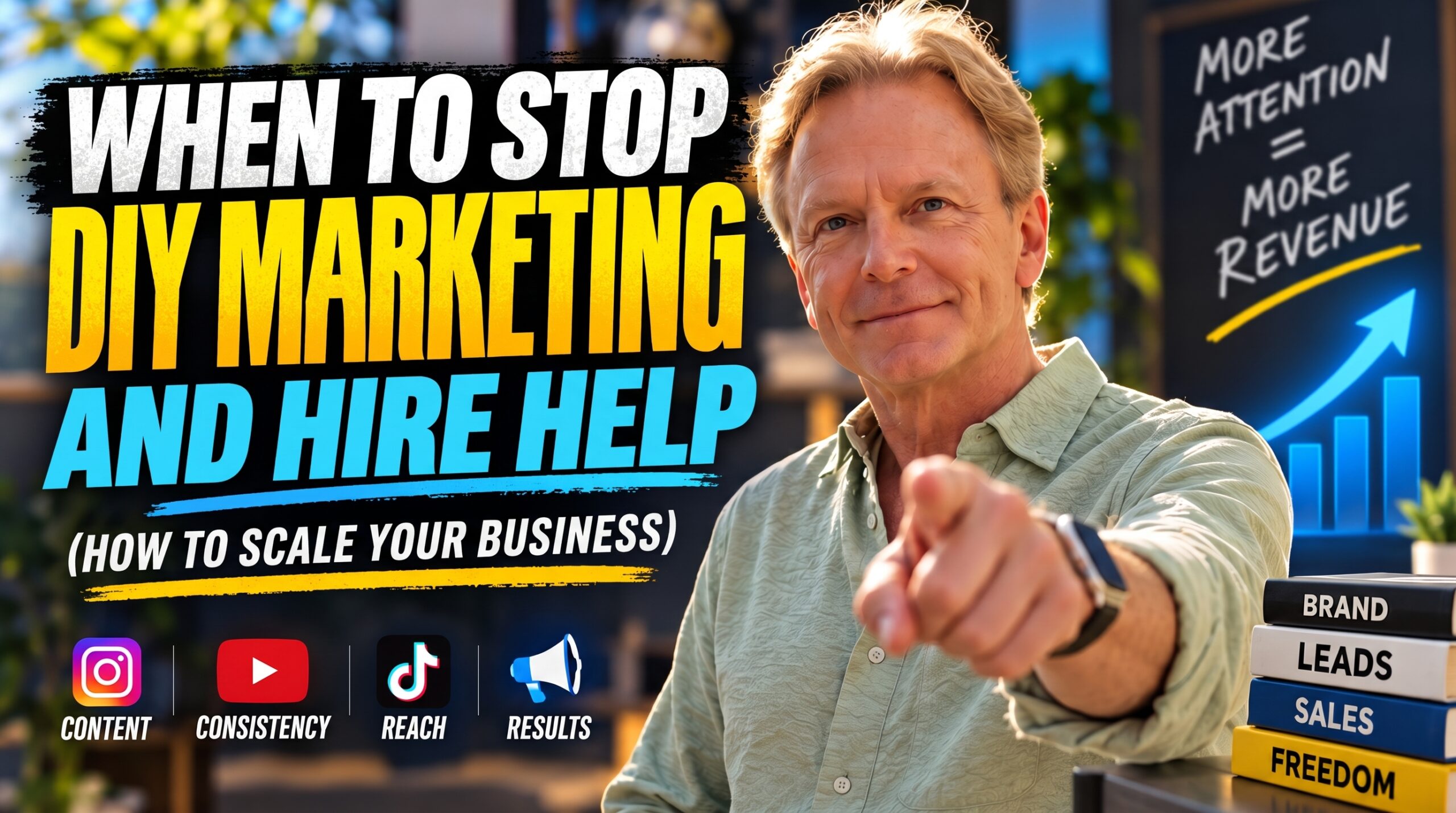 Is your business making money, but you feel busier, not bigger? Imagine you’re the captain of a ship. Your job is to steer it toward new horizons, but instead, you’re stuck in the engine room, shoveling coal. That’s what happens when you’re a CEO doing all your own marketing. You’re not a growth-focused leader; you’re the marketing bottleneck.
The scrappy DIY approach that got you here might be the very thing holding you back now. This is about recognizing when you’ve hit that ceiling, and what to do next. We’ll cover the three clear signs your DIY marketing is costing you more than it’s saving, and break down your options: do you need an agency, a freelancer, or just better software?
Sign #1: You’re Consistently Inconsistent
The first and most glaring sign is that your marketing is like a flickering lightbulb—sometimes on, sometimes off. You get a burst of energy and post online for a week, then a big project lands, and your marketing goes dark. It’s like trying to grow a plant by watering it once a month; it’s never going to flourish. This isn’t a personal failure; it’s a capacity problem.
The fix? If your main problem is just getting specific, recurring tasks done, a freelancer can be a perfect fit, like hiring a gardener just to handle the routine weeding and watering.
It’s a targeted way to buy back your time. Software also helps, but think of it like a sprinkler system—it automates the schedule, but you still have to build it and fill it with water. It doesn’t create the content or the strategy for you.
Sign #2: You Have No Idea What’s Actually Working
The second sign is that you’re driving your business without a dashboard. A new lead comes in, but you have no clue if they came from that blog post you wrote or the ad you ran. You’re pressing the gas but have no speedometer, no fuel gauge, and no GPS. If you can’t connect your efforts to actual revenue, you can’t make smart decisions to improve.
This is an expertise problem. This is where a good marketing agency can really shine. Think of them as a pit crew for your race car. They don’t just put gas in the tank; they install the dashboard, analyze all the performance data, and help you figure out how to win the race. A specialized freelancer, like an analytics consultant, could also solve this, like hiring an expert just to install and read your GPS for one piece of the puzzle.
Sign #3: Your Growth Has Flatlined
The third sign is the most frustrating: you’re pedaling your bike as hard as you can, but you’re stuck on a flat road, and the next level of your journey is a steep mountain. Your revenue has hit a plateau. This is a strong sign you’ve reached the limit of your own marketing expertise. The bike that got you across the plains isn’t the right tool to get you up the mountain.
This is a strategy problem, and it’s the classic scenario where investing in a marketing agency can unlock your next stage of growth. An agency is like hiring a team of sherpas for your mountain climb. They bring the strategy, the ropes, the oxygen—the entire system to get you to the summit. You could also hire a high-level freelance strategist, which is like hiring a master guide to draw you the safest map. But you’ll still need to source the gear and find others for the day-to-day execution.
CTA & Conclusion
Remember, this isn’t an all-or-nothing decision. Think of it like building a custom toolbox. Many businesses use a hybrid model: software is the power drill for automation, a freelancer is the trusty hammer for consistent content, and an agency is the architect who provides the blueprints with quarterly strategy.
To help you diagnose where you’re falling short, I’ve created a free Marketing Bottleneck Scorecard. It’s a simple checklist to help you pinpoint your biggest challenges. Click the link in the description to download it.
Let’s recap the three signs:
1. You’re consistently inconsistent.
2. You have no idea what’s actually working.
3. Your growth has flatlined because you’ve hit the limit of your expertise.
Moving beyond DIY isn’t admitting defeat—it’s a strategic investment in becoming the growth-focused CEO your business truly needs.

That is exactly what happens when you throw marketing dollars at a company with a broken customer experience.
I’ve watched mid-market businesses pour $50,000 a month into ads, while their customer service team takes three days to respond to emails, or their onboarding process confuses every new buyer. The marketing brings people in, but the bad experience quietly cancels out every single dollar spent.
Before I let a client spend a dime on new marketing campaigns, I run an operations check. I look at response times, client onboarding flows, and customer retention rates. If those operational numbers are broken, we fix them first.
Don’t buy a bigger hose until you plug the leaks in your bucket.
If this has made you curious, why not take the next step and book a free 15 minute discovery session by clicking on https://www.leadbuildermarketing.com/meetnow. I’ll see you next time. Don’t forget to like and subscribe.
YouTube videos can keep generating views months after publication. Your output becomes an asset base, not just a stream of quickly‑expiring content.
Almost every marketing team agrees AI search is the future. Almost none of them can prove what it’s actually worth to the bottom line.
Executives are asking a fair question: “What are we getting for this?” If your only answer is a referral report full of tiny numbers from ChatGPT or Perplexity, you’ll lose that conversation.
AI search has value. The old attribution playbook just wasn’t built for it. Here are five things you need to understand, including the three-part framework you can start running right now to prove the value of AI visibility.
1. The Blue Link Is Dead, and Your Attribution Model Went With It
For twenty years, search measurement followed a clean story. Someone typed a query, clicked a blue link, landed on your site, and converted. Every step left a fingerprint, and it was easy to report.
That journey has changed. Today, a buyer asks a chatbot a question and gets a full answer without ever seeing a results page. They might read your brand name in a recommendation, absorb your point of view in a summary, or see your company listed alongside two competitors. Then they close the tab.
No click. No session. No fingerprint.
But the influence happened. A week later, that same buyer types your company name directly into their browser or searches for you by name on Google. Your analytics will credit “direct” or “branded organic” traffic, and the AI answer that started it all gets zero credit.
That’s the core of the attribution problem. If you’re measuring AI search purely on direct clicks, you’re tracking a ghost. The value is real, but it shows up somewhere else in your data, often days or weeks later, and under a different label.
AI search ROI isn’t linear. Once you accept that, you can stop trying to force it into a last-click model and start measuring it the way it actually works.
2. Framework Part 1: Track Brand Mention Share, Not Just Click-Through Rate.
The first shift is moving your primary visibility metric from click-through rate to brand mention share.
In AI search, the visibility question is simpler: When someone asks an AI tool about your category, does your brand show up, and how often compared to competitors?
Brand mention share measures exactly that. Here’s how to start:
Build a prompt set. Write 25 to 50 questions your buyers actually ask.
Mix problem-aware prompts (“How do I reduce employee turnover in a staffing firm?”), comparison prompts (“Best B2B marketing agencies in Dallas”), and solution prompts (“What should I look for in a fractional CMO?”).
Run them across platforms. Test the same prompts in ChatGPT, Perplexity, Google’s AI Overviews and AI Mode, Gemini, and Copilot.
Log the results. For each answer, record whether your brand was mentioned, whether it was cited with a link, where it appeared in the response, and which competitors showed up.
Calculate your share. Divide your mentions by the total brand mentions across your prompt set. That’s your share of voice inside AI answers.
Run this monthly at minimum. AI answers fluctuate, so the trend line matters more than any single snapshot.
This measures influence that happens before the click, or in place of it. A rising mention share is an early, defensible answer when leadership asks whether content is working.
3. Framework Part 2: Measure Direct and Branded Search Lift
Mention share tells you whether you’re showing up. The second part of the framework tells you whether showing up is changing buyer behavior.
The buyer who read your name in a chatbot answer and came back later leaves a trail. It shows up as lift in two places:
Branded search volume. Watch impressions and clicks for queries containing your brand name in Google Search Console. When AI tools start recommending you, more people go looking for you by name.
Direct traffic. Monitor direct sessions to your site, especially to high-intent pages like pricing, services, and contact pages, which people rarely stumble onto by accident.
The key is correlation over time. Plot your brand mention share from Part 1 against branded search and direct traffic trends. If mention share climbs in a given quarter and branded search rises over the following weeks, you have a story worth telling.
A few practical guardrails keep this honest:
Establish a baseline first. Capture at least three months of branded and direct data before major AI visibility work begins, so you have something to compare against.
Account for other drivers. Trade shows, paid campaigns, PR coverage, and seasonality all move branded search. Note them on your timeline so you don’t over-credit AI.
Look for patterns, not proof. This won’t give you perfect causation. It gives you directional evidence, which is far more useful than pretending the channel doesn’t exist.
Branded search lift is where invisible AI influence becomes visible in your reporting. It’s often the strongest signal you’ll have.
4. Framework Part 3: Tag Every Conversational Referral You Can
The third part of the framework captures the AI traffic that does click through, and makes sure none of it disappears into a generic bucket.
Some AI platforms pass referral data when a user clicks a cited link, but many analytics setups lump it into “referral” or “direct.” Fix that:
Create an AI referral channel group. In GA4, build a custom channel group that captures known AI referrers, such as chatgpt.com, perplexity.ai, gemini.google.com, copilot.microsoft.com, and claude.ai. Update the list as new platforms gain traction.
Add a “How did you hear about us?” field. Put a free-text or dropdown field on your forms and include an option for AI tools. Self-reported attribution catches the zero-click journeys your analytics will never see.
Ask in sales conversations. Train your sales team to ask how prospects found you and log the answer in your CRM. “I asked ChatGPT for recommendations” is a data point worth recording.
Tag the links you control. Where you publish content likely to be cited, such as guides, research, and resource pages, use clean, trackable URLs so visits are easier to trace.
Tagging won’t capture everything. Its job is to close as much of the gap as possible and put hard numbers beside the directional evidence from Parts 1 and 2.
5. Build Your New AI Attribution Model Today
Each part of the framework answers a different question:
Brand mention share: Are we visible in AI answers?
Branded and direct search lift: Is that visibility changing buyer behavior?
Conversational referral tagging: How much traffic and pipeline can we trace directly?
No single metric proves AI search ROI on its own. Combined, they give leadership a credible, multi-signal picture of what AI visibility is worth.
Start simple. Build a one-page monthly dashboard with your mention share trend, branded search and direct traffic trends, AI referral sessions, and self-reported AI attribution from forms and sales. Review it quarterly against pipeline and revenue.
Stop waiting for platforms to hand you clean, perfect metrics. They may never arrive. The brands building their attribution models today are the ones who will own search share tomorrow.
What’s your team doing to track AI visibility? Watch the full breakdown on YouTube, premiering November 5, 2026, and share your approach in the comments.
AI business impact is shifting how companies operate. Learn how to navigate the risks and profits of this new technology.
Public accessibility to tools like ChatGPT has moved quickly from a tech novelty to a core component of modern sales. We break down the evolution of these systems and why they are currently forcing a massive shift in how businesses handle their daily operations and economic planning.
Whether you are managing a team or evaluating your own workflow, understanding these AI tools is necessary to stay competitive. We examine the practical application of artificial intelligence in sales and why the future of work looks fundamentally different than what we saw just a few years ago.
In this video, we break down the five pillars of society that AI will completely dismantle: Work, Business, The Economy, Romance, and Life itself. From deepfake influencers and infinite-learning sales bots to universal basic income and literal robot spouses, the future is arriving at breakneck speed.
But you don’t have to be replaced. I reveal the exact mindset shift you need to make today to transition from a manual “Producer” to an AI-leveraged “QA Expert” so you can 10X your output and your income before it’s too late.
Timestamps:
0:00 – The Fastest Growing Platform in History
1:15 – The 5 Pillars of AI Disruption
2:30 – What is AI Actually Doing?
4:15 – Super Intelligence & The Physical World
6:00 – The Singularity & The End of White-Collar Work
8:30 – Deepfakes & The Reset of Capitalism
10:30 – Robot Spouses & The Alien Theory
13:00 – The 10X Playbook: How to Make Money with AI Today
Subscribe for weekly business strategy breakdowns, and let me know in the comments how you are currently using these tools in your own workflow.
Question for you all: Which of the 5 pillars (Work, Business, Economy, Romance, or Life) do you think AI will completely break first? Drop your vote below. 👇
Bonus: Let me know if you’ve already made the shift to “QA Expert” or if you’re still doing 100% of the manual labor. I’ll be hanging out in the replies for the next 24 hours!
Your marketing team says they hit their lead goal this month, but your sales team says the leads are garbage. Most B2B marketing stops at the lead, sending form fills into a sales process that marketing never sees.
In this video, Daniel Elliott, founder of Appture Digital Media, explains how to build marketing that generates qualified sales conversations rather than just clicks. A B2B program that actually produces revenue must have four parts planned together:
Here is the part nobody wants to say out loud: most B2B marketing stops at the lead. A form
fill comes in, someone celebrates, and then it disappears into a sales process that marketing never sees.
Marketing buys more traffic. Sales ignores more leads. And the company pays for both.
B2B is fundamentally different from selling sneakers online. Your buyers take longer to decide. There is
usually a buying committee. And the price is high enough that nobody buys on impulse. Long sales cycles
punish marketing that only knows how to get clicks.
The Four Pillars of Pipeline Generation
A B2B program that actually produces revenue must have four parts planned together. Everything we plan, from
the website to the video to the paid media, gets measured against pipeline.
Part 1 Positioning & Messaging
Your buyers need a clear reason to choose you. If your website and your sales deck tell two different
stories, buyers believe neither. This messaging must be consistent everywhere: on the website, in the ads,
in the sales deck, and in what your reps say on the call.
Part 2 Demand Generation
Most of your future buyers aren’t looking yet. Demand generation builds interest using thought leadership
video, search, AI visibility, and paid media aimed exclusively at your target accounts—not broad
audiences.
Part 3 Lead Capture & Nurture
Interest that never turns into a meeting is just a nice-looking chart. We build landing pages, offers,
and email sequences that answer the questions a buyer would normally ask a rep, turning interest into
booked meetings.
Part 4 Pipeline Reporting
Everything must be tracked from the first touch all the way to the closed deal. You get reporting on what
is actually working and what is just spending money. Not a report full of clicks—a report on pipeline.
Our 4-Step Process for B2B Growth
| Step | Phase | What We Do |
|---|---|---|
| 1 | Diagnose | We review your market, your offer, your funnel, and your current sales process. |
| 2 | Plan | We establish positioning, a channel plan, a budget, and rigid pipeline targets. |
| 3 | Launch | We deploy the updated website, content, campaigns, and full-funnel tracking. |
| 4 | Optimize | We optimize every month, providing clear reporting on pipeline and upcoming changes. |
Proven Results Built in Dallas
With over 40 years of experience in marketing and sales, Daniel Elliott understands that a lead is not a
result—a closed deal is a result.
We work alongside your sales team, not around them. We establish a shared definition of a qualified lead,
set up lead routing rules, implement CRM-connected tracking, and build sales enablement materials your reps
actually want to use. We serve B2B clients across manufacturing and distribution, medical products,
government and public safety, construction, healthcare, and professional services.
Ready for marketing your sales team will thank you for? We offer fractional CMO services to
lead your entire strategy, or standalone packages for websites, SEO, and video. Book a B2B strategy call to
see where your pipeline is leaking and exactly how to fix it.
With over 40 years of experience in marketing and sales, Daniel understands that a lead is not a result—a closed deal is a result. Appture Digital Media has produced more than 850 websites since 2002, brought over 7,000 products to market, and utilizes an in-house studio in Dallas to serve industries like manufacturing, medical, public safety, construction, healthcare, and professional services.
Ready for marketing your sales team will thank you for?
Book a B2B strategy call: leadbuildermarketing.com
Call us: (855) GET-BIZZ
Like, subscribe, and drop your biggest pipeline
question in the comments.
A skunk is a cat designed by committee
I have watched it happen for forty years. A founder has a clear vision. The product works. The market responds. Then the committee forms.
Marketing wants input. Sales wants a say. The board wants to weigh in. Finance needs to approve. Legal has concerns. HR wants alignment with company values.
Six months later, the thing that made you different is gone.
The pattern I keep seeing
A client comes to me burned. They have been through two agencies, maybe three. The first one promised the moon and delivered templates. The second one had great ideas but no follow-through. The third one was actually offshore labor branded as local talent.
I ask them what happened to their original concept.
They tell me it got “refined.”
Translation: it got committee’d to death.
The sharp edge that made people stop and look? Smoothed out because someone thought it was too aggressive. The bold claim that separated them from competitors? Watered down because legal was nervous. The personality that made the brand memorable? Removed because the VP of operations said it “wasn’t professional enough.”
What you are left with is a skunk. It looks like a cat. It is supposed to act like a cat. But it stinks, and nobody wants to be near it.
Why this keeps happening
Committees do not create. They negotiate.
When you put ten people in a room and ask them to agree on a direction, you do not get the best idea. You get the idea that offends the fewest people. You get compromise. You get safe.
Safe does not convert. Safe does not build brands. Safe does not make people stop scrolling and pay attention.
I have brought seven thousand items to market. I have built 850 websites. I have managed over a billion dollars in portfolio. The things that worked were never designed by committee. They were designed by someone who saw the pattern, trusted their experience, and moved.
What actually works
You need “one person” who understands the full continuum.
Not a committee. Not a department. One person who can see the genetic structure of the idea before it becomes visual, who knows what will survive execution and what will collapse under market pressure.
That person listens. They research. They clarify the plan. Then they execute.
No mystery. No theater. No endless revision cycles where every stakeholder gets to leave their fingerprints on the work until it does not resemble anything useful.
When a client hires me, I do not ask them to form a committee. I ask them to trust the process. I have seen this movie. I know how it ends. If you could do it yourself, you would not need me.
The real cost
Committees do not just slow you down. They erode your competitive advantage.
While you are negotiating with internal stakeholders, your competitor is shipping. While you are refining the message to make everyone comfortable, someone else is claiming the position you should have owned.
I have watched companies lose years to this. They come back later, frustrated, asking why their marketing is not working. The answer is simple: you designed a skunk when you needed a lion.
Here’s what I recommend
If you are stuck in committee hell right now, do this:
Identify the one person who actually understands your market, your customer, and your competitive position. Give them authority. Let them build the thing without requiring consensus from people who have never closed a deal or shipped a product.
If you do not have that person, hire them. Do not hire an agency that will tell you what you want to hear. Hire someone who will tell you what you need to hear, then execute without requiring you to manage the process.
Committees are useful for governance. They are terrible for creation.
Stop designing skunks. Start shipping work that actually moves the market.
If you have been burned by agencies that overpromised and underdelivered, or if you are tired of watching good ideas get watered down by internal politics, let’s talk. I have been doing this for forty years. I know what works. And I do not need a committee to tell me.
— Daniel
Vibe coding has made static websites easier than ever to build. You can spin up a site with Astro, Jekyll, Gatsby, Hugo, or another static framework without ever touching a traditional CMS.
But easier to build doesn’t necessarily mean easier to optimize.
WordPress and other CMSs quietly handle many SEO basics through plugins and built-in functionality, from canonicals and sitemaps to redirects, metadata, schema, and 404 handling.
With a static site, much of that work becomes your responsibility.
As Suganthan puts it,
Going static doesn’t remove SEO work; it moves it, in my opinion. WordPress hides a load of defaults behind plugins, and static turns every one into a job you do yourself.
That doesn’t make static sites bad for SEO. It just means you need to know what your CMS used to do for you, and what you now need to build, configure, and monitor yourself.
Common SEO issues on static sites
Static sites can be fast and technically clean, but they also leave more room for small SEO mistakes to slip through, since no CMS or plugin handles things in the background.
That becomes even more important with vibe-coded sites. AI can build the page, but it won’t necessarily know which SEO conventions you want it to follow across the entire site.
Here are some of the most common issues to watch for:
|
Why it happens |
Impact if missed |
|
|---|---|---|
|
Trailing slash and canonical conflicts |
Your website host (such as Netlify) and static site framework (such as Astro) may disagree about whether a page URL should end with a slash. |
Duplicate URLs and split ranking signals |
|
Sitemaps that ignore noindex |
Your sitemap may include pages you don’t want Google to show in search. |
Drafts, thank-you pages, and other unwanted URLs can get indexed |
|
Missing or misconfigured robots.txt |
Your website may launch without a robots.txt file unless you create one yourself. |
Important crawling rules can be missing or accidentally misconfigured |
|
Unoptimized images |
Images added outside your site’s usual image tools may not be resized or compressed automatically. |
Larger page weight, slower loads, and missing alt text |
|
Meta and schema template failures |
A mistake in a shared template can appear on every page that uses it. |
Duplicate or overlong titles, incorrect metadata, and broken schema at scale |
|
Incorrect HTTP status codes |
Missing pages can return a “success” response (200 OK) unless your 404 is set up correctly. |
Soft 404s and wasted crawling |
|
Inconsistent internal linking |
Different templates and components can link to the same page in different ways, for example, with and without a trailing slash. |
Crawl confusion and diluted internal linking signals |
|
Fragile sitemap logic |
A basic sitemap setup can become difficult to manage when different pages need different rules. |
Bloated, incomplete, or malformed sitemap files |
|
Poor loading performance and Core Web Vitals |
A static site can still load more JavaScript or CSS than a page actually needs. |
Slower page loads and weaker Core Web Vitals |
A website audit is one of the easiest ways to catch these problems.
Ahrefs’ Site Audit crawls your site and surfaces over 170 technical SEO issues that may otherwise go unnoticed, which is especially useful when there’s no CMS or SEO plugin checking them for you.
Not all businesses need a CMS. Not all businesses can live without one.
That’s probably the more useful decision framework. A small site with a handful of pages and infrequent updates may be a great fit for a static setup. A large publishing operation with complex workflows may not be.
Final thoughts
Static sites can give you more control, fewer dependencies, and less reliance on plugins. But that control comes with more responsibility.
A traditional CMS hides a lot of SEO plumbing behind plugins and defaults. With a static or vibe-coded site, you’re more likely to own that plumbing yourself, from canonicals and sitemaps to redirects, schema, performance, and status codes.
Vibe coding makes the build process faster, but it doesn’t remove the need to understand what good technical SEO looks like.
Type your company name into Google. Before your website shows up, there is a good chance Google has already written its own summary of who you are, what you sell and what it costs. And it may be quoting a YouTube reviewer instead of you.
Fresh research from Ahrefs shows how fast this is happening. AI Overviews, the AI-generated answers at the top of Google results, now appear on the large majority of branded searches. That changes who controls the first impression of your brand, and it changes what your marketing has to do about it.
Here is what the data says, why it matters, and what I would do about it if this were my brand.
AI Overviews now show up on most branded searches
Ahrefs analyzed 232.8 million US desktop Google results collected from July through September 2026. That included 92.5 million results for branded keywords and 140.2 million for non-branded keywords.
On September 29, 2026, AI Overviews appeared in 82.91% of US desktop results for branded keywords. That is where the 83% headline comes from. It is a single-day snapshot, so the monthly averages tell the steadier story:
| Month (2026) | Branded keywords with an AI Overview | Non-branded keywords with an AI Overview |
|---|---|---|
| July | 61.3% | 73.5% |
| August | 65.1% | 74.7% |
| September | 73.3% | 78.3% |
Branded searches climbed 12 percentage points in three months, roughly 20% growth over July’s rate. Non-branded searches rose too, but only by 4.8 points.
That is a real reversal. In an earlier Ahrefs study from November 2025, AI Overviews were far more common on non-branded searches than branded ones. Different samples, so treat the comparison as directional, but the direction is hard to miss. The gap between branded and non-branded queries shrank from 12.2 points in July to 5 points in September.
On brand-name searches, the AI answer usually takes the top spot
Where an AI Overview appears matters as much as whether it appears. Every AI Overview cuts into clicks. In an earlier study, Ahrefs found a 58% lower click-through rate for the top-ranking page when one was present. The worst case is an AI Overview sitting in position one for your own name, above your own website.
To measure that, Ahrefs tracked exact-name searches for 100 brands from Interbrand’s Best Global Brands 2025 list (bare names like “bluehost”) at 14 weekly checkpoints from July through September. This was a separate sample from the larger study above.
The jump came fast in September. On July 1, only five of 98 usable results had an AI Overview. By September 30, 63 of the 100 brand-name searches did.
Of those 63 AI Overviews, 48 (76.2%) appeared in position one, with an average position of 1.49. Google could move them lower later. For now, on a brand’s own name, the AI answer is usually the first thing a searcher sees, ahead of the brand’s website.
Wikipedia, YouTube and LinkedIn are telling your story
The bigger risk is not the AI answer itself. It is where that answer gets its information. When Google summarizes your brand, it may lean on sources you do not own, and in the worst case, on a competitor.
In the same 100-brand panel, the most-cited outside sources (sites other than the brand being searched) were Wikipedia, YouTube and LinkedIn. Wikipedia led at 71.9% of the AI Overviews with source lists, followed by YouTube at 38.6% and LinkedIn at 22.8%.
Wikipedia is at least a fairly neutral source for most brands. YouTube and LinkedIn are a different story. Anyone can post a video review or a LinkedIn take about your company, and you have far less control over those than over the pages on your own site.
Here is the AI Overview for Bluehost, with YouTube videos heavily represented among the sources:
There is some good news. Of the AI Overviews where the full text was visible, only two of 58 (3.4%) explicitly discussed competitors. Pepsi’s answer mentioned Coca-Cola in the context of the “cola wars,” and Intel’s named TSMC and NVIDIA. Across 57 source lists, only one verified competitor-owned website was cited. For now, Google mostly avoids sourcing your brand story from your competitors.
Why this matters for your brand
Let’s be real: a branded search is the warmest traffic you will ever get. That person already knows your name. They are looking for your pricing, your login, your phone number or a reason to pick you. If Google answers them with a summary built from someone else’s content, you have lost control of the moment that matters most.
Chris Long put it plainly on LinkedIn: “competitors/external sources can now control the narrative of your brand directly in the search results.” Ann Smarty raised a related problem with the videos cited in these answers. They often are not from the brand’s official channel and “may very well include outdated product information.”
Google changes when and how AI Overviews appear all the time, so none of these numbers are permanent. But the trend is clear. Google is putting AI Overviews on every results page that will tolerate one, and branded searches are now firmly in that group. Plan for it.
What to do about it
You cannot turn AI Overviews off for your brand. You can make sure the sources Google pulls from say the right things. That is the core of AI search optimization, and it starts with a few practical moves:
- Make your own site the clearest answer. Your pricing, services, locations, contact details and FAQs should be easy to find, current and written in plain language. If your site is vague, Google will look elsewhere.
- Own your YouTube presence. If YouTube is one of the most-cited sources, your official channel should have current product, service and customer videos. Otherwise, someone else’s video gets to define you.
- Keep your LinkedIn and third-party profiles consistent. Your company page, leadership profiles, directory listings and Wikipedia entry (if you have one) should describe the business the same way your website does.
- Watch your branded results every month. Search your brand name, product names and “brand + pricing” or “brand + reviews.” Note what the AI Overview says and which sources it cites.
- Fix the sources, not just the symptoms. If an outdated video or article keeps getting cited, publish a current, better answer on a channel you control.
How to check your brand’s AI Overviews in Ahrefs
If you use Ahrefs, you can see which of your branded keywords trigger an AI Overview. In Site Explorer, open the Organic Keywords report. Under Intents, choose Branded keywords. Then click Add filter, choose SERP features, and select AI Overviews.
Click Show results to see every branded keyword your domain ranks for that also shows an AI Overview. In the Bluehost example, that includes its brand name and login searches.
To see what those AI Overviews actually say, which competitors they mention and which sites they cite, use Ahrefs Brand Radar. Enter your brand, and it will suggest competitors and competing domains to track alongside you.
Open the AI responses report and filter for AI Overviews that mention your brand.
Click Apply, and you will get a list of AI Overviews with their full text, plus the brands mentioned and the domains cited in each one.
Don’t have Ahrefs? Start manually. Search your brand name and your top three branded phrases in a private browser window, screenshot the AI Overview, and list every source it cites. That alone will show you where your story is being told without you.
The bottom line
Your brand name used to be the one search you could count on winning. That is no longer guaranteed. Google’s AI is now the first voice many buyers hear when they search for you, and it is building that answer from whatever sources it trusts most.
If you want to know what Google is saying about your brand and how to fix it, book a strategy call. We’ll review your branded search results, show you which sources are shaping them, and lay out what to fix first.
Source: Ahrefs, “AI Overviews Currently Appear for 83% of Branded Searches,” October 2026. All charts, data and Ahrefs tool screenshots are based on that study.
Your buyers are asking AI before they ask you. According to Forrester research cited by Ahrefs, 94% of business buyers now use AI search when making purchase decisions, and they rate it above vendor websites, product experts and sales reps. Consumers are not far behind: NielsenIQ puts it at 42% of shoppers researching products with AI.
So budgets are moving toward AI search. And the moment money moves, leadership asks the obvious question: what are we getting back?
Interest in that question is climbing fast. Ahrefs’ Keywords Explorer data shows searches for AI attribution and ROI terms up 212% over the last 18 months.
Let’s be real: you will never prove AI search ROI to the penny. AI is one of the hardest channels to track that marketing has ever had.
- Someone can get a complete answer inside ChatGPT and never visit your website.
- When they do click through, the referrer is often stripped, so the visit shows up as direct traffic.
- And when someone acts on an AI recommendation, they rarely tell you that is what happened.
The good news is that leadership does not need a perfect number. They need a reasonable estimate they can trust and compare over time. Between what you can track and what your customers tell you, you have enough data to build one. Here is a practical method, adapted from Ahrefs’ approach, that you can repeat every quarter using data you mostly already have.
The AI search ROI formula
AI search ROI is the value you get from showing up in AI answers, minus what it cost you to get there, divided by that cost.
- Value includes sales, traffic, awareness among people who never click, conversions and better-informed buyers.
- Cost includes content, technical work, tools and team time.
Revenue is the number leadership cares about most, so that is what the steps below focus on:
AI search ROI = (AI revenue − AI cost) ÷ AI cost × 100
Anything above 0% means the work paid for itself. For example, $45,000 in AI revenue on $18,000 in AI cost is a 150% return.
Revenue is not the whole story, though. The awareness and shortlisting value of AI visibility matters too, and it should be reported alongside your ROI. More on that at the end.
Step 1: Add up what AI search costs you
There are two kinds of cost to account for:
- Pure AI costs only exist because of AI search, such as an AI visibility tracking tool or an agency retainer for AI work.
- Shared costs support both AI search and your broader SEO and content work, including your team, SEO tools, ChatGPT or Claude subscriptions, freelancers and agencies.
The easiest way to sort them is one question: would you still pay for this if you stopped AI search work tomorrow?
- If the answer is no, count all of it.
- If the answer is yes, count a share of it.
Do not burn a week trying to account for every cent. A solid ballpark is good enough, as long as you calculate it the same way every quarter.
Your team’s time
People are usually the biggest shared cost. You do not need timesheets. Just ask your team or vendors how they spent their time that quarter. Was about a third of it on AI content and optimization?
Say your three-person content team costs $54,000 a quarter. If they spent about a third of their time on AI search work, count $18,000.
Your tools
Most tools are shared too, and their usage is harder to pin down. The simplest approach is to use the same share as the team that uses them. If your content team spends a third of its time on AI search, count a third of its tool spend.
If a tool has a separately priced AI add-on, count the add-on and ignore the rest. And if your AI workload changes from quarter to quarter, adjust the share to match.
Put together, a quarter’s AI search costs might look like this:
| Cost | Type | Quarterly cost | Share counted | AI cost |
|---|---|---|---|---|
| AI visibility tracking tool | Pure AI | $1,500 | All | $1,500 |
| AI-only agency retainer | Pure AI | $3,500 | All | $3,500 |
| Content team (3 people) | Shared | $54,000 | A third | $18,000 |
| Freelance writer | Shared | $6,000 | Half | $3,000 |
| SEO suite and AI subscriptions | Shared | $3,000 | A third | $1,000 |
| Total | $27,000 |
That $27,000 is your AI cost. Hold onto it for Step 3.
Step 2: Estimate the revenue AI search brings in
Much of AI’s influence never shows up in analytics, so there is no single clean revenue number. There are two good ways to estimate it. Use whichever fits your data, or use both.
Either way, be upfront in your report that both methods likely undercount the real value of AI.
Method 1: Tracked revenue
Tracked revenue comes from conversions you can tie directly to visits from AI tools. You can find those in GA4 or tools like Ahrefs Web Analytics.
- Count the conversions that came from AI referral traffic.
- Multiply them by your average customer value for that product or service, or use actual deal values if your CRM connects to your analytics.
If 40 AI-referred visitors converted last quarter and your average customer is worth $900, that is $36,000 in tracked revenue.
Tracked revenue only shows part of the picture. AI is usually one touchpoint in a longer buying journey. Plenty of people read an AI answer and come back later by searching your brand name or typing in your URL, and those visits never get credited to AI. The reverse happens too: your traditional content may have done the persuading, even if the final click came from ChatGPT.
Most analytics also cannot follow a visitor all the way to a closed deal. Declined cookie banners, cookieless tracking, device switching and long B2B sales cycles all break the chain. That is why average customer value is the practical choice for most teams. It turns the conversions you can see into a revenue estimate without needing every system to connect.
If your forms pass the traffic source into your CRM, you may be able to see the actual pipeline and deals tied to AI visitors who converted on their first visit. If those same 40 conversions carried $42,000 in deal value, use $42,000 instead of the $36,000 estimate. Just remember it only covers people who converted on that first visit.
Method 2: Self-reported revenue
This one is simple: ask new customers how they found you. A “How did you hear about us?” question at signup, checkout, onboarding or on your lead form does the job.
Because it does not depend on tracking, it catches many of the people your analytics misses, including buyers who saw you in an AI answer and came back later another way. Ahrefs does exactly this with its own free signups and pipes the answers into its analytics and Slack.
To turn survey answers into a revenue number:
- Add AI tools (ChatGPT, Gemini, Perplexity, Copilot, Google AI Overviews) as answer options, and allow more than one answer.
- Use actual deal values, since every answer is tied to a real customer.
- Calculate what share of respondents’ revenue came from AI, then apply that share to all of your new-customer revenue for the quarter.
That last step matters because you will never get a 100% response rate. Start with the customers who did answer. Add up the revenue from those who picked an AI tool, and divide it by the total revenue from everyone who answered. Then apply that percentage to revenue from all new customers, including the ones who skipped the question.
For example, if respondents brought in $100,000 and $10,000 of it came from people who chose an AI tool, that is 10%. If all new customers brought in $400,000 that quarter, your estimated AI revenue is $40,000.
Now you have the value side of the equation.
Step 3: Calculate your ROI
Plug your numbers into the formula: subtract cost from revenue, divide by cost and multiply by 100.
AI search ROI = (AI revenue − AI cost) ÷ AI cost × 100
Using the $27,000 cost from Step 1:
- Tracked revenue of $36,000 gives you (36 − 27) ÷ 27 × 100 = 33% ROI.
- Self-reported revenue of $54,000 gives you (54 − 27) ÷ 27 × 100 = 100% ROI.
A 33% ROI is a good result. Every dollar you put in comes back with an extra 33 cents of profit.
If you used one method, that is your number. If you used both, lead with the higher figure and show the other next to it so leadership sees the full range. Then repeat the process every quarter. The calculation will never be perfectly precise, but doing it the same way each time keeps the trend honest, and the trend is what tells you whether the investment is working.
Step 4: Put an ad-equivalent value on your AI visibility (optional)
There is one more number executives love: what your AI visibility would have cost if you had paid for it. ChatGPT now sells ads by the impression at a reported $25 to $45 per 1,000 impressions, which gives you a benchmark.
AI ad-equivalent value = (mention-adjusted impressions ÷ 1,000) × CPM
Ahrefs ran this calculation on its own brand. It started with about 110 custom, bottom-of-funnel prompts, the questions people ask when they are actively shopping for an AI visibility tool. Using Brand Radar’s estimate of how often each prompt is asked on each AI platform, Ahrefs adjusted for how often it actually appeared in the answers. Over 30 days, it showed up in 46% of ChatGPT responses to those prompts.
That visibility worked out to roughly $77 to $139 in equivalent ad spend. That is small, and it should be. High-intent, bottom-of-funnel prompts are niche and do not get huge volume, whether paid or organic.
Running the same math across roughly 1,800 broader prompts from the Brand Radar index gave a better picture of top- and mid-funnel visibility. Ahrefs appeared in 45% of those ChatGPT answers, worth roughly $7,300 to $13,100 a month in equivalent ad spend.
It is a hypothetical number, not cash in the bank. But it shows leadership what it would cost to buy the same presence, and that makes a strong companion to your ROI figure.
The bottom line
You will not prove AI search ROI to the penny. You can build an estimate leadership trusts and can compare quarter to quarter:
- Add up what you spend on AI search, counting pure costs in full and shared costs by share.
- Estimate the revenue it brings in, using tracked conversions, survey answers or both.
- Run the formula the same way every quarter, so when the number moves, you know performance moved with it.
- If you have the data, add the ad-equivalent value of your visibility.
Remember that revenue is the smallest, most measurable slice of what AI search delivers. AI answers shape which brands buyers remember and put on their shortlist long before they ever visit a website. Ahrefs covers how to measure that in its follow-up guide to measuring AI search visibility.
If you want help setting up the tracking, the lead-form source questions and the CRM connections that make this math possible, book a strategy call. We’ll show you what you can measure today and what to fix first.
Source: Louise Linehan, Ahrefs, “AI Search ROI Is Messy. Here’s How to Measure It Anyway,” October 2026. Charts, screenshots and the ad-equivalent calculations come from that article.
To help you find the right strategic partner, we analyzed DFW’s top digital marketing agencies by their core specializations, client fit, and conversion approach.
At a Glance: Top DFW Agencies Compared
| Agency | Primary Focus | Best For |
|---|---|---|
| Lead Builder Marketing | Custom B2B websites, conversion sprints, GTM pipeline systems & Fractional CMO | B2B, Industrial, Staffing & Tech |
| Thrive Agency | Multi-channel SEO, PPC, social media management & national campaigns | Enterprise & Multi-location Brands |
| Spire Agency | B2B brand strategy, corporate identity, messaging & high-concept creative | Mid-Market B2B Rebranding |
| JSL Marketing | Boutique WordPress web design, local SEO & Google Ads | Local SMBs & Professional Services |
| Agency Entourage | Social-first campaigns, paid digital media, PR & consumer marketing | Consumer, Retail & Regional Brands |
1. Lead Builder Marketing / Appture Digital Media
Best for: B2B lead generation websites, Fractional CMO leadership, and high-ROI go-to-market engines.
- Location: Dallas (Addison / North Dallas), TX
- Primary Focus: B2B lead-generation websites, Fractional CMO services, conversion rate optimization sprints, video production, CRM/marketing automation, and AI-search optimization.
- Pricing Model: Transparent, fixed project tiers starting at $2,500 (website refresh & conversion sprints) and $7,500 (custom lead-generation website builds).
Why They Stand Out
Operating under the Appture Digital Media umbrella and led by veteran marketing principal Daniel Elliott (40+ years in marketing, 850+ web builds), Lead Builder Marketing takes a revenue-first approach to digital design. Rather than building static “digital brochures,” they construct conversion-engineered sales engines for B2B, industrial manufacturing, recruiting/staffing, and govtech/SaaS companies.
Key Highlights
- Proven Revenue Proof: Over $113M+ in documented client sales generated, including a $90M contract pipeline for Auth-Florence/Gibraltar Industries and $12.8M for IThinQware.
- Fractional CMO Guidance: Bridges executive marketing strategy with execution—ideal for companies that need senior GTM leadership without hiring a $250k+ full-time executive.
- 100% Asset Ownership: Clients retain full ownership of their domains, code, CMS, ad accounts, and analytics data with zero proprietary lock-in.
- In-House Studio: Integrated professional video production and studio photography based right in Dallas.
2. Thrive Internet Marketing Agency
Best for: Enterprise-scale brands and multi-location franchise operations needing national reach.
- Location: Arlington / Dallas, TX (with nationwide presence)
- Primary Focus: Enterprise SEO, multi-location PPC, link building, reputation management, and social media advertising.
- Pricing Model: Monthly recurring retainers (typically $3,000–$15,000+/month).
Why They Stand Out
Thrive is one of the largest agency names with North Texas roots. With hundreds of team members and deep department-level resources, Thrive excels at scaling multi-location local SEO campaigns, enterprise eCommerce paid search, and high-volume link building across multiple regional markets simultaneously.
Considerations
Because of their agency scale, daily account management is typically handled by junior-to-mid-level account coordinators rather than senior agency partners.
3. Spire Agency
Best for: Mid-market and enterprise B2B companies undergoing high-stakes rebranding.
- Location: Dallas, TX
- Primary Focus: B2B brand strategy, corporate identity design, print/digital collateral, and employer branding.
- Pricing Model: Custom project and enterprise retainer-based pricing.
Why They Stand Out
Spire Agency is one of the most awarded B2B branding agencies in Texas. They specialize in transforming complex B2B brand architecture into sleek, cohesive corporate identities. If your organization is undergoing a major merger, corporate repositioning, or brand overhaul before an IPO or major acquisition, Spire’s visual polish and brand-first storytelling are top tier.
Considerations
Spire’s core focus is brand identity and creative elevation; organizations seeking rapid conversion sprints or technical lead-capture funnels will find their process more branding-intensive.
4. JSL Marketing & Web Design
Best for: Small-to-midsize businesses (SMBs) seeking boutique web design and local SEO.
- Location: Addison / Dallas, TX
- Primary Focus: Custom WordPress design, local SEO, content marketing, and Google Ads management.
- Pricing Model: Project-based web builds and monthly marketing retainers.
Why They Stand Out
JSL Marketing offers an accessible, boutique experience for local DFW businesses. They specialize in creating clean, user-friendly websites paired with steady local organic search strategies. Their culture is centered on close client communication and hands-on support for growing regional businesses.
Considerations
Ideal for local service providers, medical practices, and boutique firms, though less specialized in complex B2B buyer journeys or multi-tier CRM integrations.
5. Agency Entourage
Best for: Consumer-facing (B2C) and regional lifestyle brands wanting integrated multi-channel campaigns.
- Location: Downtown Dallas, TX
- Primary Focus: Paid social media, creative content production, media buying, PR integration, and search marketing.
- Pricing Model: Full-service monthly retainers.
Why They Stand Out
Located in the heart of Dallas, Agency Entourage focuses on building buzz and community engagement. They excel at integrated social campaigns, influencer collaborations, and digital advertising tailored for consumer, hospitality, retail, and regional lifestyle brands.
How Lead Builder Marketing Compares Directly
| Evaluation Factor | Lead Builder Marketing | Traditional Full-Service Agencies |
|---|---|---|
| Primary Metric | Qualified pipeline & bottom-line sales | Impressions, clicks, and pageviews |
| Leadership Involvement | Direct access to senior principal (40+ yrs exp.) | Account managed by junior/mid coordinators |
| Pricing Transparency | Upfront published tiers ($2.5k refresh, $7.5k flagship) | Custom opaque retainers with minimum spend gates |
| Target Niche | B2B, Industrial, Staffing, Tech, Professional Services | Broad mix of B2C, retail, and general SMBs |
| Deliverables | Conversion sales engines, CRM sync, video, GTM plan | Static design templates & monthly vanity metric decks |
Key Takeaways: Which Agency Fits Your Business?
- Choose Lead Builder Marketing if: You are a B2B, staffing, industrial, or tech company that needs a high-converting website, measurable sales pipeline, or hands-on Fractional CMO strategy with clear upfront pricing.
- Choose Thrive if: You manage 20+ franchise locations and need massive national SEO and PPC scaling power.
- Choose Spire Agency if: Your primary objective is corporate rebranding, visual identity redesign, and high-concept creative prestige.
- Choose JSL Marketing if: You are an emerging local DFW business seeking an approachable, boutique agency for local web and SEO services.
Instead, I sit down and ask five operational questions:
- How long does it take your sales team to call a new lead?
- What is your exact customer churn rate over the last 12 months?
- How many steps does a client go through before they get fully onboarded?
- What is the #1 complaint your account managers hear from existing clients?
- How often do your sales reps follow up with a lead that goes quiet?
The answers to those five questions almost always change the entire plan. Half the time, the “marketing issue” is actually a response time issue or a client retention problem.
Fix the operational friction first, and your marketing suddenly works twice as hard.
If this has made you curious, why not take the next step and book a free 15 minute discovery session by clicking on https://www.leadbuildermarketing.com/meetnow. I’ll see you next time. Don’t forget to like and subscribe.
Well, hey there. You’re back again and so am I. Now ask yourself — do you just want to make a website? Or do you really want the website leads? Because your website won’t matter in 3 years. Here’s what to build instead.
68% of searches right now end with zero clicks. They never even touch your website. If you’re a B2B firm living off organic leads, you’re screwed unless you build this instead.
Why: Strong curiosity gap for staffing / industrial owners feeling the traffic drop.
Posting another blog does not make Google send you buyers. No, far from it. Google’s AI answers them right inside search now. So let’s build what it actually pulls from.
SETUP / WHY WEBSITES ARE LOSING
Last month I broke down why your knowledge catalog is gonna be more important than your company’s website in the next 3 years. That idea blew up — over 300,000 views.
And the number one question I got was, “Dan, what actually goes into one, and how do I build it?”
So today, B2B version. No fluff. What goes in, how to build the pipeline, and how to actually use it to get demos, placements, and proposals — not just traffic.
Here’s why this matters real quick. Right now 68% of searches end with zero clicks. People ask Google, Google answers inside AI Mode. No 10 blue links. No visit to your site.
And folks say, “Well, Google needs my website to sell ads.”
Nope. They’re rolling ads inside AI Mode. You have a knowledge catalog, you deploy it in an agent, that prospect can start a conversation, book a call, fill a form — right inside Google. Never touches your website.
Sundar Pichai himself said 2027 is the year of the agent. AI Mode just crossed a billion users. Your website isn’t dust yet. But it’s not your lead engine anymore. It’s just a data layer.
Pattern interrupt:
Are you aware that only about 2% of visitors go beyond page one? Now imagine they don’t even go to page one. Got it? That’s why we’re here.
WHAT A KNOWLEDGE CATALOG ACTUALLY IS
Your business already has a brain. Think about it. Your sales team, your recruiters, your project managers, you — everything happening every day. That’s the brain.
Problem is, it’s scattered. SOP over here. Sales calls over here. Reviews over here. Nobody documented the whole thing.
A knowledge catalog is a second brain for your business. Living system that captures everything you know and keeps getting smarter.
It’s built from two kinds of knowledge — internal and external. And this is where most B2B firms get it wrong.
THE 6 SOURCES – Internal vs External
Internal — stuff that never makes it online. Three things.
One, customer and sales calls. I was with a staffing firm — four account managers doing 40 hiring-manager calls a week. Real objections. “Your bill rate’s too high.” “We need CNC machinists in two weeks.” All gold. Poof, gone if you don’t capture it.
Two, discovery calls and proposals. Every industrial sales engineer out quoting a job, every “why’d we lose that bid” — that’s a honey hole for content and training.
Three, SOPs and documentation. You get a branding doc, a delivery playbook, a safety process. You email it to marketing and hope they use it. No. That belongs in the brain.
Now external — three things.
One, social content. Your LinkedIn posts, your YouTube videos answering real buyer questions.
Two, reviews. Google, Clutch, Indeed. What real customers and candidates actually say about you.
Three, your website. And I’m gonna be real with you — your website is the least real of all six. Because a website can be artificially manufactured and jammed with keywords that ain’t true to how you actually operate.
Together? That’s your brain. You need all six captured, structured, and deployed everywhere.
BUILD THE PIPELINE, NOT THE PILE
Now let me be very clear. Centralizing isn’t enough. If you just dump 2,000 calls and PDFs into an AI tool, you don’t have a brain. You just have a bigger pile of junk.
The goal isn’t to build the catalog. The goal is to build the pipeline feeding the catalog.
New sales call happens? Drops in automatically. New SOP? In. New YouTube video? In. New review? In. New website page? In. Ever evolving. Smarter over time.
Business-owner to business-owner — I had 23 team members all asking me questions. I was the bottleneck. We built this digital twin that knows everything — my stuff, team stuff, all of it. Now the team asks it. I’m not the bottleneck.
If you want leads, you need an agency that understands sales and understands this shift. We’ve done almost 600 websites, 200+ mobile apps. We don’t just build pretty pages. We build conversion engines. 855-GET-BIZ. Call me. Let’s talk about what your second brain should look like.
HOW TO USE IT + FIND THE GAPS
How do you deploy it? Four places.
Marketing — stop guessing blog topics. Pull real language from sales calls for 64 ai search optimization , 67 ai seo , emails, LinkedIn, FAQs. That’s how you show up when AI answers.
Sales — objection handling, better proposals, call prep. “They always ask about lead time” — now you have the answer, with proof, before the call.
Customer service — chatbots and CSRs pulling from the same point of truth, not making it up.
Ops and leadership — onboarding. New recruiter, new PM asks a question, brain answers. Pattern recognition. You start seeing what you were missing.
And here’s the money part — knowledge gaps. Compare internal signals vs external signals. Your buyers ask “what does industrial web design cost with CRM integration?” 20 times on calls, but Google can’t find you saying it anywhere? That gap is your content roadmap. Fill it, and you own AI answers.
Look, competitors can copy your website. They can copy your keywords, your ads, your offer. They cannot copy 10 years of sales calls, lost bids, SOPs, and institutional knowledge. That’s your moat. That’s a business asset — raises your valuation, not just your traffic.
So here’s your checklist.
- One, accept the website is now a spoke, not the hub.
- Two, capture all six sources.
- Three, build the automatic pipeline.
- Four, compare internal vs external to find gaps.
- Five, pick a build path — NotebookLM for DIY up to 50 docs, Claude for more advanced, or custom on Google Cloud if you want it done for you.
You either ask for the sale or you lose the sale. So I’m asking. Don’t hire somebody who’s just a coder or just an illustrator who doesn’t understand business. Take your business elsewhere — come here.
I’m Dan Elliott. You’re the customer. Let’s get together. 855-GET-BIZ. Thanks for watching, and thanks for the call — cuz I know you’re gonna pick up the phone.
Is your business making money, but you feel busier, not bigger? Imagine you’re the captain of a ship. Your job is to steer it toward new horizons, but instead, you’re stuck in the engine room, shoveling coal. That’s what happens when you’re a CEO doing all your own marketing. You’re not a growth-focused leader; you’re the marketing bottleneck.
The scrappy DIY approach that got you here might be the very thing holding you back now. This is about recognizing when you’ve hit that ceiling, and what to do next. We’ll cover the three clear signs your DIY marketing is costing you more than it’s saving, and break down your options: do you need an agency, a freelancer, or just better software?
Sign #1: You’re Consistently Inconsistent
The first and most glaring sign is that your marketing is like a flickering lightbulb—sometimes on, sometimes off. You get a burst of energy and post online for a week, then a big project lands, and your marketing goes dark. It’s like trying to grow a plant by watering it once a month; it’s never going to flourish. This isn’t a personal failure; it’s a capacity problem.
The fix? If your main problem is just getting specific, recurring tasks done, a freelancer can be a perfect fit, like hiring a gardener just to handle the routine weeding and watering.
It’s a targeted way to buy back your time. Software also helps, but think of it like a sprinkler system—it automates the schedule, but you still have to build it and fill it with water. It doesn’t create the content or the strategy for you.
Sign #2: You Have No Idea What’s Actually Working
The second sign is that you’re driving your business without a dashboard. A new lead comes in, but you have no clue if they came from that blog post you wrote or the ad you ran. You’re pressing the gas but have no speedometer, no fuel gauge, and no GPS. If you can’t connect your efforts to actual revenue, you can’t make smart decisions to improve.
This is an expertise problem. This is where a good marketing agency can really shine. Think of them as a pit crew for your race car. They don’t just put gas in the tank; they install the dashboard, analyze all the performance data, and help you figure out how to win the race. A specialized freelancer, like an analytics consultant, could also solve this, like hiring an expert just to install and read your GPS for one piece of the puzzle.
Sign #3: Your Growth Has Flatlined
The third sign is the most frustrating: you’re pedaling your bike as hard as you can, but you’re stuck on a flat road, and the next level of your journey is a steep mountain. Your revenue has hit a plateau. This is a strong sign you’ve reached the limit of your own marketing expertise. The bike that got you across the plains isn’t the right tool to get you up the mountain.
This is a strategy problem, and it’s the classic scenario where investing in a marketing agency can unlock your next stage of growth. An agency is like hiring a team of sherpas for your mountain climb. They bring the strategy, the ropes, the oxygen—the entire system to get you to the summit. You could also hire a high-level freelance strategist, which is like hiring a master guide to draw you the safest map. But you’ll still need to source the gear and find others for the day-to-day execution.
CTA & Conclusion
Remember, this isn’t an all-or-nothing decision. Think of it like building a custom toolbox. Many businesses use a hybrid model: software is the power drill for automation, a freelancer is the trusty hammer for consistent content, and an agency is the architect who provides the blueprints with quarterly strategy.
To help you diagnose where you’re falling short, I’ve created a free Marketing Bottleneck Scorecard. It’s a simple checklist to help you pinpoint your biggest challenges. Click the link in the description to download it.
Let’s recap the three signs:
1. You’re consistently inconsistent.
2. You have no idea what’s actually working.
3. Your growth has flatlined because you’ve hit the limit of your expertise.
Moving beyond DIY isn’t admitting defeat—it’s a strategic investment in becoming the growth-focused CEO your business truly needs.
That is exactly what happens when you throw marketing dollars at a company with a broken customer experience.
I’ve watched mid-market businesses pour $50,000 a month into ads, while their customer service team takes three days to respond to emails, or their onboarding process confuses every new buyer. The marketing brings people in, but the bad experience quietly cancels out every single dollar spent.
Before I let a client spend a dime on new marketing campaigns, I run an operations check. I look at response times, client onboarding flows, and customer retention rates. If those operational numbers are broken, we fix them first.
Don’t buy a bigger hose until you plug the leaks in your bucket.
If this has made you curious, why not take the next step and book a free 15 minute discovery session by clicking on https://www.leadbuildermarketing.com/meetnow. I’ll see you next time. Don’t forget to like and subscribe.
The shift to TV‑based consumption, the Shorts monetization gap, and the professionalization pressure all point to the same pattern: YouTube has evolved into infrastructure for building sustainable media businesses, not just a platform for viral‑content gambling.
If you’re still treating YouTube as a marketing channel for short‑term campaign distribution, you’re missing the structural opportunity. The platform now functions as a digital headquarters where:
- Content compounds over time.
- Audiences discover you through interest alignment rather than follower relationships.
- Monetization comes from integrated revenue streams, not ad revenue alone.
That’s not a trend. That’s a fundamental recalibration of how content creates commercial value.
Call to Action: Turn This Strategy Into a System
If you’re a business owner or marketing leader who wants to turn YouTube from a guessing game into a predictable growth engine, you don’t have to figure this all out alone.
Book a strategy session with our team and we’ll help you:
- Audit your current content and channel positioning.
- Design an interest‑based content plan that works with YouTube’s modern algorithm.
- Build a barbell strategy that uses Shorts for discovery and long‑form for revenue.
- Identify the right platforms and revenue streams for your specific business model.
Click here to schedule your session now and start turning your content into a compounding, monetizable asset instead of disposable posts.
Keywords
Keywords found in this article:
- YouTube algorithm
- interest-based discovery
- subscriber model
- viewer satisfaction
- viewer surveys
- engagement signals
- watch history
- recommendation system
- subscriber myth
- small channels
- mid-growth companies
- TV-based consumption
- connected TV
- viewer hours
- long-form content
- background-capable media
- YouTube Shorts
- short-form video
- Shorts monetization
- CPM
- long-form monetization
- discovery vs revenue
- creator economy
- creator income
- multiple revenue streams
- brand sponsorships
- digital products
- affiliate revenue
- ad revenue
- services
- paid subscriptions
- audience ownership
- email list
- liquid content capital
- professional infrastructure
- content consistency
- production quality
- early monetization
- revenue validation
- platform selection
- LinkedIn creators
- podcasts
- short-form creators
- platform economics
- B2B content
- enterprise buyers
- content strategy
- compounding content assets
- digital headquarters
- integrated revenue streams