Tag: professional seo


Any More Questions?

web design and promotion


How to Become an SEO Lead (10 Tips That Advanced My Career) |

A few years ago, I was an SEO Lead managing enterprise clients’ SEO campaigns. It’s a senior role and takes a lot of work to get there. So how can you do it, too?

In this article, I’ll share ten tips to help you climb the next rung in the SEO career ladder.

Sadly, you can’t just rock up to a monthly meeting and start leading a big brand SEO campaign. You’ll need to prove yourself to your line manager first. So how can you do this?

Here’s what I’d suggest you do:

  • Create a strong track record with smaller companies.
  • Obsessively share your wins with your company, so that senior management will already know you can deliver.
  • At your performance review, tell your line manager that you want to work on bigger campaigns and take on more responsibility.

If there’s no hope of working with a big brand at your current job, you might need to consider looking for a new job where there is a recognizable brand. This was what I realized I needed to do if I wanted to get more experience.

Tip

Get recruiters on LinkedIn to give you the inside scoop on which brands or agencies are hiring. Ask them if you have any skill gaps on your resume that could prevent you from getting a job with these companies.

Being critical of your skill gaps can be hard to do. I found the best way to identify them early in my career was to ask other people—specifically recruiters. They had knowledge of the industry and were usually fairly honest as to what I needed to improve.

From this, I realized I lacked experience working with other teams—like PR, social, and development teams. As a junior SEO, your mind is focused 99% on doing SEO, but when you become more senior, your integration with other teams is important to your success.

For this reason, I’d suggest that aspiring SEO Leads should have a good working knowledge of how other teams outside of SEO operate. If you take the time to do this, it will pay dividends later in your career:

  • If there are other teams in your company, ask if you can do some onboarding training with them.
  • Get to know other team leads within your company and learn how they work.
  • Take training courses to learn the fundamentals of other disciplines that complement SEO, such as Python, SQL, or content creation.

Sometimes, employers use skill gaps to pay you less, so it’s crucial to get the skills you need early on…

Skills gap illustration
Source

Examples of other skill gaps I’ve noticed include:

Tip

If you think you have a lot of skill gaps, then you can brush up your skills with our SEO academy. Once you’ve completed that, you can fast-track your knowledge by taking a course like Tom Critchlow’s SEO MBA, or you can try to develop these skills through your job.

How to Become an SEO Lead (10 Tips That Advanced My Career) |

As a junior in any company, it can be hard to get your voice heard amongst the senior crowd. Ten years ago, I shared my wins with the team in a weekly group email in the office.

Here’s what you should be sharing:

  • Praise from 3rd parties, e.g. “the client said they are impressed with the work this month.”
  • Successful performance insights, e.g “following our SEO change, the client has seen X% more conversions this month.”
  • Examples of the work you led, e.g. if your leadership and decision-making led to good results, then you need to share it.

At Ahrefs I keep a “wins” document. It’s just a simple spreadsheet that lists feedback on the blog posts I’ve written, the links I’ve earned and what newsletters my post was included in. It’s useful to have a document like this so you have a record of your achievements.

Example of wins spreadsheet

Sidenote.

Junior SEOs sometimes talk about the things “we” achieved as a team rather than what they achieved at the interview stage. If you want the SEO Lead role, remember to talk about what you achieved. While there’s no “I” in team, you also need to advocate for yourself.

One of my first big wins as an SEO was getting a link from an outreach campaign on Buzzfeed. When I went to Brighton SEO later that year and saw Matthew Howells-Barby sharing how he got a Buzzfeed link, I realized that this was not something everyone had done.

So when I did manage to become an SEO Lead, and my team won a prize in Publicis Groupe for our SEO performance, I made sure everyone knew about the work we did. I even wrote a case study on the work for Publicis Groupe’s intranet.

Silver prize winning at publicis groupe

I’ve worked with some incredibly talented people, many of whom have helped me in my career.

I owe my big break to Tim Cripps, Laura Scott, and Kevin Mclaren. Without their support and encouragement, I wouldn’t be where I am today. Even before that, David Schulhof, Jodie Wheeler, and Carl Brooks let me mastermind some bonkers content campaigns that were lucky enough to succeed:

Digital Spy Coverage for emoji campaign
Some of the coverage I got for a stag and hen do client, back in the day.

I wasn’t even an SEO Lead at that point, but they gave me the reins and trusted me.

So, how can you find your tribe?

  • Speak to recruiters – they might hold the ticket to your next dream job. I spoke to many recruiters early in my career, but only two recruiters delivered for me—they were Natasha Woodford, and Amalia Gouta. Natasha helped me get a job that filled my skill gap, and Amalia helped me get my first SEO Lead role.
  • Go to events and SEO conferences, and talk to speakers to build connections outside of your company.
  • Use LinkedIn and other social media to interact with other companies or individuals that resonate with you.

Many senior SEO professionals spend most of their online lives on X and LinkedIn. If you’re not using them, you’re missing out on juicy opportunities.

Example of Linkedin recruiter message
Example of a recruiter message I got just after I joined Ahrefs.

Sharing your expertise on these platforms is one of the easiest ways to increase your chances of getting a senior SEO role. Because, believe it or not, sometimes a job offer can be just a DM away.

Here’s some specific ideas of what you can share:

I’ve recently started posting on LinkedIn and am impressed by the reach you can get by posting infrequently on these topics.

Here’s an example of one of my posts where I asked the community for help researching an article I was writing:

Linkedin post example

And here is the content performance across the last year from posting these updates.

Linkedin-Content-Performance

I’m clearly not a LinkedIn expert—far from it! But as you can see, with just a few months of posting, you can start to make these platforms work for you.

Godard Abel, co-founder of G2, talked on a podcast about conscious leadership. This struck a chord with me recently as I realized that I had practiced some of the principles of conscious leadership—unconsciously.

You can start practicing conscious leadership by asking yourself if your actions are above or below the line. Here are a few examples of above and below-the-line thinking:

Above and below the line thinking

If you want a senior SEO role, I’d suggest shifting your mindset to above-the-line thinking.

In the world of SEO, it’s easy to blame all your search engine woes on Google. We’ve all been there. But a lot of the time, simple changes to your website can make a huge difference—it just takes a bit of effort to find them and make the changes.

SEO is not an exact science. Some stakeholders naturally get nervous if they sense you aren’t sure about what you’re saying. If you don’t get their support early on then you fall at the first hurdle.

Business plan with no detail
Source

To become more persuasive, try incorporating Aristotle’s three persuasive techniques into your conversations.

  • Pathos: use logical reasoning, facts, and data to present water-tight arguments.
  • Ethos: establish your credibility and ethics through results.
  • Logos: make your reports tell a story.
Persuasive techniques

Then sprinkle in language that has a high level of modality:

Modality of language

Further reading

Some people will be able to do this naturally without even realizing it, but for others, it can be an uphill struggle. It wasn’t easy for me, and I had to learn to adapt the way I talked to stakeholders early on.

The strongest way I found was to appeal to emotions and back up with data from a platform like Ahrefs. Highlight what competitors have done in terms of SEO and the results they’ve earned from doing it.

Sidenote.

You don’t have to follow this tip to the letter, but being aware of these concepts means you’ll start to present more confident and persuasive arguments for justifying your SEO strategies.

When I started in SEO, I had zero connections. Getting a job felt like an impossible challenge.

Once I’d got my first SEO Lead job, it felt stupidly easy to get another one—just through connections I’d made along the way in my SEO journey.

I once got stuck on a delayed train with a senior member of staff, and he told me he was really into Google Local Guides, and he was on a certain high level. He said it took him a few years to get there.

Local Guides is part of Google Maps that allows you submit reviews and other user generated content

When he showed me the app, I realized that you could easily game the levels by uploading lots of photos.

In a “hold my beer” moment, I mass downloaded a bunch of photos, uploaded them to Local Guides and equaled his Local Guide level on the train in about half an hour. He was seething.

Google Local Guides Screenshot Level 7

One of the photos I uploaded was a half-eaten Subway. It still amazes me that 50,974 people have seen this photo:

How to Become an SEO Lead (10 Tips That Advanced My Career) |

This wasn’t exactly SEO, but the ability to find this ‘hack’ so quickly impressed him, and we struck up a friendship.

The next month that person moved to another company, and then another few months later, he offered me an SEO Lead job.

Tip

Build connections with everyone you can—you never know who you might need to call on next.

Final thoughts

The road to becoming an SEO Lead seems straightforward enough when you start out, but it can quickly become long and winding.

But now armed with my tips, and a bucket load of determination, you should be able to navigate your way to an SEO Lead role much quicker than you think.

Lastly, if you want any more guidance, you can always ping me on LinkedIn. 🙂


7 Content Marketing Conferences to Attend in 2024 |

I spend most of my days sitting in front of a screen, buried in a Google Doc. (You probably do too.)

And while I enjoy deep work, a few times a year I get the urge to leave my desk and go socialize with other human beings—ideally on my employer’s dime 😉

Conferences are a great excuse to hang out with other content marketers, talk shop, learn some new tricks, and pretend that we’re all really excited about generative AI.

Without further ado, here are the biggest and best content marketing conferences happening throughout the rest of 2024.

Further reading

Dates: May 5–7
Prices: from $795
Website:
https://cex.events/
Location: Cleveland, OH
Speakers: B.J. Novak, Ann Handley, Alexis Grant, Justin Welsh, Mike King

CEX is designed with content entrepreneurs in mind (“contenpreneurs”? Did I just coin an awesome new word?)—people that care as much about the business of content as they do the craft.

In addition to veteran content marketers like Ann Handley and Joe Pulizi waxing lyrical about modern content strategy, you’ll find people like Justin Welsh and Alexis Grant exploring the practicalities of quitting your job and becoming a full-time content creator.

Here’s a trailer for last year’s event:

Sessions include titles like:

  • Unlocking the Power of Book Publishing: From Content to Revenue
  • Quitting A $200k Corporate Job to Become A Solo Content Entrepreneur
  • Why You Should Prioritize Long-Form Content

(And yes—Ryan from The Office is giving the keynote.)

Dates: Jun 3–4
Location: Seattle, WA
Speakers:
Wil Reyolds, Bernard Huang, Britney Muller, Lily Ray
Prices: from $1,699
Website: https://moz.com/mozcon

Software company Moz is best known in the SEO industry, but its conference is popular with marketers of all stripes. Amidst a lineup of 25 speakers there are plenty of content marketers speaking, like Andy Crestodina, Ross Simmonds, and Chima Mmeje.

Check out this teaser from last year’s event:

This year’s talks include topics like:

  • Trust and Quality in the New Era of Content Discovery
  • The Power of Emotion: How To Create Content That (Actually) Converts
  • “E” for Engaging: Why The Future of SEO Content Needs To Be Engaging

Dates: Sep 18–20
Location: Boston, MA
Speakers: TBC
Prices: from $1,199
Website:
https://www.inbound.com/

Hosted by content marketing OG HubSpot, INBOUND offers hundreds of talks, deep dives, fireside chats, and meetups on topics ranging from brand strategy to AI.

Here’s the recap video:

I’ve attended my fair share of INBOUNDs over the years (and even had a beer with co-founder Dharmesh Shah), and always enjoy the sheer choice of events on offer.

Keynotes are a highlight, and this year’s headline speaker has a tough act to follow: Barack Obama closed out the conference last year.

Dates: Oct 22–23
Location: San Diego, CA
Speakers: TBC
Prices: from $1,199
Website:
https://www.contentmarketingworld.com/

Arguably the content marketing conference, Content Marketing World has been pumping out content talks and inspiration for fourteen years solid.

Here’s last year’s recap:

The 2024 agenda is in the works, but last year’s conference explored every conceivable aspect of content marketing, from B2C brand building through to the quirks of content for government organizations, with session titles like:

  • Government Masterclass: A Content Marketing Strategy to Build Public Trust 
  • A Beloved Brand: Evolving Zillow’s Creative Content Strategy 
  • Evidence-Based SEO Strategies: Busting “SEO Best Practices” and Other Marketing Myths

Dates: Oct 24–25
Location: Singapore
Speakers:
Andy Chadwick, Nik Ranger, Charlotte Ang, Marcus Ho, Victor Karpenko, Amanda King, James Norquay, Sam Oh, Patrick Stox, Tim Soulo (and me!)
Prices: TBC
Website: https://ahrefs.com/events/evolve2024-singapore

That’s right—Ahrefs is hosting a conference! Join 500 digital marketers for a 2-day gathering in Singapore.

We have 20 top speakers from around the world, expert-led workshops on everything from technical SEO to content strategy, and tons of opportunities to rub shoulders with content pros, big brands, and the entire Ahrefs crew.

I visited Singapore for the first time last year and it is really worth the trip—I recommend visiting the Supertree Grove, eating at the hawker markets in Chinatown, and hitting the beach at Sentosa.

If you need persuading, here’s SEO pro JH Scherck on the Ahrefs podcast making the case for conference travel:

And to top things off, here’s a quick walkthrough of the conference venue:

Dates: Oct 27–30
Location: Portland, OR
Speakers:
Relly Annett-Baker, Fawn Damitio, Scott Abel, Jennifer Lee
Prices: from $1,850
Website: https://lavacon.org/

LavaCon is a content conference with a very technical focus, with over 70 sessions dedicated to helping companies solve “content-related business problems, increase revenue, and decrease production costs”.

In practice, that means speakers from NIKE, Google, Meta, Cisco, and Verizon, and topics like:

  • Operationalizing Generative AI,
  • Taxonomies in the Age of AI: Are they still Relevant?, and
  • Out of Many, One: Building a Semantic Layer to Tear Down Silos

Here’s the recap video for last year’s conference:

Dates: Nov 8
Location: London
Speakers:
Nick Parker, Tasmin Lofthouse, Dan Nelken, Taja Myer
Prices: from £454.80
Website: https://www.copywritingconference.com/

CopyCon is a single-day conference in London, hosted by ProCopywriters (a membership community for copywriters—I was a member once, many years ago).

Intended for copywriters, creatives, and content strategists, the agenda focuses heavily on the qualitative aspects of content that often go overlooked—creative processes, tone of voice, and creating emotional connections through copy.

It’s a few years old, but this teaser video shares a sense of the topics on offer:

This year’s talks include sessions like:

  • The Mind-Blowing Magic of Tone of Voice,
  • The Power of AI Tools as a Content Designer, and the beautifully titled
  • Your Inner Critic is a Ding-Dong.

(Because yes, your inner critic really is a ding-dong.)

Final thoughts

These are all content-specific conferences, but there are a ton of content-adjacent events happening throughout the year. Honourable mentions go to DigiMarCon UK 2024 (Aug 29–30, London, UK), Web Summit (Nov 11–14, Lisbon, Portugal), and B2B Forum (Nov 12–14, Boston, MA).

I’ve focused this list solely on in-person events, but there are also online-only conferences available, like ContentTECH Summit (May 15–16).

Heading to a content conference that I haven’t covered? Share your recommendation with me on LinkedIn or X.


HARO Has Been Dead for a While |

Every SEO’s favorite link-building collaboration tool, HARO, was officially killed off for good last week by Cision. It’s now been wrapped into a new product:

Despite only reviewing a few dozen of the many pitches I received, one stood out to me: 

Example HARO pitch that caught my attention

Believe it or not, this response came from a past client of mine who runs an SEO agency in the UK. Given how knowledgeable and experienced he is (he actually taught me a lot about SEO back in the day when I used to hassle him with questions on Skype), this pitch rang alarm bells for two reasons: 

  1. I truly doubt he spends his time replying to HARO queries
  2. I know for a fact he’s no fan of Neil Patel (sorry, Neil, but I’m sure you’re aware of your reputation at this point!)

So… I decided to confront him 😉 

Here’s what he said: 

Hunch, confirmed ;)

Shocker. 

I pressed him for more details: 

I’m getting a really good deal and paying per link rather than the typical £xxxx per month for X number of pitches. […] The responses as you’ve seen are not ideal but that’s a risk I’m prepared to take as realistically I dont have the time to do it myself. He’s not native english, but I have had to have a word with him a few times about clearly using AI. On the low cost ones I don’t care but on authority sites it needs to be more refined.

I think this pretty much sums up the state of HARO before its death. Most “pitches” were just AI answers from SEOs trying to build links for their clients. 

Don’t get me wrong. I’m not throwing shade here. I know that good links are hard to come by, so you have to do what works. And the reality is that HARO did work. Just look at the example below. You can tell from the anchor and surrounding text in Ahrefs that these links were almost certainly built with HARO: 

Example of links build with HARO, via Ahrefs' Site Explorer

But this was the problem. HARO worked so well back in the day that it was only a matter of time before spammers and the #scale crew ruined it for everyone. That’s what happened, and now HARO is no more. So… 

If you’re a link builder, I think it’s time to admit that HARO link building is dead and move on. 

No tactic works well forever. It’s the law of sh**ty clickthroughs. This is why you don’t see SEOs having huge success with tactics like broken link building anymore. They’ve moved on to more innovative tactics or, dare I say it, are just buying links.

Sidenote.

Talking of buying links, here’s something to ponder: if Connectively charges for pitches, are links built through those pitches technically paid? If so, do they violate Google’s spam policies? It’s a murky old world this SEO lark, eh?

If you’re a journalist, Connectively might be worth a shot. But with experts being charged for pitches, you probably won’t get as many responses. That might be a good thing. You might get less spam. Or you might just get spammed by SEOs with deep pockets. The jury’s out for now. 

My advice? Look for alternative methods like finding and reaching out to experts directly. You can easily use tools like Content Explorer to find folks who’ve written lots of content about the topic and are likely to be experts. 

For example, if you look for content with “backlinks” in the title and go to the Authors tab, you might see a familiar name. 😉 

Finding people to request insights from in Ahrefs' Content Explorer

I don’t know if I’d call myself an expert, but I’d be happy to give you a quote if you reached out on social media or emailed me (here’s how to find my email address).

Alternatively, you can bait your audience into giving you their insights on social media. I did this recently with a poll on X and included many of the responses in my guide to toxic backlinks.

Me, indirectly sourcing insights on social media

Either of these options is quicker than using HARO because you don’t have to sift through hundreds of responses looking for a needle in a haystack. If you disagree with me and still love HARO, feel free to tell me why on X 😉


The Best of Ahrefs’ Digest: March 2024 |

Every week, we share hot SEO news, interesting reads, and new posts in our newsletter, Ahrefs’ Digest.

If you’re not one of our 280,000 subscribers, you’ve missed out on some great reads!

Here’s a quick summary of my personal favorites from the last month:

Best of March 2024

How 16 Companies are Dominating the World’s Google Search Results

Author: Glen Allsopp

tl;dr

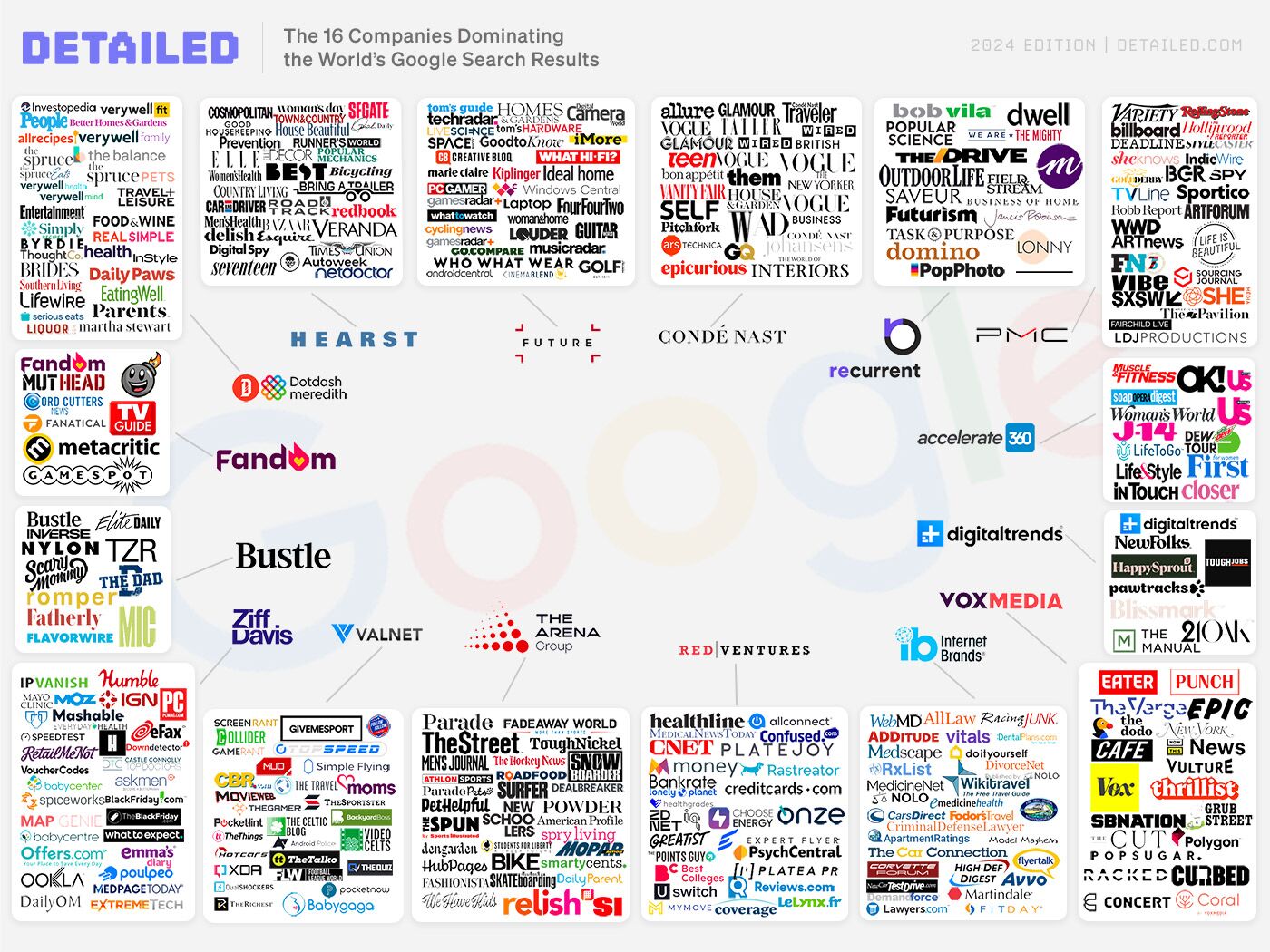
Glen’s research reveals that just 16 companies representing 588 brands get 3.5 billion (yes, billion!) monthly clicks from Google.

My takeaway

Glen pointed out some really actionable ideas in this report, such as the fact that many of the brands dominating search are adding mini-author bios.

Example of mini-author bios on The Verge

This idea makes so much sense in terms of both UX and E-E-A-T. I’ve already pitched it to the team and we’re going to implement it on our blog.

How Google is Killing Independent Sites Like Ours

Authors: Gisele Navarro, Danny Ashton

tl;dr

Big publications have gotten into the affiliate game, publishing “best of” lists about everything under the sun. And despite often not testing products thoroughly, they’re dominating Google rankings. The result, Gisele and Danny argue, is that genuine review sites suffer and Google is fast losing content diversity.

My takeaway

I have a lot of sympathy for independent sites. Some of them are trying their best, but unfortunately, they’re lumped in with thousands of others who are more than happy to spam.

Estimated search traffic to Danny and Gisele's site fell off a cliff after Google's March updates
Estimated search traffic to Danny and Gisele’s site fell off a cliff after Google’s March updates 🙁 

I know it’s hard to hear, but the truth is Google benefits more from having big sites in the SERPs than from having diversity. That’s because results from big brands are likely what users actually want. By and large, people would rather shop at Walmart or ALDI than at a local store or farmer’s market.

That said, I agree with most people that Forbes (with its dubious contributor model contributing to scams and poor journalism) should not be rewarded so handsomely.

The Discussion Forums Dominating 10,000 Product Review Search Results

Author: Glen Allsopp

Tl;dr

Glen analyzed 10,000 “product review” keywords and found that:

  • The ‘Discussions and forums’ SERP feature was present in 7,702 of them (77%).
  • Reddit was present in 97.5% of those.
  • 51% of Reddit’s top-ranking threads currently have spam as a top comment.

My takeaway

After Google’s heavy promotion of Reddit from last year’s Core Update, to no one’s surprise, unscrupulous SEOs and marketers have already started spamming Reddit. And as you may know, Reddit’s moderation is done by volunteers, and obviously, they can’t keep up.

I’m not sure how this second-order effect completely escaped the smart minds at Google, but from the outside, it feels like Google has capitulated to some extent.

John Mueller seemingly having too much faith in Reddit...

I’m not one to make predictions and I have no idea what will happen next, but I agree with Glen: Google’s results are the worst I’ve seen them. We can only hope Google sorts itself out.

Who Sends Traffic on the Web and How Much? New Research from Datos & SparkToro

Author: Rand Fishkin

tl;dr

63.41% of all U.S. web traffic referrals from the top 170 sites are initiated on Google.com.

Data from Sparktoro

My takeaway

Despite all of our complaints, Google is still the main platform to acquire traffic from. That’s why we all want Google to sort itself out and do well.

But it would also be a mistake to look at this post and think Google is the only channel you should drive traffic from. As Rand’s later blog post clarifies, “be careful not to ascribe attribution or credit to Google when other investments drove the real value.”

I think many affiliate marketers learned this lesson well from the past few Core Updates: Relying on one single channel to drive all of your traffic is not a good idea. You should be using other platforms to build brand awareness, interest, and demand.

Want more?

Each week, our team handpicks the best SEO and marketing content from around the web for our newsletter. Sign up to get them directly in your inbox.


How "Deep Content" Will Protect Your SEO in the AI Era |

SEOs are panicking that AI is taking over and their jobs are done. But I’m uncharacteristically optimistic this isn’t the case.

Yes, AI has changed SEO forever (and will continue to do so), but it’s not going to kill it. We just need to adapt. How? By prioritizing “deep content” about topics that can’t be answered quickly or easily.

Here are three reasons why I think this is the future of SEO.

:

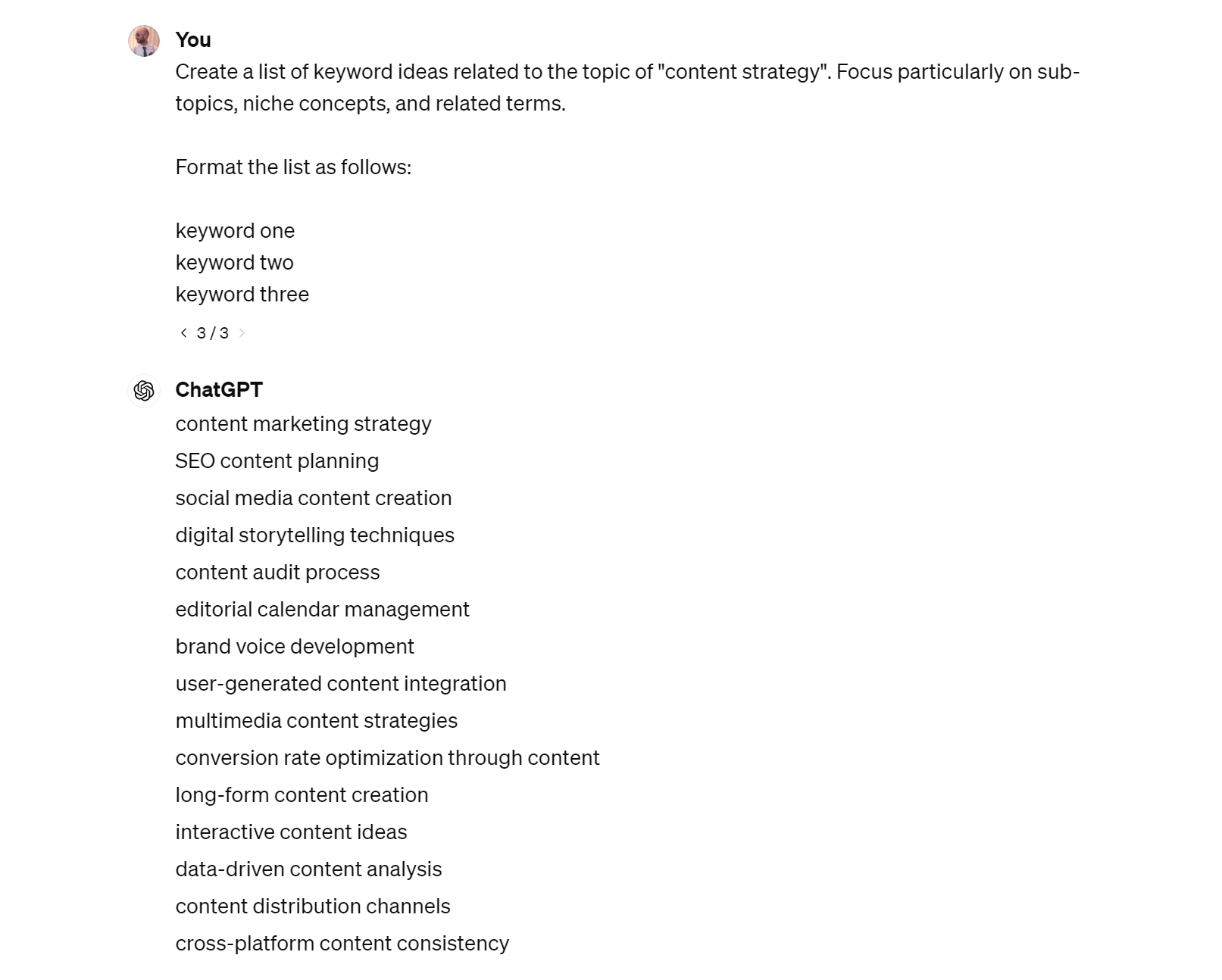
ChatGPT explaining how to run a content audit. The result leaves a lot to be desired.

Even with half the answer cut off, the issue is clear: it tells us what to do but not how to do it.

  • How do we choose the right objective?
  • How do we pull data from Google Analytics, our CMS, and website crawlers to compile a content inventory?
  • Which are the “appropriate tools” that will help with the audit?

Because this is a deeper topic, it needs a deeper answer. You can’t get that from AI. You need to click a result to find a tutorial from someone with actual experience performing content audits.

These are the kinds of topics you should be prioritizing in an AI world.

How can you find “deep” topics?

There’s no exact science. It’s largely about knowing your industry well and applying common sense. However, if you’re doing keyword research, you can narrow things down by excluding keywords that trigger featured snippets. After all, if Google thinks a query can already be answered well with a featured snippet, an AI answer will definitely do the job.

You can do this in Keywords Explorer with the SERP features filter:

Filtering for keywords without featured snippets in Ahrefs' Keywords Explorer

You can also use the “Identify intent” button in Keywords Explorer to learn more about what searchers are looking for. If it seems like something that couldn’t be answered quickly or easily, it’s probably a “deep” topic.

For example, it tells us that many of the people searching for “content audit” want “a detailed process for conducting a content audit, including templates”:

Using AI to identify keyword intent in Ahrefs' Keywords Explorer

It’s going to be virtually impossible for generative AI to give searchers this—especially the templates.

If you’re still not sure whether a topic is “deep” enough for AI to fail, paste your topic into ChatGPT or Gemini and see what it generates. If it leaves much to be desired and only tells you the what, not the how, then it’s probably a deep topic.

Backlinks are still a ranking factor. AI hasn’t changed that. You need to earn them if you want to rank for anything competitive, and the best way to do that is to showcase unique experiences, expertise, and data in your content.

For example, we got a link from adobe.com (DR 96) when they cited a statistic from our study on how many pages get no search traffic:

Example of a backlink earned with data

And we got a link from hubspot.com (DR 93) when they cited the SEO report template we made:

Example of a backlink earned with a template

But here’s the problem:

It’s hard to do this for shallow topics because there’s not much you can add. 

For example, take the topic of how to reinstall macOS. What exactly can you write here beyond the same basic instructions featured in every other post? Nothing. It’s virtually impossible to make “linkable” content about this topic. It’s too shallow.

It’s hard to rank for shallow topics because your content is never unique. It’s just a bunch of words that have already been said a million times. There’s nothing underneath the surface for people to cite and link to.

It's what's below the surface of your content that earns backlinks!
It’s what’s below the surface of your content that earns backlinks!

It’s hard to make shallow topics interesting. I think that’s why there’s so much dull “SEO content” out there. You know the kind of stuff I’m talking about: no personality, just vague answers to boring questions nested under keyword-rich H2s.

Now, I know what you’re probably thinking:

“But Josh, this is what works! We’re only doing it because it’s what Google wants!”

That might be true for shallow topics, but we already discussed how AI will steal the traffic from these in the not-so-distant future. For deep topics that require more explanation, your content needs to be engaging and interesting.

There are (at least) two reasons for this.

Interesting content = “information gain”

Even if bringing something new and interesting to the table doesn’t earn you more backlinks, it may still help you rank higher in Google.

That’s because Google cares about the originality of content and almost certainly has mechanisms in place to identify and reward it. They even patented a mechanism for scoring “information gain” back in 2022.

Engaging content = better user signals

If you want to spark debate among SEOs, steer the conversation towards user signals.

Many in the industry have been convinced for years that user signals like click-through rate are ranking signals. You might even be familiar with Rand Fishkin’s infamous mini-experiment from 2014 where he asked his Twitter followers to click on a search result en masse, leading to a #1 ranking that evening.

Google says signals like these aren’t ranking factors because they’re too noisy.

If you think about it, clicks in general are incredibly noisy. People do weird things on the search result pages. They click around like crazy, and in general it’s really, really hard to clean up that data.

Gary Illyes

But… they also say this on their “How Search Works” page:

We also use aggregated and anonymised interaction data to assess whether Search results are relevant to queries. We transform that data into signals that help our machine-learned systems better estimate relevance.

Tomayto, tomahto. Directly or indirectly, user data influences Google’s algorithms. If all you’re publishing is dull, uninspiring content that AI could write in a heartbeat, nobody is going to read or engage with it. This might negatively impact your ability to rank.

Final thoughts

If you want the ChatGPT-esque summary of this post, it’s this: prioritize deep topics that AI will struggle to answer and create interesting and engaging content about them. That’s how you build an SEO moat in an AI world.

I know that can seem like a waste of time, especially in a world of ever-decreasing attention spans. It’s easy to convince yourself that dull AI answers are what people actually want.

This is exactly how I felt a few months ago… before Tim kindly set me straight 😅

Tim's comment to me a few months ago. Very wise, if you ask me :)

Maybe it’s just because he’s my boss and I respect him, but I think there’s some real truth to this comment. People still want to read content, but only if it’s engaging and deep.

So, let’s make it our collective mission to pick wiser battles and craft interesting content that stands the test of time.


A Comprehensive On-Page SEO Checklist for 2024 |

If you’ve invested time and effort writing an epic piece of content, don’t forget about on-page SEO. It helps google to understand what your page is about and show it to as many people as possible in the search results.

Even better, many on-page improvements are super quick and easy to do.

Follow this checklist for perfect on-page SEO every time:

If you’re looking for a reusable interactive checklist to use time and time again, here are a few other formats

Let’s run through everything real quick.

Google says it’s best to use words that are relevant to your content in page URLs, so you don’t want random gobbledygook urls like domain.com/734/834753956756 if you can avoid it. It’s better to use something short and descriptive like domain.com/mens/shirts.

Short, descriptive URLs are best for SEO

It only takes a few seconds to change this in most content management systems:

You can change URL structures in most CMS's in seconds

If you’re not sure what words or phrases to use, the main keyword you’re targeting is usually a good bet. That’s what we do on the Ahrefs blog 90% of the time.

For example, our target keyword for this post is “on page SEO checklist,” so that’s what the post’s URL is:

Using the target keyword is never a bad idea for a URL slug

Few best practices to keep in mind:

  • Avoid repeating words. If your page is about mens shirts and it’s nested in the /mens/ subfolder, you don’t need to repeat the word “mens.” domain.com/mens/shirts/ is better than domain.com/mens/mens-shirts/
  • Avoid dates. If a searcher comes across domain.com/blog/2020/fashion-tips/ in 2024, they’re going to assume it’s out-of-date even if you updated the content yesterday. So domain.com/blog/fashion-tips/ would be better.
  • Avoid being too specific. If your URL is domain.com/blog/20-best-fashion-tips/, it’s going to look weird if you add more tips to your post later on. Using the less specific domain.com/blog/best-fashion-tips/ gives you more future freedom.

Further reading

Google says that title tags are often the main piece of information searchers use to decide which result to click on. If yours is boring and dull, you’re probably not going to get as many clicks as you could—even if you rank.

It’s the same story for meta descriptions, which Google often uses for the descriptive snippet.

Pages with compelling title tags and meta descriptions get more clicks

There’s no one-size-fits-all approach for title tags, but the ABC formula is a decent starting point for blog posts:

Use the ABC formula to craft more compelling title tags

For your meta description, my best advice is to try to expand on your title tag to give searchers more detail and context.

If you’re struggling or just want a fast solution, give our free AI title tag generator and meta description generator a shot. Tell the tools what your page is about and your desired writing tone and they’ll generate a few options.

Use Ahrefs' free AI and meta description generators to craft compelling copy in seconds

Remember to keep them both short and swee, too. If they’re too long, they’ll get cut-off in search. This looks odd and makes them less compelling. You can use a free tool like this one to check for truncation before publishing, or Ahrefs’ Site Audit to find all the issues on your site.

Further reading

Google recommends using one H1 tag per page. It makes sense to use this for your page title as H1 is the highest level heading there is.

Most content management systems do this automatically, but you can double-check your title is indeed a H1 for free using Ahrefs SEO toolbar. Just click the Content tab:

Use the Ahrefs SEO Toolbar to check the structure of your content

If the copy you’d expect to be wrapped in a H1 tag isn’t, hit up your developer!

Further reading

People want what you promised them in your title and meta description, so don’t kick things off with a load of fluff. Get straight to the point and give the reader what they came for in the first sentence.

There’s no one-size-fits-all way to do this. It all depends on what searchers are looking for.

For example, when people search for “toxic backlinks,” they’re overwhelmingly looking for a definition above all else. That’s why I made the very first paragraph of my article the definition:

People have short attention spans; get to the point fast

But when people search for “best snow blower,” they just want a recommendation—so that’s what Wirecutter gives them in the first paragraph:

Wirecutter is great at getting to the point in their intros

Sidenote.

I think Wirecutter’s opening paragraph could be even better because there’s no point in that first sentence. If you’re searching for “best snow blower,” you already know the benefits of the product. You just want to know which one is best!

Google’s John Mueller said that the search giant uses headings to help better understand the content on a page. This is why you need to make sure they’re clear and descriptive.

It’s easy to miss the mark here. We’ve even been guilty of it ourselves.

For example, look at these two subheadings from our list of blogging tips:

Some of our rather cryptic subheadings from our list of blogging tips

Do you have any idea what those mean at first glance?

Me neither. And many of the other subheadings in our post were also unclear.

If you suspect the same might be true for your subheadings, try this: ask ChatGPT to rewrite them for clarity.

Asking ChatGPT to rewrite subheadings for clarity

This is exactly what Sam did for our post, and it made them much clearer in seconds.

For example, “Create a ‘Do 100’ project” became “Start a ‘write 100 blog posts’ project”:

Example of a subheading rewritten by ChatGPT

Make sure your subheadings have proper hierarchy, too. It helps Google to understand the structure and makes it easier to skim for readers.

Headings improve user experience by creating hierarchy

Search intent is the reason behind the search. Unless your page aligns with intent and gives searchers what they’re looking for, your chances of ranking high are slim to none.

To show just how important this is, look at this graph:

Our rankings for "backlink checker" shot up after we matched search intent

This shows our ranking position for the keyword “backlink checker” over time. You can see that in late 2018, we suddenly went from struggling to rank higher than position #5 to consistently ranking #1.

How? By optimizing our page for search intent.

Here’s what the page looked like before:

Our original "backlink checker" landing page

Here’s what it looks like now:

Our current "backlink checker" landing page

Minor design tweaks aside, there’s one important difference: there’s now a free backlink checker embedded. Before it just asked visitors to start a trial of our SEO software.

By catering to what searchers actually wanted, we improved the page’s rankings and its estimated search traffic from ~18K to ~215K monthly visits. That’s a 12X improvement!

Traffic increased by 12X when we improved search intent. That's huge!

But how did we know what searchers wanted?

Back then, we had to do a manual analysis of the top search results. While you can still do that, it’s much easier just to click the “Identify intents” button in Keywords Explorer:

Use the "Identify intents" button in Keywords Explorer to quickly understand what searchers are looking for

This uses the power of AI to analyze the top search results and tell you what searchers are looking for.

Further reading

Broadly aligning your content with search intent isn’t enough. It should also cover the topic in full to tell searchers everything they want to know. This can help it rank for more keywords and bring more traffic as a result, too.

To find what searchers are looking for, look for common subtopics among top-ranking pages.

There are a few ways you can do this.

Manually check the top-ranking pages

Search for your target keyword in Google, open a few top-ranking pages, and eyeball them for commonalities.

For example, many top results for “best running shoes for flat feet” give a budget option:

Many first-page results for "best running shoes for flat feet" talk about the best budget option

Check the keyword rankings of top-ranking pages

Pages often rank for keywords related to the subtopics they cover. If you see many top pages ranking for these keywords, it’s probably an important subtopic to cover.

Here’s how to find these keywords:

  1. Go to the Competitive Analysis tool in Ahrefs
  2. Enter your page’s URL in the “This target doesn’t rank for” field. (If you haven’t published your page yet, enter the URL you plan to use.)
  3. Enter the URLs of a few similar top-ranking pages in the “But these competitors do” fields
  4. Look for keywords that represent subtopics

For example, the top three results for “best running shoes for flat feet” also rank in the top 10 for many keywords related to men and women’s shoes:

Keyword rankings for top-ranking pages often reveal important subtopics

This tells you that the best picks for men and women is an important subtopic to include.

Find subtopics with the help of AI

It’s currently in beta, but the new AI Content Grader in Ahrefs finds “missing” subtopics. It does this by comparing the content of the three top-ranking pages for your target keyword to your content.

To use it, just enter your target keyword and your page’s URL. (If you haven’t published your page yet, enter the URL you plan to use).

For example, here’s one of its suggestions for the keyword “best running shoes for flat feet”:

AI suggestions for subtopics to include, via Ahrefs' Content Grader

Information gain is a measure of how unique your content is. Google describes a mechanism for scoring this in a patent granted in June 2022.

Two months later, in August 2022, Google launched the helpful content update, which they described as “part of a broader effort to ensure people see more original, helpful content written by people, for people, in search results.”

Are these two things related? Nobody knows. But what we do know is that Google cares about the originality of your content, and almost certainly has mechanisms in place for identifying it. 

This means that covering what other top-ranking pages cover isn’t enough for a well-optimized page. It also needs to bring something new and valuable to the table.

For example, my colleague Chris collected data on how folks deal with low-quality backlinks for his post on removing backlinks:

Research Chris did for his post on removing backlinks

Ryan interviewed three B2B marketers for unique insights for his post on B2B content marketing:

Research Ryan did for his post on B2B content marketing

And I worked with Patrick Stox to create an interactive workflow and template for my content audit guide:

Template I made for my post on how to do a content audit

None of these posts are completely unique. They contain plenty of information that you can probably find elsewhere—and that’s fine. What matters is that we’re bringing at least something new to the table.

Google’s algorithms are designed to surface content that demonstrates E-E-A-T: Experience, Expertise, Authority, and Trust.

If you’re an expert in your field or crafted your content from personal experience, your page already has E-E-A-T. But searchers aren’t going to know that without reading it, so you should try to showcase it as obviously as you can on the page. Let’s look at two ways to do this.

Flash your credentials

Healthline does this extremely well. The very first thing you see on their page about rheumatoid arthritis is that the content was reviewed by a rheumatologist:

Healthline flashes author's credentials right in the intro

Put your uniqueness front and center

If you’ve put time and effort into adding “information gain” to your content, don’t bury it. Make sure searchers see it right away so they know they can trust you.

For example, to curate our list of the best Facebook groups for SEOs, we asked the 12K+ members of our customer-only group to vote for their favorites. Instead of burying this fact deep in the post, we highlighted it in the very first paragraph.

Always put your uniqueness front and center

Further reading

For a page to earn backlinks (which are a strong ranking factor) and shares, people have to actually consume the content. This isn’t going to happen if the copy is hard to read.

You can use free tools like Hemingway and Grammarly to fix this.

For example, Hemingway gives my recent guide to toxic backlinks a reading grade level of 7:

Use tools like Hemingway and Grammarly to improve readability

Given that 54% of Americans lack literary proficiency (essentially reading below the equivalent of a sixth-grade level), this means we’re alienating at least 46% of readers. If we could bring the reading grade level down, more people would be able to read it.

Sidenote.

This isn’t absolutely necessary for every topic. It depends on who your audience is. If they’re technical folks, don’t worry about it. But if you’re publishing content for the masses, accessibility matters.

Here are a few more tips to improve readability:

  • Use short sentences and paragraphs
  • Use bulleted lists
  • Use images

Featured snippets give searchers a short answer right in the search results.

Featured snippets in search results

But here’s the cool thing: Google pulls the snippet from one of the top-ranking pages. This means that if your page already ranks in the top 10 for keywords where Google shows a featured snippet, there might be an opportunity to steal it without much effort.

This is exactly what I managed to do a couple of months ago, which led to a ~38.9% jump in estimated search traffic to our page:

Traffic improvement of 38.9% by optimizing for featured snippets

Here’s what happened:

In Ahrefs’ Site Explorer, I used the Organic Keywords report to find the page’s top 10 keyword rankings with featured snippets we didn’t own.

How to find featured snippet opportunities

Right away, I noticed a trend: many of the keywords were people searching for the most searched thing in Google (singular) rather than a list of top searches (plural):

Example of an obvious opportunity to optimize for featured snippets

After searching for a few of these keywords in Google, I saw that the snippet was pretty much always pulled from this very short paragraph in a competing post:

Example of copy Google was using for a featured snippet

So… I added a similar paragraph to our post (using our data instead):

The copy I added to our page to optimize for featured snippets

This quick big of on-page SEO won our page 163 more featured snippets:

Results of optimizing - 163 more featured snippets

Further reading

Images on your page can rank in Google Images and send you more traffic. There are three things you need to do to optimize them.

Filenames are descriptive

Google says that these give clues about the subject matter, so avoid random file names like IMG_5497.jpg in favor of something short and descriptive like brown-dog.jpg.

How to name image files for SEO

Alt text is present and descriptive

Google also says that image alt text helps them understand subject matter, so the same rules apply as filenames: keep them short and descriptive.

How to write alt text for SEO

Most content management systems have a place to add alt text in the UI, so there’s no need to mess around with HTML:

Most CMS's make it easy to add alt text

Images are compressed

Compressed images are smaller and faster to load. Some platforms like Shopify claim to do this automatically, but the results aren’t always great. It’s generally better to employ the help of a plugin like TinyIMG or Shortpixel.

Further reading

Internal links are links from one page on your site to another. They help Google understand what a page is about and boost its authority, which can lead to higher rankings.

For this reason, when you publish a new page, it pays to internally link from there to other relevant pages. This won’t help the new page’s rankings, but it might help the rankings of the pages you internally link to.

To find relevant opportuntities, use Ahrefs’ Site Audit:

  1. Go to the Internal Link Opportunities tool
  2. Enter the URL of your newly-published page in the search box
  3. Choose “Source page” from the dropdown
How to find internal linking opportunities

Sidenote.

Site Audit needs to have crawled your site since you published the new page, otherwise this won’t work.

Pay attention to these columns:

  • Source page → your newly-published page, where you will add the link
  • Keyword context → where on the page to add the link
  • Target page → where to link to

For example, here the report is suggesting that I link from my post on toxic backlinks to our bad links guide:

Example of an internal linking opportunity

Further reading

Citing valuable resources is helpful for readers. Even Google says so.

Does that mean it’s a “ranking factor?” No. But it does improve your content’s credibility with readers, and that can impact things that do matter like links and shares.

This is something we regularly do on the Ahrefs blog:

Example of us linking to sources on the Ahrefs blog

If you’re trying to boost the rankings of the page you’re optimizing, you’ll want to add internal links to it from other pages on your site.

To find relevant opportunities, use Ahrefs’ Site Audit:

  1. Go to the Page Explorer tool
  2. Enter your target keyword (or part of it) in the search box
  3. Choose “Page text” from the dropdown
How to find internal linking opportunities on other pages

This will find pages on your site that mention your target keyword, which may be good places to add internal links.

For example, it tells us that our guide to removing backlinks mentions the word “toxic”:

Example internal linking opportunity

If we search that page, this is the mention:

Perfect place to add an internal link

That looks like the perfect place to internally link to our guide to toxic backlinks.

Schema markup is code that helps search engines understand the information on a page. It also powers many rich snippets you see in Google, which can lead to more clicks.

What rich results look like

If you’re not sure whether schema markup is worth prioritizing for your page, search for your main target keyword in Google and look at the top results. If all or many are rich results, it’s probably worth adding it.

Most of the results for this term show rich snippets, so it's probably worth optimizing for them

If you use WordPress, you can easily add schema with a plugin like Yoast or RankMath. Alternatively, use a tool like Merkle’s Schema Markup Generator to generate the JSON-LD code yourself and add it manually.

Further reading

Keep learning

Check out even more of our on-page SEO resources:


7 Easy SEO Tips for Small Businesses |

If you’re a small business owner, people are searching for what you do on Google. Unless you show up, you’re missing out on customers or clients.

SEO is how you do that, and the basics are quick and easy.

Follow these tips to rank your small business higher in no time.

If you only do one thing as a small business owner, make it to claim and optimize your GBP.

A Google Business Profile helps users find and learn about your business in Google search and maps. It’s free to set up and lets you share important details about your business with customers, like its phone number, opening times, and offerings.

But here’s the real beauty of Business Profiles: People don’t have to search for your business to see your profile. They can appear for broader searches like “pizza restaurant near me.”

Example of a Google Business Profile in the 'map pack ' results

This makes them a powerful way to attract new customers searching for what you do.

Here are the basics of optimizing your profile:

  • Set the right business category and type
  • Add opening hours (and keep them up to date!)
  • Add contact details
  • Add photos
  • Add your products or services

Learn more in our 30-minute Business Profile optimization guide.

People don’t always turn to Google to find small businesses. They also search popular business directories and trusted review websites.

Even if they do search Google, they’ll often end up browsing a popular directory anyway because that’s often what ranks.

For example, I was recently searching for a cat sitter for an upcoming vacation. I started my search by typing “cat sitter near me” into Google. But I soon ended up browsing a niche directory because that’s what all the top results were.

Local directories and niche sites rank for "cat sitter near me"

In fact, I even ended up booking a cat sitter through one of these websites:

Booking I made on a local niche site after finding it in Google

Long story short, if you’re not listed on popular niche or local directories, you’re losing out on second-hand search traffic and customers.

Let’s look at a couple of ways to find the best directories to get listed on.

Search Google

Head over to Google and search for “[what your business does] in [location]”, then add your business to directories that rank on the first page.

For example, if you’re a cat sitter in Seattle, you’ll probably want to get listed on:

  • Meowtel
  • Rover.com
  • Yelp
  • Care.com
Local niche sites and directories ranking in Google search

Find the directories your competitors are listed on

Most directory listings also link to your website, which means you can use your competitors’ backlink profile to find relevant directories.

Here’s how to do it in Ahrefs:

  1. Go to our Competitive Analysis tool
  2. Select the “referring domains” mode
  3. Enter your site in the “Not linking to target” field
  4. Enter the sites of a few competing businesses in the “But linking to these competitors” fields
  5. Hit “Show link opportunities”
Finding local and niche directories in Ahrefs

You should see a list of domains that link to your competitors but not you. Eyeball this list for sites that look like relevant directories and add your business to them.

Examples of local directories linking to competitors

Not sure who your competitors are?

Search Google for “[what your business does] in [location]” and go to Maps. Follow the website links on their profiles to find their domains, then copy and paste them into Ahrefs.

How to find competitors

Having technical SEO issues can hurt your rankings, so it’s worth checking that your website is technically sound and fixing any major issues.

The easiest way to do this is with an SEO audit tool like Ahrefs’ Site Audit. You can use this free of charge with an Ahrefs Webmaster Tools (AWT) account. Just sign up, follow the steps to crawl your site, then filter the All issues report for Errors:

How to find website errors in Ahrefs' Site Audit

For advice on what the issues mean and how to fix them, hit the tooltip:

How to find advice on fixing the issues

For example, Site Audit found eight 404 pages on our blog during a recent crawl:

Example of a 404 page issue

To fix this issue, we can either reinstate, redirect, or remove internal links to the pages.

If you also schedule regular crawls in Site Audit, you’ll get alerts about new SEO issues so you can fix them before they cause problems.

Email alert from Ahrefs' Site Audit

People often search for specific products or services rather than what your business does. For example, they might search for “bathroom remodel near me” instead of “plumber near me.”

If they do this, Google tends to show pages about that service, not plumbers’ homepages.

Google tends to service pages rather than homepages when searching for specific services

You might struggle to rank for these terms unless you have these pages.

But you might be thinking, “I offer lots of services. I don’t have enough time to create pages for all of them.”

Keyword research is the answer. This is the process of discovering what words and phrases your customers are typing into Google. You can use it to find the products or services they’re searching for the most and then prioritize creating pages about them.

Here’s how to do it:

  1. Brainstorm all the products or services you offer
  2. Paste them into Ahrefs’ Keywords Explorer (make sure to select the country you’re in)

You’ll see the keywords sorted by their estimated monthly search volumes from high to low:

Plumbing keywords sorted by popularity, via Ahrefs' Keywords Explorer

This should give you a good idea of relative interest in the products or services you offer and the pages you should prioritize creating.

Sidenote.

These are national volumes, but that shouldn’t really matter. If a service is more popular than another nationally, it’s probably more popular in the local area where your business operates, too. The only caveat is if you offer something like HVAC services and the climate in your country differs greatly from region to region.

For example, it would make sense to have a page for boiler servicing if it’s something you offer.

Having pages about your products and services is one thing, but you also need to make sure they tell searchers what they want to know. If you know your customers well, you can probably get halfway there easily. But it’s always best to do a bit of research.

For example, I was recently searching for someone to repair our boiler…

My process went a little like this:

  • Searched Google for “boiler repair near me”
  • Had a quick look at the reviews and websites of the top-ranked businesses
  • Called the most promising ones

I knew that our boiler brand isn’t very common, so I was specifically looking for engineers who mentioned working with our brand on their websites. Out of a dozen sites I checked, only one mentioned this:

Example of a site giving searchers what they want

As a result, this was the first company I called.

If the other engineers had only done a bit of keyword research, they’d have known this is something customers care about and included it on their pages.

Here’s how you can do that in Ahrefs:

  1. Go to Keywords Explorer
  2. Search for your product or service (e.g., “boiler repair”)
  3. Go to the Matching Terms report
  4. Go to the “Cluster by terms” tab
Use term clustering in Ahrefs' Keywords Explorer to find what customers care about

From here, skim the list for similar terms that might indicate the kind of information searchers are looking for.

For example, the highlighted terms below are all boiler brands:

Customers searching for boiler repair care about boiler brands

I also see mentions of different types of boilers, like oil, gas, and electric:

Customers searching for boiler repair care about boiler types

From this quick skim alone, it’s clear that searchers are looking for engineers who can repair their type and brand of boiler.

If you’re a local boiler engineer, having this information not only helps searchers but also saves wasted time answering the phone to give your “Oh… I don’t work with that brand of boiler, sorry!” response.

Can this also help you rank higher?

In all likelihood, yes.

For example, had I searched Google for local engineers who work with our brand of boiler, the engineer’s website that actually mentions the brand ranks in position #3:

Giving searchers what they want seems to pay off

Backlinks are a known ranking factor. The only problem is that high-quality backlinks are far from easy to get. (This is what makes them such a good ranking factor.)

For small businesses, taking advantage of existing relationships is a good starting point.

Here are a few ideas:

  • Give suppliers testimonials. These often get featured on their sites along with a link.
  • Publish client spotlights. For example, if you’re a plumber who recently helped renovate your local church, write it up and ping them about it. They might feature it on their website.
  • Pitch stockist pages. For example, if your store stocks a local craft beer, see if the brewery lists its stockists on its website. If its does, you can usually get featured just by asking.

I would also recommend trying to replicate your competitors’ best backlinks. To find these, plug their site into Ahrefs’ Site Explorer and check the Backlinks report.

How to find your competitors' backlinks in Ahrefs' Site Explorer

Sidenote.

If there is a lot to go through, toggle the “Best links” filter to narrow things down.

For example, this local plumber has two links from sites listing small businesses that offer discounts to health and other key workers:

Example of easy-to-replicate backlinks to a plumber's website

Both of these would be pretty easy links to replicate (assuming you’re happy to offer this discount!)

Further reading

Google itself advises small business owners to remind customers to leave reviews and reply to them to build trust:

Google's advice on reviews for small businesses

As Google says, the easiest way to do this is to create and share a link to your Business Profile with customers. You can do this in “thank you” emails, at the end of customer support interactions, or simply by including a link or QR code on receipts.

This is also likely to help with your “map pack” rankings, at least according to BrightLocal’s survey. It states that 17% of SEOs deem reviews to be the most important ranking factor.

17% of SEOs think reviews is the most important ranking factor for the 'map pack'

But don’t limit yourself to asking for and replying to reviews on your Google Business Profile. Many customers also trust other websites. If you’re wondering which review sites matter most for your small business, Google its name and look for other review sites in the results.

For example, reviews on TripAdvisor are clearly important for my favorite pizzeria:

TripAdvisor is an important place to get reviews for restaurants

For my favorite local craft bottle shop, niche review sites like RateBeer and Untapped seem more important:

Untappd is an important place to get reviews for bottle shops

FAQs

What is small business SEO?

Small business SEO is the process of improving your online presence to get more customers from Google and other search engines. It almost always revolves heavily around optimizing for local searches.

What are the benefits of small business SEO?

There are three main benefits of doing SEO for your small business:

  • More brand awareness. Showing up in more places online means more people will become familiar with your business.
  • More traffic. Ranking higher in Google and other search engines leads to more traffic.
  • More customers. As long as your traffic is targeted, it’ll bring in more customers or clients.

What’s the difference between small business SEO and local SEO?

Unless you sell products or services beyond your local area, not much.

If your small business sells products nationally or internationally, check out our guide to ecommerce SEO or our guide to international SEO.

If your small business sells services in multiple locations (e.g., car hire), read our guide to local keyword research to learn how to optimize for that.


8 Free SEO Reporting Tools |

There’s no shortage of SEO reporting tools to choose from—but what are the core tools you need to put together an SEO report?

In this article, I’ll share eight of my favorite SEO reporting tools to help you create a comprehensive SEO report for free.

Price: Free

Google Search Console, often called GSC, is one of the most widely used tools to track important SEO metrics from Google Search.

Most common reporting use case

GSC has a ton of data to dive into, but the main performance indicator SEOs look at first in GSC is Clicks on the main Overview dashboard.

As the data is from Google, SEOs consider it to be a good barometer for tracking organic search performance. As well as clicks data, you can also track the following from the Performance report:

  • Total Impressions
  • Average CTR
  • Average Position
gsc-performance-overview

Tip

If you’ve signed up for AWT using Google Search Console, you can view your GSC performance data in Ahrefs by clicking “GSC Performance” from the main dashboard.

But for most SEO reporting, GSC clicks data is exported into a spreadsheet and turned into a chart to visualize year-over-year performance.

organic-traffic-graph-showing-clicks-year-over-year

Further reading

Favorite feature

One of my favorite reports in GSC is the Indexing report. It’s useful for SEO reporting because you can share the indexed to non-indexed pages ratio in your SEO report.

google-search-console-indexed-pages-report

If the website has a lot of non-indexed pages, then it’s worth reviewing the pages to understand why they haven’t been indexed.

Price: Free

Google Looker Studio (GLS), previously known as Google Data Studio (GDS), is a free tool that helps visualize data in shareable dashboards.

Most common reporting use case

Dashboards are an important part of SEO reporting, and GLS allows you to get a total view of search performance from multiple sources through its integrations.

Out of the box, GLS allows you to connect to many different data sources.

Such as:

  • Marketing products – Google Ads, Google Analytics, Display & Video 360, Search Ads 360
  • Consumer products – Google Sheets, YouTube, and Google Search Console
  • Databases – BigQuery, MySQL, and PostgreSQL
  • Social media platforms – Facebook, Reddit, and Twitter
  • Files – CSV file upload and Google Cloud Storage

Sidenote.

If you don’t have the time to create your own report manually, Ahrefs has three Google Looker Studio connectors that can help you create automated SEO reporting for any website in a few clicks

google-looker-studio-partner-connectors

Here’s what a dashboard in GLS looks like:

ahrefs-seo-audit-dashboard
Ahrefs Google Looker Studio integration

With this type of dashboard, you share reports that are easy to understand with clients or other stakeholders.

Favorite feature

The ability to blend and filter data from different sources, like GA and GSC, means you can get a customized overview of your total search performance, tailored to your website.

Price: Free for 500 URLs

Screaming Frog is a website crawler that helps you audit your website.

Screaming Frog’s free version of its crawler is perfect if you want to run a quick audit on a bunch of URLs. The free version is limited to 500 URLs—making it ideal for crawling smaller websites.

screaming-frog-user-interface-screenshot

Most common reporting use case

When it comes to reporting, the Reports menu in Screaming Frog SEO Spider has a wealth of information you can look over that covers all the technical aspects of your website, such as analyzing, redirects, canonicals, pagination, hreflang, structured data, and more.

Once you’ve crawled your site, it’s just a matter of downloading the reports you need and working out the main issues to summarize in your SEO report.

Favorite feature

Screaming Frog can pull in data from other tools, including Ahrefs, using APIs. 

If you already had access to a few SEO tools’ APIs, you could pull data from all of them directly into Screaming Frog. This is useful if you want to combine crawl data with performance data or other 3rd party tools.

screaming-frog-api-access

Even if you’ve never configured an API, connecting other tools to Screaming Frog is straightforward.

Price: Free

Ahrefs has a large selection of free SEO tools to help you at every stage of your SEO campaign, and many of these can be used to provide insights for your SEO reporting.

when-to-use-ahrefs-free-tools-across-the-seo-process-illustration

For example, you could use our:

Most common reporting use case

One of our most popular free SEO tools is Ahrefs Webmaster Tools (AWT), which you can use for your SEO reporting.

With AWT, you can:

  • Monitor your SEO health over time by setting up scheduled SEO audits
  • See the performance of your website
  • Check all known backlinks for your website
ahrefs-overview

Favorite feature

Of all the Ahrefs free tools, my favorite is AWT. Within it, site auditing is my favorite feature—once you’ve set it up, it’s a completely hands-free way to keep track of your website’s technical performance and monitor its health.

If you already have access to Google Search Console, it’s a no-brainer to set up a free AWT account and schedule a technical crawl of your website(s).

Price: Free

Ahrefs’ SEO Toolbar is a free Chrome and Firefox extension useful for diagnosing on-page technical issues and performing quick spot checks on your website’s pages.

Most common reporting use case

For SEO reporting, it’s useful to run an on-page check on your website’s top pages to ensure there aren’t any serious on-page issues.

ahrefs-seo-toolbar-overview

With the free version, you get the following features:

  • On-page SEO report
  • Redirect tracer with HTTP Headers
  • Outgoing links report with link highlighter and broken link checker
  • SERP positions
  • Country changer for SERP

The SEO toolbar is excellent for spot-checking issues with pages on your website. If you are not confident with inspecting the code, it can also give you valuable pointers on what elements you need to include on your pages to make them search-friendly.

If anything is wrong with the page, the toolbar highlights it, with red indicating a critical issue.

severity-highlight-ahrefs-seo-toolbar

Favorite feature

The section I use the most frequently in the SEO toolbar is the Indexability tab. In this section, you can see whether the page can be crawled and indexed by Google.

indexability-tab-ahrefs-seo-toolbar

Although you can do this by inspecting the code manually, using the toolbar is much faster.

Price: Free

Like GSC, Google Analytics is another tool you can use to track the performance of your website, tracking sessions and conversions and much more on your website.

google-analytics-screenshot

Further reading

Most common reporting use case

GA gives you a total view of website traffic from several different sources, such as direct, social, organic, paid traffic, and more.

Favorite feature

You can create and track up to 300 events and 30 conversions with GA4. Previously, with universal analytics, you could only track 20 conversions. This makes conversion and event tracking easier within GA4.

Price: Free

Google Slides is Google’s version of Microsoft PowerPoint. If you don’t have a dashboard set up to report on your SEO performance, the next best thing is to assemble a slide deck.

Many SEO agencies present their report through dashboard insights and PowerPoint presentations. However, if you don’t have access to PowerPoint, then Google Slides is an excellent (free) alternative.

google-slides-screenshot

Most common reporting use cases

The most common use of Google Slides is to create a monthly SEO report. If you don’t know what to include in a monthly report, use our SEO report template.

Favorite feature

One of my favorite features is the ability to share your presentation on a video chat directly from Google Slides. You can do this by clicking the camera icon in the top right.

share-video-chat-google-slides

This is useful if you are working with remote clients and makes sharing your reports easy.

Price: Free

Google Trends allows you to view a keyword’s popularity over time in any country. The data shown is the relative popularity ratio scaled from 0-100, not the direct volume of search queries.

Most common reporting use cases

Google Trends is useful for showing how the popularity of certain searches can increase or decrease over time. If you work with a website that often has trending products, services, or news, it can be useful to illustrate this visually in your SEO report.

Google Trends makes it easy to spot seasonal trends for product categories. For example, people want to buy BBQs when the weather is sunny.

Using Google Trends, we can see that peak demand for BBQs usually happens in June-July every year.

bbq-google-trends-graph

Using this data across the last five years, we could be fairly sure when the BBQ season would start and end.

Favorite feature

Comparing two or more search terms against each other over time is one of my favorite uses of Google Trends, as it can be used to tell its own story.

google-trends-comparison-example

Embellishing your report with trends data allows you to gain further insights into market trends.

You can even dig into trends at a regional level if you need to.

regional-trends-via-google-trends

Final thoughts

These free tools will help you put together the foundations for a well-rounded SEO report.

The tools you use for SEO reporting don’t always have to be expensive—even large companies use many of the free tools mentioned to create insights for their client’s SEO reports.

Got more questions? Ping me on X 🙂


Automated SEO Reporting (The Easy Way) |

If you’ve dabbled in SEO reporting, you’ll know that manual reporting becomes more painful the more you have to do. So, how can you take the weight off your shoulders? By automating the repetitive bits.

In this article, I’ll share how you can automate your SEO reporting easily using just two tools: Ahrefs and Google Looker Studio (GLS).

In theory, automating SEO reporting should help:

  • Free up time
  • Improve efficiency
  • Improve consistency
  • Reduce costs

But, in reality, these types of projects can get complicated quickly—often taking longer than expected—if finished at all.

Source: XKCD (crude adaptations by me)

So, rather than trying to automate all the things, let’s keep it simple and focus on what we can automate easily:

  • Organic traffic reporting
  • Keyword rank tracking
  • Website auditing
  • Competitor analysis
  • Website changes
  • Brand mentions

The two most popular data sources for SEO reporting are Google Search Console (GSC) and Google Analytics (GA). So, how can we automate these two reports?

Here’s what we’ll do:

  • Connect data sources to Google Looker Studio – GSC and GA
  • Design a report – we’ll cheat using a template
  • Schedule it to be delivered in our email box

Plot spoiler: We’ll use these two Google Looker Studio templates:

looker-studio-templates-with-highlights

Automating Google Search Console reporting

To start, make sure you’re logged into Google Search Console. Then, head to Looker Studio and click on the Search Console Report.

Google-looker-studio-search-console-report-homepage

Then click on Use my own data and Replace data.

Use-my-own-data-search-console

Then, select your site from the list.

Add-your-site-to-the-list-google-looker-studio-screenshot

Then select either Site Impression and web or URL Impression and web, depending on your preference. I am using URL Impression and web in this example.

Site configuration GLS screenshot

Sidenote.

Site Impression and URL impression support different search types. For full details and differences, check Google’s documentation here.

Click Add at the bottom right-hand corner. You’ll then probably get a pop-up—click Add to report.

Add-to-report-gsc-screenshot

Once that’s added, you should get something that looks like this but with your website’s data showing.

google-search-console-looker-studio-template

Now you’ve got your report, let’s schedule it. To do so, click on the downward-facing caret in the top right and click Schedule delivery.

schedule-automatic-delivery-of-reports-google-looker-studio

Add the people you want to receive the report and pick a start time and time for the report to be sent. Then click Save.

email-delivery-scheduling

Once you’ve completed these steps, you’ll get a PDF report automatically sent to those email inboxes on the date you specified.

Automating Google Analytics 4 (GA4) reporting

Automating GA4 reporting uses a similar process. To start, head back to the main Looker Studio dashboard and set up a new GA4 report by clicking on the GA4 Report icon.

GA-4-report-template-via-google-looker-studio

Then, click on Use my own data and select your GA4 account.

ga4-report-template-

Then select your site from the drop-down list and click Add.

selecting-your-site-ga-4

Your site’s information will then be populated in the copy of the GA4 template.

ga-4-report-template-example

Once you’ve done that, you can automate the sending like we did with the GSC report.

  1. Go to Share and click the downward facing caret
  2. Click Schedule delivery
  3. Add the people you want to send the report to and select a frequency to deliver the report.
sharing-report-with-other-people-google-looker-studio

Now, we’ve seen how easy it is to schedule reports for GSC and GA4. We can do the same using the Ahrefs Google Looker Studio Connectors.

Ahrefs has three connectors for Looker Studio that help you create GLS dashboards in a couple of clicks. You can find them in the Partner Connectors list within GLS.

Here’s what they look like:

Ahrefs' Partner connectors for Google Looker Studio

Let’s get started with keyword rank tracking.

One of the issues with sharing traditional rank tracking data with clients is the reports can be too overwhelming at a glance, making it hard for them to see what’s going on.

Our Rank Tracker connector creates a shareable, easy-to-understand scheduled report in a few clicks.

Here’s how you set it up.

Go to Ahrefs’ Rank Tracker

Click on the project that you want to create a dashboard for, then click on Looker Studio.

Looker studio button screenshot

Then click on Ahrefs’ Rank Tracker connector.

Ahrefs Rank Tracker connector highlight

Authorize the connector

Once you’ve done that, you’ll be taken to Google Looker Studio to authorize the connector.

Authorize the connector

Click on Authorize and sign in using your Google account. You’ll need to click Allow for Ahrefs Rank Tracker to access your Google Account.

Automated SEO Reporting (The Easy Way) |

Once you’ve done that, enter the project you want to add and then hit Connect in the top right-hand corner. When you’re happy with everything, click Create Report.

Automated SEO Reporting (The Easy Way) |

Then, you should get a dashboard that looks something like this.

Automated SEO Reporting (The Easy Way) |

Schedule it

To make it automated, follow the same steps we used for our GSC and GA4 reports by clicking the downwards facing caret next to Share and click Schedule delivery.

schedule-automatic-delivery-of-reports-google-looker-studio

Add the recipients to the report and select how regularly you want it sent.

Adding recipients to the scheduled email

Now you’ve set up the Rank Tracker report, you’ll be able to check these details in every email:

  • Positions
  • SERP features
  • Competitors
  • Tags
  • Traffic share
  • Keywords metrics

If you’re focusing on technical SEO on your website then it’s a good idea to get an automated Site Audit dashboard set up. It lets you keep track of your website’s technical health easily.

Go to Ahrefs’ Site Audit

Go to Ahrefs’ Site Audit and select a project from the dashboard to click on it.

Selecting an Audit from Site Audit Dashboard

Then click on the Looker Studio button in the top right-hand corner.

Looker Studio button screenshot

On the dropdown, click Ahrefs Site Audit connector.

Ahrefs Site Audit Connector setup

Authorize the connector

Like other connectors, you may be prompted to Authorize and sign in using your Google account. You’ll need to click Allow for Ahrefs Rank Tracker to access your Google Account.

Afterward, set your parameters. I normally set it up like this.

Parameters-selection

If prompted, click on allow parameter sharing and then Create Report.

Create-GLS-report-button-screenshot

Then click Create Report again when prompted.

Create-report-gls

GLS then starts to build your report in the background.

Schedule it

You can schedule the reports in exactly the same way as you did with the other connectors. Click on Share and Schedule delivery to share with the people you want to receive the report.

schedule-automatic-delivery-of-reports-google-looker-studio

You can use the Site Explorer report for monitoring your own site, but you can also use it to monitor your competitors’ sites.

Sidenote.

You must have your competitor’s website set up as a project in order to create a dashboard for it.

This dashboard report makes it possible to keep tabs on your competitors, and have it sent to your or your client’s inbox on a regular basis.

Go to Ahrefs’ Site Explorer

Once on the Overview page, click the Looker Studio button in the top right-hand corner.

ahrefs-site-explorer-overview-google-looker-studio-connector

Then click on Ahrefs’ Site Explorer Connector.

ahrefs-site-explorer-connector

Authorize the connector

Once you’ve done that, hit Authorize.

authorize-the-ahrefs-connector

And sign in with Google.

ahrefs-site-explorer-google-access

Then, select a project and check all the boxes to ensure compatibility with the template.

Automated SEO Reporting (The Easy Way) |

Once you’ve done that, hit Connect, and if prompted, select Allow. Then click Create Report on the following screen.

Create-GLS-report-button-screenshot

Once you’ve created your report, it will appear on the following screen, and all the data should be populated.

ahrefs-site-explorer-google-looker-studio-report

Schedule it

Scheduling delivery is the same as we have seen for the other reports.

schedule-automatic-delivery-of-reports-google-looker-studio

Once you’ve shared it with your colleagues or clients, it will automatically be delivered to your inboxes on your chosen schedule.

If your website is prone to occasional downtime, a tool like Uptime Robot is an easy and free way to automate monitoring of your website’s status.

Once you’ve set it up, you can receive notifications through email, slack messages, SMS, or even a voice call—that way, you’ll be the first to know when your website goes down.

If you want to monitor certain pages on your website for changes, you can use a tool like Little Warden. The tool can monitor many different things, but I like to use it to monitor the robots.txt file for changes.

This type of monitoring is useful in enterprise SEO, where multiple teams have access to the website and can change things often without notifying the SEO team beforehand.

If tracking web mentions of your brand or a specific keyword is important, you can do this using Ahrefs Alerts.

To do so, head to Alerts on the main site navigation and click the Mentions tab.

ahrefs-mentions

Then click + Add alert and enter the details in the pop-up box of the mention you want to track.

new-alerts-ahrefs

Mention alerts are a useful way to report unbranded mentions of your brand or website. Once you are alerted of the mention you can contact the website to request a link.

Final thoughts

Automating your SEO reporting process isn’t always easy to do. But by using Ahrefs’ Google Looker Studio connectors, you can make it easier to automate your SEO reporting process—without sacrificing quality.

Even if you have no coding knowledge or experience in building SEO dashboards, you can have a plug-and-play set of automated SEO reports ready to go in just a few clicks.

Got more questions? Ping me on X


6 SEO Experiments That Help Reveal How Google Works |

“Test, test, test!” We hear it shouted from the virtual rooftops of X and LinkedIn. But if you’re focused on running a business, how often do you get a chance to test

How important is the main content on a page for ranking?

You may assume it’s very important for Google— but the recent trial exhibits from the U.S. Department of Justice suggest that Google has previously relied heavily on how people reacted to documents rather than understanding the documents themselves.

Google doesn't understand documents they fake it

What was the experiment?

Patrick and the team removed the main content from two pages to determine the SEO impact on our organic traffic.

Here’s an example of what one of our blog posts looked like after we removed the main content.

Top youtube searches page with no content
At least it’s a quick read.

Once the content was removed, we saw an immediate drop.

The drop and rebound in Clicks and Impressions was shown clearly on Google Search Console:

Clicks and Impressions in Google Search Console

Although the Clicks drop is relatively small, this is fairly compelling evidence that removing content is a bad idea.

What it tells us about Google

Whether or not Google understands the nature of the content or infers it from user experience signals, we don’t know for sure.

What we do know is that there is a strong correlation between removing our main content and the drop in clicks.

With no content on the page about the topic, the relevancy of this result for users hits rock bottom.

Can you test this yourself?

I strongly advise you not to try this test yourself.

Further reading

3. Can you rank #1 in 24 hours?

Sounds tough, right?

But in one of Sam Oh’s most audacious videos, he tried to rank #1 on Google in 24 hours using only a handful of basic SEO techniques.

Sam’s video got tons of engagement, likes, and views—and even Google praised the quality of Sam’s advice.

google-epic-tips-ahrefs-youtube

What was the experiment?

Sam found a post on blogging tips he wanted to rank number one for and set about using basic SEO techniques to improve its ranking in Google.

He identified why the page was ranking poorly, created a plan to beat the competitors by improving the content, and then submitted the updated page to Google Search Console.

Sam used Ahrefs’ Also talk about report in Keywords Explorer combined with some ChatGPT wizardry to identify unique and fresh angles to expand the content.

Watch the full video here:

What it tells us about Google

When we polled SEOs and asked them how long SEO takes, most SEOs said it can take three months or more:

How long does SEO take

This SEO experiment flipped that narrative on its head and showed that improving your rankings in Google can actually be much faster—even using only basic SEO skills.

Can you test this yourself?

Yes. The fact that Google praised this video should be enough to tell you that the techniques used in this video are “Google-safe” experiments that you could try on your website.

But, like any test—be aware that the results you get may vary from ours.

Further reading

Related posts are usually shown at the bottom of a blog page and internally link to similar content. Most content management systems offer functionality to add related content.

What was the experiment?

In December 2022, we added a “Keep Learning” related posts section using a popular WordPress plugin.

The theory was that adding this section would help improve our internal linking and be useful for our readers who might want to explore other parts of our content.

Related posts section highlighted

The results were positive across multiple URLs:

Organic traffic increase from SEO experiment via Ahrefs' Site Explorer

What it tells us about Google

Adding a related content section to your blog can improve your internal linking. Because Google crawls the internet using links, it makes it easier for Google to understand the relationship between pages.

As Ahrefs’ Blog already had a decent internal linking structure in place, we didn’t see a tremendous uplift, but it might have more impact for blogs with fewer internal links.

Can you test this yourself?

Yes. Adding a related posts section to your blog is usually a low effort and easy to implement. Your results may vary, but in most cases it should have a positive impact over time.

Further reading

It’s surprisingly common for websites to accidentally block parts or even their whole website without realizing it. Patrick’s theory was that by blocking the pages from being crawled, Google would have to rely on the link signals alone to rank the content.

So, did it work?

What was the experiment?

Patrick blocked Google from crawling two pages using robots.txt. Both pages lost traffic, but despite blocking the page, the scale of the loss was not as bad as it could have been.

Pages blocked with robots.txt via Ahrefs' Site Explorer

So the good news is that Google can be fairly forgiving if you accidentally block a page from being crawled—so long as you eventually unblock it. If you want to remove the page from Google’s index, robots.txt is not the way to go.

What it tells us about Google

Google needs to crawl and check your website periodically. If you block pages in robots.txt, you’re telling Google not to crawl certain parts of your website.

This is not a good idea to do on pages that you want Google to rank in their search engine.

Can you test this yourself?

No. I wouldn’t advise you to try this.

Further reading

Can you improve rankings just by building links to your article?

What was the experiment?

Josh and the team wanted to know whether it was possible to rank number one by just focusing on link-building for a specific content type—no other changes to the article.

The result was this SEO statistics post specifically designed to attract links. 500+ emails later, Josh managed to secure a stack of decent links, which boosted the page to the number one spot on Google.

Ranking number one with linkbuilding

To this day, the post still ranks number one and has the most Backlinks and Domains compared to the competition.

SEO statistics backlinks and domains screenshot, via Ahrefs' SERP overview

What it tells us about Google

This experiment showed two things. Firstly, acquiring high-quality links to your pages can help boost rankings. But also that some types of content can earn links easier than other types of content.

Statistics-based content is highly shareable and is also the type of content that will be referenced by journalists—especially if it’s up to date.

Can you test this yourself?

Yes. Creating a statistics post and backing it up with an outreach campaign is a straightforward SEO experiment. In my opinion, it is one of the best ways to earn links naturally.

Further reading

So, you’ve got a taste of the SEO experiments we’ve run here at Ahrefs. Now, it’s time to pass the baton over to you.

To set up your own SEO experiment, you need to develop an idea to test and a way to measure it.

The process usually goes something like this:

  • Hypothesis – What do you think will happen in your experiment
  • Test – Running the experiment
  • Measure – Measuring results using a tool like Ahrefs Portfolio to track your positions
  • Review – Reviewing the results and drawing a conclusion from the experiment
6 SEO Experiments That Help Reveal How Google Works |

I can’t tell you what to test, but I can show you two ways to measure your results using Ahrefs.

SERP overview

If you want to spot-check a keyword to see if it has gone up or down over a time period, you can use Ahrefs’ Keywords Explorer to see if there have been any position increases for your target keywords.

To do this:

  • Enter your keyword into Keywords Explorer
  • Scroll down to the SERP overview
  • Add a comparison date – this should be the date that you started the test
SERP-overview-screenshot

The green and red lines show whether or not a website has Improved or Declined in its position over time.

Keywords Explorer is great for spot checks, but what if you wanted to track multiple keywords in a bigger SEO experiment? You can use Portfolios.

Portfolios

I find myself using Portfolios all the time now, and it’s probably one of my favorite Ahrefs features. But it’s also great for tracking the results of your SEO experiments over time.

To set up a new Portfolio, click on + Create and then on Portfolio from the main dashboard.

creating-a-new-portfolio

Once you’ve done that, add the URLs you want to track to your Portfolio.

creating-a-new-portfolio

Once you’ve updated the settings to your preferences, click Create.

Ahrefs will then track all the URLs in your portfolio collectively and individually.

Portfolios operate in a similar way to Projects. Clicking on different elements on the dashboard will take you through to the different Ahrefs reports.

My favorite report is the Compare pages report.

compare-pages-portfolio-comparison

This would be particularly useful if you were running an SEO experiment, as you could visually track the progress of your different URLs and Organic traffic over time.

Sidenote.

You can set up multiple portfolios, so if you need to, you can create a control portfolio to compare against, or track against competitors’ equivalent URLs.

Final thoughts

Taking what Google says as gospel truth isn’t what SEOs are hardwired to do. But at the same time, creating and running SEO experiments takes time and resources.

If you want to run your own SEO experiments, you can start by recreating Ahrefs’ more successful SEO experiments. Don’t forget to use a tool like Keywords Explorer’s SERP Overview and Portfolio to ensure you aren’t making changes that negatively impact your website in the long term.

Got more questions? Ping me on X 🙂


Content Pruning: Why It Works, and How to Do It |

How content pruning works (with real examples)

There are a few mechanisms through which content pruning might improve your website performance:

Pruning pages can help make better use of your crawl budget

Google allocates a certain amount of time and resources to crawling a website, known as crawl budget. On really big websites, it’s possible that some pages won’t get crawled (and appear in search) because your crawl budget just isn’t big enough.

In these cases, content pruning could allow you to make better use of your crawl budget. By pruning content that you don’t want indexed, you’re reducing the total amount of pages that need to be crawled and increasing the likelihood that other, more important pages, end up crawled and indexed.

When SEO Consultant Francesco Baldini and team audited a vehicle valuation platform, he found that most of the website’s crawl budget was used on low-quality programmatic pages which resulted in no search visits or conversions.

When they deleted almost 5 million pages (going from 4,860,000 pages to just 1,500), organic visits increased by 160% and conversions by 105% in a matter of weeks:

In case the mechanism of action is in doubt (did deleting pages really improve indexing?), it’s worth reading about Victor Pan’s experience deleting 3,000 pages from the HubSpot sitemap:

As of two weeks ago, we’re able to submit content, get it indexed, and start driving traffic from Google search in just a matter of minutes or an hour. For context, indexation often takes hours and days for the average website.”

Victor Pan

It’s worth pointing out that both of these examples feature extremely big websites—crawl budget is not an issue for most smaller sites.

Further reading

Removing low-quality pages might help the remaining content rank better

Some of Google’s systems—like Helpful Content—look at your website as a whole to help influence where your content is ranked.

As Google explains:

“Having relatively high amounts of unhelpful content might cause other content on the site to perform less well in Search, to a varying degree. Removing unhelpful content might contribute to your other pages performing better.

When Eugene Zatiychuk, SEO Lead at Belkins, started a content pruning exercise, his focus was removing low-quality content: “duplicates (targeting same search intent); low-quality writing, including both cheap writers and AI-generated; and content written for the wrong target audience.”

Here’s an example of a pruned page, an AI-generated article about sales lead job descriptions that didn’t include a job description anywhere on the page:

Content Pruning: Why It Works, and How to Do It |

After pruning 400 pages of low-quality content (almost two-thirds of the entire site), traffic began to climb steadily from 3,000 organic visits per month to almost 10,000:

Content Pruning: Why It Works, and How to Do It |

Eugene points out that he started on other improvements alongside the prune (like reducing the site’s reliance on JavaScript rendering about a month after the prune started), but he’s confident that pruning helped improve the performance of the remaining pages.

Simpler, smarter navigation makes for a better visitor experience

Content pruning can help by simplifying the user journey and making it easier to navigate to important pages.

That was the primary motivation behind Bryan Casey’s initiative to prune over 1,000 pages from IBM’s main site navigation. As Bryan explained, “these pages were a small percentage of our traffic and our site footprint, but responsible for a large percentage of our complexity.”

“We were determined to change the structure of the site and flattening it to one menu was a key part of that. Our product footprint was another huge chunk of the site and had consistent page types and so we analyzed all the “types” within the product footprint and decided that we could a) eliminate entire page types (details, FAQ) and b) aggressively consolidate across parts of the portfolio (ie go from 5 pages to 1 for a product).”

Bryan Casey

By way of example, I used the Wayback Machine to see how many clicks it used to take to find the main landing page for one of IBM’s products, robotic process automation.

My journey from the homepage spanned five pages: /us-en → /cloud/automation → /cloud/automation/technology → /cloud/learn/rpa → /products/robotic-process-automation:

Content Pruning: Why It Works, and How to Do It |

After pruning and consolidating, the current journey requires covers just two pages: /us-en → /products/robotic-process-automation:

Content Pruning: Why It Works, and How to Do It |

Traffic growth wasn’t the goal of this pruning exercise—Bryan was happy that the team ensured no change to site traffic. Instead, it was the subjective experience of visitors using the site that Bryan cared about, as measured by Net Promoter Score:

“NPS of nav on ibm.com improved by 30% immediately. And the really cool thing was that our experience scores around content quality improved by the same amount. It proved our hypothesis that the structure of the site impacts your perception of everything on it.”

Bryan Casey

How to prune content


7 Content Marketing Reporting Tools for Data That Matters |

Content marketing reporting tools allow you to track, analyze, and present data and qualitative feedback to your boss or client. Their main purpose is to look back on performance and help make data-driven decisions.

This article lists a complete tool stack that will allow you to track all the

Analytics panel from YouTube.

You will need the built-in analytics from social media platforms to report:

  • Content output.
  • Likes.
  • Comments.
  • Reach.
  • Audience growth.

Using your social media platforms’ analytics instead of social media management tools is a cost-effective option. After all, social media aggregators like Buffer or Sprout Social show mostly the same data you can get in native analytics.

So if you’re tracking just a few metrics for one to three sites, this is all you need. You can simply report that data directly in your document or feed it to Looker through a Google Sheet.

Reporting in Looker via Google Sheet.

However, this setup may not be optimal for everyone. For those managing multiple social media accounts, handling numerous clients, or seeking more efficient reporting methods, there are alternatives worth considering:

Google Looker Studio.

Google Looker Studio is a powerful free tool for converting data into interactive, shareable dashboards. With it, your stakeholders can get instant, always-on access to all the important metrics without the need to learn any tools, pay for access or bother you with the smallest requests like showing the same data for a different date range.

If you never use Looker or a similar tool, you can see a live dashboard example with data from Ahrefs to get a feel of it. Notice that the top navigation bar allows the user to filter the report.

Example of a live dashboard with Ahrefs  SEO data.

There are three different ways to use the tool, and they depend on how much you can invest in automated reporting.

  1. Enter data through Google Sheets (costs only your time). This can be a viable option if you’ve got a small number of metrics to report on and you’re reporting on up to three different sites. It works by manually entering the data into Google Sheets from your tools or semi-manually, by exporting data from the tools and importing it into Google Sheets.
  2. Use a dedicated data connector (like the one in Ahrefs). If you want to save time through automated reporting or you’re working with many sites/clients, tools with Looker data connectors are something to consider.
  3. Use a business analytics tool (like Supermetrics). A solution that offers connectors for various tools in one place. It acts as an intermediary between your analytics tools and Looker. It may be worth the cost if there are too many tools in your stack that need separate paid connectors.

For example, to use Ahrefs with Looker, all you need to do is authorize the tool in Looker and choose data dimensions to be included in your report (like date, keyword positions, and organic traffic).

Setting up Ahrefs data source in Looker.

You can also mix data from different tools and use different input methods. For example, you can have Ahrefs data inserted automatically and your publishing output inserted manually through a Google sheet.

There is more than one way to share a report built in Looker. You can even schedule automated delivery with a custom message. The report doesn’t even have to be interactive — you can even report it in a document form.

Sharing options in Looker.
ChatGPT

You’ll know you’re really living in the XXI century when using this tool for reporting. It can:

  • Perform data analysis tasks like correlation analysis, forecasting, creating data visualizations, or running calculations beyond the functionality of other tools.
  • Clean and format data sets.
  • Write ready-to-use Google Sheet formulas.
  • Help you draw conclusions from raw data. You can even upload an image of a chart and ask for an interpretation.
  • Help you with writing. For instance, executive summaries for your reports.

So basically, ChatGPT acts as your data-savvy copilot. For example, if you want to prove the correlation between revenue and organic traffic, you can ask Chat something like…

“Analyze this data, calculate and visualize the correlation between [data points]”

…and it will generate charts like the ones below in no time.

Correlation analysis with ChatGPT.

Final thoughts

This selection of tools emphasizes a balance between affordability and functionality. No matter if you’re working in-house, agency, or as a freelancer, it gives you access to top-notch data analysis and reporting capabilities without needing to delve into complex coding or break the bank.

My advice would be to try to achieve the same balance in your choice of tools. It’s always a good idea to start by checking if any of your existing tools could do the job well enough.

On a final note, I didn’t list an email provider for tracking email engagement and lead generation metrics. The reason is, when it comes to reporting and even integrations with tools like Google Analytics, all popular tools are very similar, if not the same (e.g., Mailchimp, Mailerlite, Brevo, GetResponse). So, whatever you’re currently using for email marketing should be enough.

Got questions or comments? Let me know on X or LinkedIn.


← Previous pageNext page →